微信网页版
Tofloor
poster avatar
180******71
deepin
2016-05-01 05:34
Author
请教下各位大侠 深度怎么安装微信网页版
Reply Favorite View the author
All Replies
avatar
h***a@gmail.com
deepin
2016-05-01 05:46
#1
本帖最后由 nalan 于 2016-4-30 21:52 编辑

有两种方式安装微信网页版:

1、在深度商店中搜索、安装“微信网页版”

2、在深度终端中输入 sudo apt-get install apps.com.wechat.web


安装后运行时如上图
Reply View the author
avatar
180******71
deepin
2016-05-01 16:04
#2
谢谢 已经用终端安装上了
Reply View the author
avatar
180******71
deepin
2016-05-01 16:05
#3
深度商店中搜索不上,是不是安装好系统后要设置什么源才能在商店中搜索到国产软件
Reply View the author
avatar
h***a@gmail.com
deepin
2016-05-01 16:14
#4
https://bbs.deepin.org/post/39197
深度商店中搜索不上,是不是安装好系统后要设置什么源才能在商店中搜索到国产软件 ...

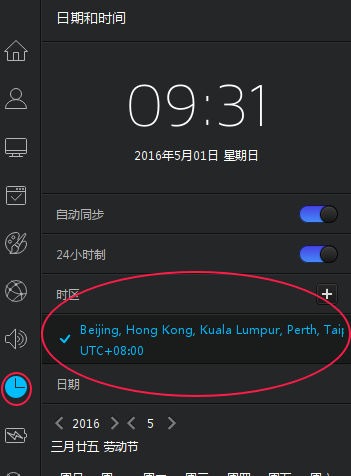
不是设置源,而是将时区设置为北京所在的东八区。
Reply View the author
avatar
180******71
deepin
2016-05-01 16:24
#5
这个还真不会设置
Reply View the author
avatar
h***a@gmail.com
deepin
2016-05-01 17:34
#6
在控制中心中点“日期和时间”,如下图


Reply View the author
avatar
carrjay
deepin
2016-05-01 18:16
#7
先在时间那随便选个时区,再改回东八区!打开应用商店应该就有了
Reply View the author
avatar
180******71
deepin
2016-05-01 20:12
#8
OK了,谢谢热心的亲们
Reply View the author
avatar
46******51@qq.com
deepin
2016-05-02 20:14
#9
apt-cache search wechat
Reply View the author