Home
Categories
WIKI
Topic
User
LANGUAGE:
中文
English
Thunar增加右键菜单
Experiences and Insight
1535
views ·
1
replies ·
To
floor
Go
海天鹰
deepin
2016-04-26 06:27
Author
本帖最后由 sonichy 于 2016-10-20 09:42 编辑
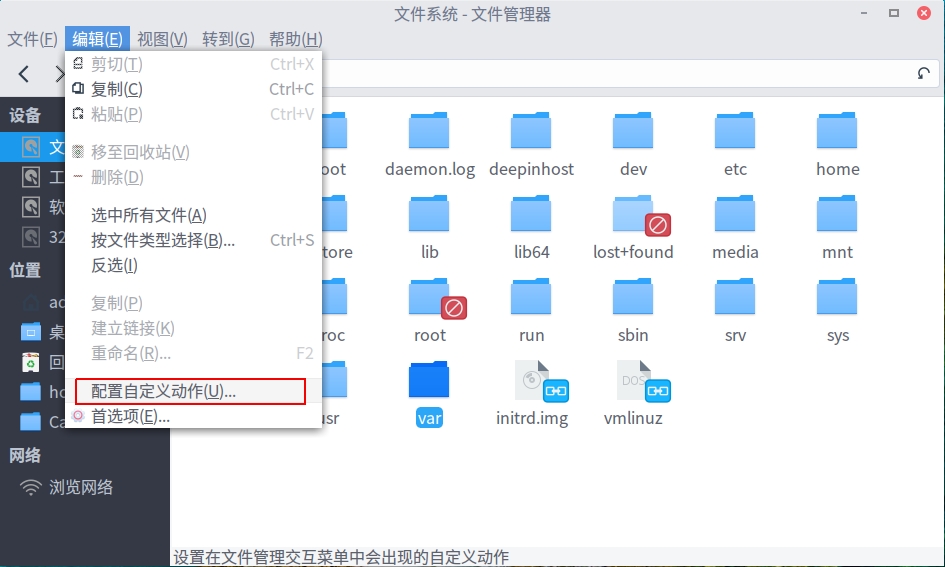
Nautilus换成Thunar后,可以选择打开方式了,但是发现了新的问题,右键没有用管理员身份打开,在host文件夹修改文档就不方便了。
于是找资料,官方找到了文档,菜单里有入口,设置超级方便,秒Nautilus十条街!
http://docs.xfce.org/xfce/thunar/custom-actions
gksu:弹出密码对话框。
在此打开终端的示例有点怪,命令是:exo-open --working-directory %f --launch TerminalEmulator
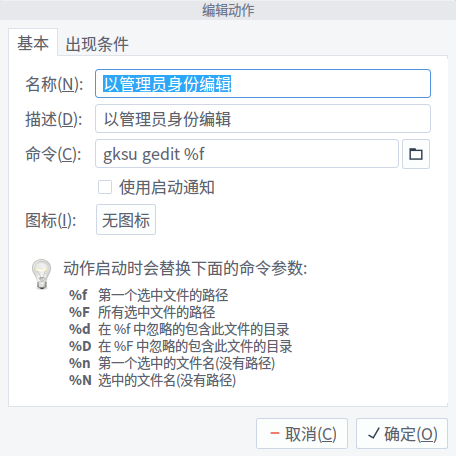
以管理员身份编辑:gksu gedit %f,出现条件:文本
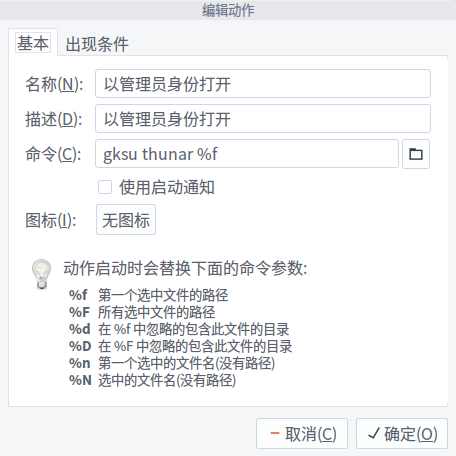
以管理员身份打开:gksu thunar %f,出现条件:目录
Reply
Like 0
Favorite
View the author
All Replies
sunnyyuu2
deepin
2016-04-26 16:50
#1
MARK!谢谢分享
Reply
Like 0
View the author
Please
sign
in first
Featured Collection
Change
Nuntia - Modern IMAP/SMTP mail client for Deepin (Beta tester wanted!)
[Tutorial] deepin25 WSL Offline Installation Guide
UOS AI 2.8 Released! Three New Intelligent Agents & Major Evolution
Solid Q&A | deepin 25 Common Questions – The Immutable System Edition
New Thread
Popular Ranking
Change
Adding a Dancing Spectrum Bar to the Deepin Taskbar | deepin-spectrum
Popular Events
More


 中文

 deepin deepin

 deepin
 deepin


 Adding a Dancing Spectrum Bar to the Deepin Taskbar | deepin-spectrum