【已解决】希望深度能够恢复【wubi安装方式】
Tofloor
poster avatar
youyou2011
deepin
2016-04-14 07:10
Author
本帖最后由 youyou2011 于 2016-7-17 14:36 编辑

作为尝鲜和预先熟悉系统。比光盘安装方式更适合新手。目前大众还是以Windows系统为主,为了尝试新系统,需要花费时间和精力去折腾。会让初学者失去动力。【wubi】的安装方式很适合新人。
Reply Favorite View the author
All Replies
avatar
MattD
deepin
2016-04-14 07:16
#1
LZ不知道“体验安装”是干嘛的,对吧?
Reply View the author
avatar
186******98
deepin
2016-04-14 16:10
#2
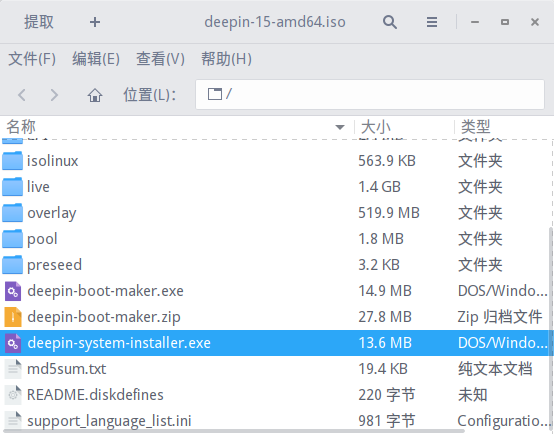
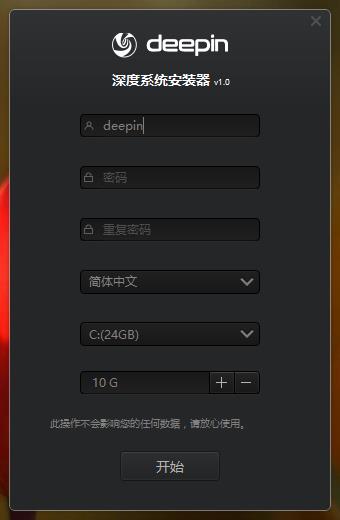
我们的ISO已经带了这个工具
Reply View the author
avatar
159******10
deepin
2016-04-14 17:58
#3
iso里有这个工具,这个是64位版的截图,32位可能名称不太一样
Reply View the author
avatar
WeAreFun
deepin
2016-04-16 02:23
#4
wubi好像是被淘汰的东西←_←
Reply View the author
avatar
132******13
deepin
2016-04-16 07:27
#5
似乎这种东西不支持GPT硬盘,需要有一块MBR格式的硬盘才可以
Reply View the author
avatar
soar_sola
deepin
2016-04-16 08:39
#6
https://bbs.deepin.org/post/38798
wubi好像是被淘汰的东西←_←

wubi被淘汰是因为ubuntu不喜欢uefi。咱深度集成了libuefi,所以支持win8-win10下安装。
Reply View the author
avatar
youyou2011
deepin
2016-04-17 02:33
#7
https://bbs.deepin.org/post/38798
iso里有这个工具,这个是64位版的截图,32位可能名称不太一样

找到了【Deepin System Installer】,非常感谢


Reply View the author
avatar
redstoneleo
deepin
2016-04-17 06:38
#8
https://bbs.deepin.org/post/38798
我们的ISO已经带了这个工具

希望出个easyBCD安装deepin 2016的方法,之前的14还可以easyBCD安装,16就摸不着头脑了
Reply View the author
avatar
159******10
deepin
2016-04-18 17:30
#9
https://bbs.deepin.org/post/38798
希望出个easyBCD安装deepin 2016的方法,之前的14还可以easyBCD安装,16就摸不着头脑了 ...

我也想用硬盘安装,不管没找到方法,就用u盘安装了
Reply View the author