按装deepin系统后win7启动选择没有了,怎么办? 求解!!!
Tofloor
poster avatar
lzx19990227
deepin
2016-04-04 04:23
Author
本人小白,在win7 把 deepin镜像写入U盘后,重启了安装deepin系统,win7在C;deepin在D盘,根据deepin官网的视频介绍说安装只要没覆盖原来系统的盘就算是双系统,但是开机后并没有发现win7的启动选择 只有 deepin的启动选择 ,现在该怎么办才能把win7系统的启动选择弄出来呢?求大神指教!!!
Reply Favorite View the author
All Replies
avatar
天地不仁
deepin
2016-04-04 07:36
#1
现在好了吗??

我也小白,不过解决这个也该OK!!

需要帮忙,说话
Reply View the author
avatar
jiuxian
deepin
2016-04-04 17:09
#2
sudo update-grub2
Reply View the author
avatar
lzx19990227
deepin
2016-04-04 21:17
#3
https://bbs.deepin.org/post/38559
现在好了吗??

我也小白,不过解决这个也该OK!!

你知道怎么弄吗?
Reply View the author
avatar
lzx19990227
deepin
2016-04-04 21:18
#4

能麻烦你说清楚些吗?
Reply View the author
avatar
4***8@qq.com
deepin
2016-04-04 21:52
#5
https://bbs.deepin.org/post/38559
能麻烦你说清楚些吗?

打开深度终端输入上面的命令:sudo update-grub
然后输入自己的密码回车,等待grub更新启动菜单,再重启机器看看。
Reply View the author
avatar
lzx19990227
deepin
2016-04-04 21:56
#6
https://bbs.deepin.org/post/38559
打开深度终端输入上面的命令:sudo update-grub
然后输入自己的密码回车,等待grub更新启动菜单,再重启 ...

谢谢,已经解决! 对了 开机时有三个选择  一个是 Deepin 15.1.1 GNU/linux     第二个是 Advanced opttions for Deepin 15.1.1 Gnu/linux    第三个是 Windows 7 (loader)(on/dev/sda1)  怎么把第二个选择给去除?
Reply View the author
avatar
572244023
deepin
2016-04-05 00:08
#7
顶。。。。。。。。。。。。。。。。。。。。
Reply View the author
avatar
4***8@qq.com
deepin
2016-04-05 00:22
#8
https://bbs.deepin.org/post/38559
谢谢,已经解决! 对了 开机时有三个选择  一个是 Deepin 15.1.1 GNU/linux     第二个是 Advanced optti ...

去掉不太好吧,这是深度启动菜单的高级选项,它的作用是可以选择内核版本等很多作用,如果内核有毛病时可以选择别的内核来启动系统,去掉他有点麻烦,留着吧。
Reply View the author
avatar
xiaoyao123456
deepin
2016-04-05 17:13
#9
https://bbs.deepin.org/post/38559
打开深度终端输入上面的命令:sudo update-grub
然后输入自己的密码回车,等待grub更新启动菜单,再重启 ...

怎么打开深度终端啊??
Reply View the author
avatar
176******54
deepin
2016-04-05 17:22
#10
求大神指点,,,我的  win 10 装了 deepin 之后,,win 10 不能正常启动了,,显示错误是 dmprojectex64.sys ,,只能进入 deepin ,,怎么办??求高手指点,,,
Reply View the author
avatar
4***8@qq.com
deepin
2016-04-05 17:29
#11
xiaoyao123456 发表于 2016-4-5 09:13
怎么打开深度终端啊??

我,,我,,,哎,难道你真的找不到深度终端?点击小火箭启动器,里面的图标一个一个看,一个带“>”标志的红色图标就是。我建议楼主多学习下linux知识再玩深度吧,不然会给自己带来很多苦恼的。
Reply View the author
avatar
liujindong
deepin
2016-04-05 18:20
#12
https://bbs.deepin.org/post/38559
怎么打开深度终端啊??

在深度系统力ctrl+alt+T 快捷键进入。。。。。话说建议先学习学习linux基础啊。。。。终端跟win下的dos很像,是用来输入一些命令的,很基础的东西
Reply View the author
avatar
临之
deepin
2016-04-06 00:13
#13
参考这个:http://www.cnblogs.com/phoenix--/p/5355125.html。
Reply View the author
avatar
scrailway
deepin
2016-04-06 00:26
#14
其实也挺简单的。配置一下grub。
Reply View the author
avatar
cxbii
deepin
2016-04-06 19:40
#15
https://bbs.deepin.org/post/38559
谢谢,已经解决! 对了 开机时有三个选择  一个是 Deepin 15.1.1 GNU/linux     第二个是 Advanced optti ...

这个不要删。。。有大用处的,当你电脑出问题的时候就知道了
Reply View the author
avatar
lzx19990227
deepin
2016-04-07 00:53
#16
https://bbs.deepin.org/post/38559
去掉不太好吧,这是深度启动菜单的高级选项,它的作用是可以选择内核版本等很多作用,如果内核有毛病时可 ...

好吧!那有没有方法把windows启动选择调到第二个呢?本人有些强迫症!
Reply View the author
avatar
lzx19990227
deepin
2016-04-07 00:53
#17
https://bbs.deepin.org/post/38559
这个不要删。。。有大用处的,当你电脑出问题的时候就知道了

好吧!那有没有方法把windows启动选择调到第二个呢?本人有些强迫症!
Reply View the author
avatar
4***8@qq.com
deepin
2016-04-07 02:14
#18
https://bbs.deepin.org/post/38559
好吧!那有没有方法把windows启动选择调到第二个呢?本人有些强迫症!
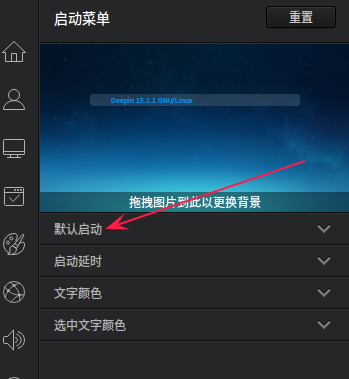
你可以把win设置为默认启动的系统,方法是在深度的控制中心的启动菜单哪里把默认启动系统修改为win即可,如图:
Reply View the author
avatar
lzx19990227
deepin
2016-04-07 04:12
#19
https://bbs.deepin.org/post/38559
你可以把win设置为默认启动的系统,方法是在深度的控制中心的启动菜单哪里把默认启动系统修改为win即可, ...

没用,不管设置那个为第一的顺序都还是一样  
Reply View the author