无法更新,请教高人
Tofloor
poster avatar
xinyonghu
deepin
2016-03-20 21:12
Author
如图,系统提示有更新,点更新总是提示更新失败


输入命令进行更新,显示的结果如图

该怎么办?
Reply Favorite View the author
All Replies
avatar
kingskill
deepin
2016-03-20 21:54
#1
本人从alpha2直接升级,断断续续打了n回命令,重启了三四趟,目前15.1.1完美。
Reply View the author
avatar
xinyonghu
deepin
2016-03-21 00:33
#2
有更好的解决办法吗?
Reply View the author
avatar
xinyonghu
deepin
2016-03-21 00:33
#3
请教各位
Reply View the author
avatar
xinyonghu
deepin
2016-03-21 00:33
#4
教我怎么正常升级
Reply View the author
avatar
xinyonghu
deepin
2016-03-21 00:34
#5
谢谢各位亲们
Reply View the author
avatar
188******93
deepin
2016-03-21 01:34
#6

提示已经说得很明白了,依赖关系被破坏了,你是不是从源之外安装了什么包?用提示中的命令修复一下依赖吧。
Reply View the author
avatar
xinyonghu
deepin
2016-03-21 04:34
#7
https://bbs.deepin.org/post/38228
提示已经说得很明白了,依赖关系被破坏了,你是不是从源之外安装了什么包?用提示中的命令修复一下依赖吧 ...

没有啊,我新安装的64位系统
Reply View the author
avatar
xinyonghu
deepin
2016-03-21 04:34
#8
https://bbs.deepin.org/post/38228
提示已经说得很明白了,依赖关系被破坏了,你是不是从源之外安装了什么包?用提示中的命令修复一下依赖吧 ...

提示的命令输入后仍然报错
Reply View the author
avatar
cxbii
deepin
2016-03-21 23:48
#9
https://bbs.deepin.org/post/38228
提示的命令输入后仍然报错

把报错贴出来,不然大家也不知道你的问题是什么
Reply View the author
avatar
xinyonghu
deepin
2016-03-27 18:23
#10
https://bbs.deepin.org/post/38228
把报错贴出来,不然大家也不知道你的问题是什么
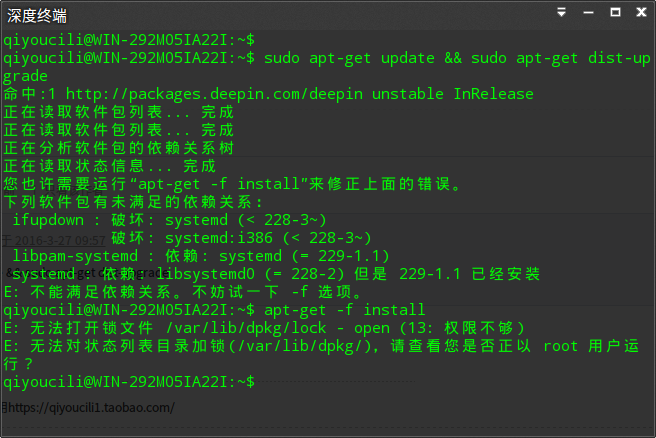
sudo apt-get update && sudo apt-get dist-upgrade

Reply View the author
avatar
speedbird
deepin
2016-03-27 20:26
#11
https://bbs.deepin.org/post/38228
sudo apt-get update && sudo apt-get dist-upgrade

sudo apt-get -f install
是没加sudo吧?
Reply View the author
avatar
hanshuiusl
deepin
2016-03-27 20:54
#12
打sudo apt-get install libsystemd0=228-2 安装这个版本,然后升级,看能不能解决
Reply View the author
avatar
xinyonghu
deepin
2016-03-28 00:11
#13
https://bbs.deepin.org/post/38228
sudo apt-get -f install
是没加sudo吧?

是的,谢谢你
Reply View the author
avatar
xinyonghu
deepin
2016-03-28 00:11
#14
https://bbs.deepin.org/post/38228
打sudo apt-get install libsystemd0=228-2 安装这个版本,然后升级,看能不能解决

好,我再试试
Reply View the author
avatar
xinyonghu
deepin
2016-03-28 00:31
#15
更新成功,谢谢各位
Reply View the author
avatar
181******12
deepin
2016-11-09 17:48
#16
怎么成功的?我的问题跟你的一样呀
Reply View the author
Comments
shiqianwei
2016-11-09 18:14
按照提示中的命令敲一遍就好,注意命令前面加上sudo