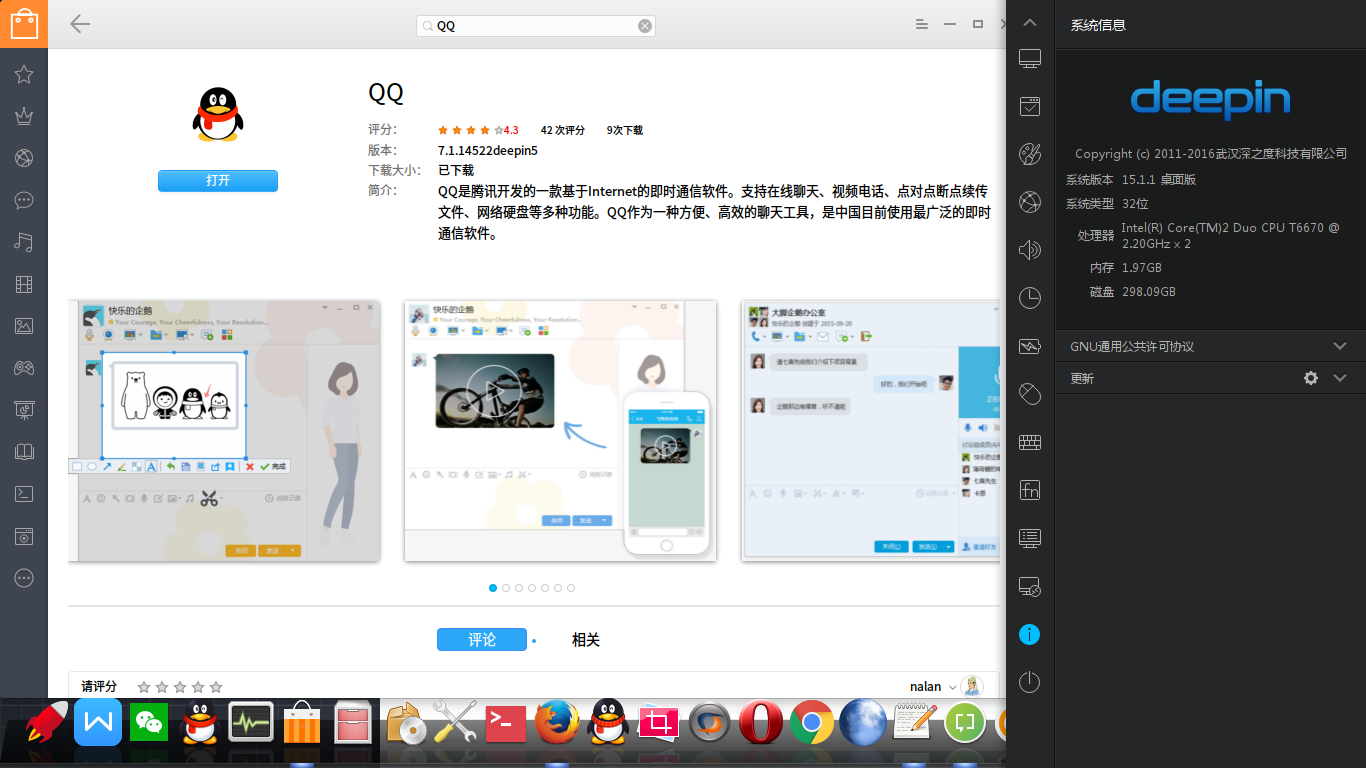
15.1.1 商店里面咋没QQ了
Tofloor
poster avatar
m1911
deepin
2016-03-10 04:09
Author
15.1.1 商店里面咋没QQ了  直接就搜索不到 啥情况
Reply Favorite View the author
All Replies
1 / 2
To page
avatar
h***a@gmail.com
deepin
2016-03-10 04:18
#1
表示没有遇到楼主所说的问题。是否楼主更新15.1.1前,将QQ删除了?


Reply View the author
avatar
WangZhongyun
deepin
2016-03-10 05:03
#2
新安装的15.1.1系统里深度商店中本来没有
Reply View the author
avatar
bobo
deepin
2016-03-10 05:11
#3
https://bbs.deepin.org/post/37907
新安装的15.1.1系统里深度商店中本来没有

猜楼主装的英文版。切换下语言到中文。或者命令安装
Reply View the author
avatar
m1911
deepin
2016-03-10 05:59
#4
https://bbs.deepin.org/post/37907
猜楼主装的英文版。切换下语言到中文。或者命令安装

在哪切换语言?
Reply View the author
avatar
bobo
deepin
2016-03-10 07:31
#5
本帖最后由 bobo 于 2016-3-9 23:34 编辑
https://bbs.deepin.org/post/37907
在哪切换语言?

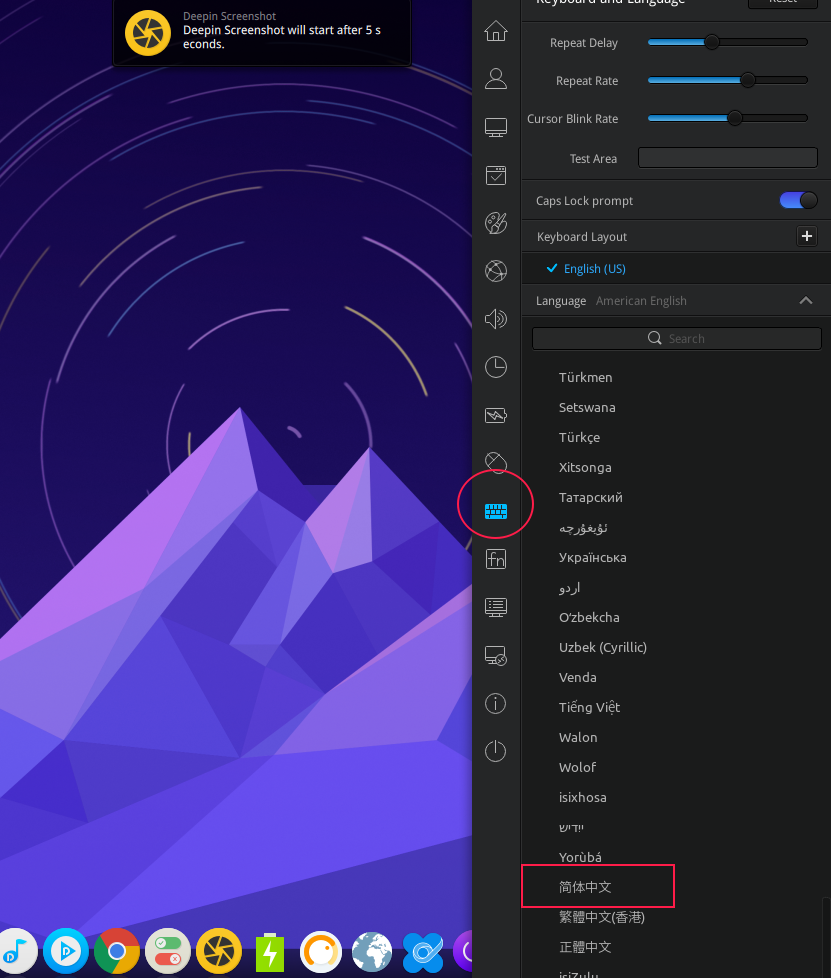
控制中心,把系统语言改成中文。

你也可以用命令行安装。
  1. apt-cache search qq
Copy the Code

你看下显示出来的程序,应该有一个叫 wine-qq的。
  1. sudo apt-get install 程序
Copy the Code

就可以安装了
Reply View the author
avatar
清松
deepin
2016-03-10 07:50
#6
系统语言设置的时简体中文,商店里也没有QQ了,连昨天看到的微信网页版,易信网页版等等都没有了。
Reply View the author
avatar
m1911
deepin
2016-03-10 08:45
#7
https://bbs.deepin.org/post/37907
表示没有遇到楼主所说的问题。是否楼主更新15.1.1前,将QQ删除了?

我是体验版安装的 你是硬盘的?
Reply View the author
avatar
m1911
deepin
2016-03-10 10:02
#8
https://bbs.deepin.org/post/37907
控制中心,把系统语言改成中文。

你也可以用命令行安装。

求 截个图看看在哪 切换语言找了一圈没看到
Reply View the author
avatar
bobo
deepin
2016-03-10 11:17
#9

Reply View the author
avatar
cxbii
deepin
2016-03-10 18:30
#10
请问楼主的系统时区。非东八区的时区,商店就是国外区了,国外区是没这些应用的
Reply View the author
avatar
cxbii
deepin
2016-03-10 18:31
#11
对了,深度商店的区和系统语言无关,是和系统的时区挂钩的
Reply View the author
avatar
deepin
deepin
2016-03-10 19:54
#12
https://bbs.deepin.org/post/37907
对了,深度商店的区和系统语言无关,是和系统的时区挂钩的

和时区挂钩好像不太合理,应该优先系统语言吧?
Reply View the author
avatar
m1911
deepin
2016-03-10 20:05
#13
https://bbs.deepin.org/post/37907
请问楼主的系统时区。非东八区的时区,商店就是国外区了,国外区是没这些应用的 ...

我看了下 是的 安装的新系统默认时区有问题
Reply View the author
avatar
cxbii
deepin
2016-03-10 21:19
#14
https://bbs.deepin.org/post/37907
和时区挂钩好像不太合理,应该优先系统语言吧?

今后会单独给出设置的
Reply View the author
avatar
cxbii
deepin
2016-03-10 21:19
#15
https://bbs.deepin.org/post/37907
我看了下 是的 安装的新系统默认时区有问题

....把时区设置为东八区吧
Reply View the author
avatar
m1911
deepin
2016-03-10 22:29
#16
https://bbs.deepin.org/post/37907
....把时区设置为东八区吧

设置了成了北京这边 但是里面还是没QQ 在启动器那边QQ到是安装好了
Reply View the author
avatar
WangZhongyun
deepin
2016-03-11 01:55
#17
https://bbs.deepin.org/post/37907
猜楼主装的英文版。切换下语言到中文。或者命令安装

安装15.1.1时就选的简体中文
Reply View the author
avatar
WangZhongyun
deepin
2016-03-11 02:00
#18
https://bbs.deepin.org/post/37907
....把时区设置为东八区吧

我系统本来就是东八区,但商店里没QQ
Reply View the author
avatar
188******93
deepin
2016-03-11 03:45
#19
https://bbs.deepin.org/post/37907
我系统本来就是东八区,但商店里没QQ

解决方法很简单,先随便改一个时区,然后再改回东八区,重新打开应用商店就可以了。
Reply View the author
avatar
WangZhongyun
deepin
2016-03-11 04:23
#20
https://bbs.deepin.org/post/37907
解决方法很简单,先随便改一个时区,然后再改回东八区,重新打开应用商店就可以了。 ...

这样确实解决了。但为了用户的友好性,建议系统安装时能先自动匹配好
Reply View the author
1 / 2
To page