全新安装 15.1.1后, deepinstore 不能搜索软件。
Tofloor
poster avatar
sen9527
deepin
2016-03-09 23:31
Author
类似下图,我想搜索阿里旺旺安装, 结果显示无。

Reply Favorite View the author
All Replies
avatar
cxbii
deepin
2016-03-09 23:43
#1
是否修改过源?
Reply View the author
avatar
cxbii
deepin
2016-03-09 23:43
#2
我说的修改是修改了/etc/apt/sources.list.d/这个文件,控制中心改的不算
Reply View the author
avatar
kalas
deepin
2016-03-09 23:46
#3
我根本就打不开这个软件中心,再说都有crosscover了,直接用exe就行了。
Reply View the author
avatar
sen9527
deepin
2016-03-09 23:47
#4
https://bbs.deepin.org/post/37894
我说的修改是修改了/etc/apt/sources.list.d/这个文件,控制中心改的不算

什么都没改, 就改了一下字体。
Reply View the author
avatar
sen9527
deepin
2016-03-09 23:48
#5
https://bbs.deepin.org/post/37894
我根本就打不开这个软件中心,再说都有crosscover了,直接用exe就行了。

有store不是方便嘛。
Reply View the author
avatar
kalas
deepin
2016-03-09 23:55
#6
https://bbs.deepin.org/post/37894
有store不是方便嘛。

这个还真是,我打开后就是一个白框在那转,然后终端也打不开。打开任务管理器看不出来哪个进程是软件中心的。tty1里杀掉所有看起来像的切不回tty7了,没办法就重启了。后来就再也没用过那个软件中心。
Reply View the author
avatar
paopao123
deepin
2016-03-10 02:39
#7
无图无真相
Reply View the author
avatar
cxbii
deepin
2016-03-10 18:27
#8
https://bbs.deepin.org/post/37894
什么都没改, 就改了一下字体。

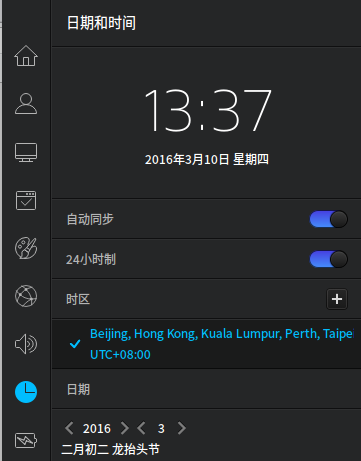
问以下,你是系统时区是什么区的?

阿里旺旺这些应用是只有中国区才有的,你的时区非东八区的吧,商店就是国外区了
Reply View the author
avatar
cxbii
deepin
2016-03-10 18:28
#9
确认时区最简单的方法,给我看下商店的首页
Reply View the author
avatar
sen9527
deepin
2016-03-10 20:28
#10
https://bbs.deepin.org/post/37894
确认时区最简单的方法,给我看下商店的首页

首页就这样。

Reply View the author
avatar
puyart
deepin
2016-03-10 21:14
#11

我也是全新安装。我的首页也是这样,好多应用貌似没了。。。
Reply View the author
avatar
cxbii
deepin
2016-03-10 21:20
#12

修改时区为东八区,你现在的深度商店是国外的版本。
Reply View the author
avatar
cxbii
deepin
2016-03-10 21:20
#13
https://bbs.deepin.org/post/37894
我也是全新安装。我的首页也是这样,好多应用貌似没了。。。

修改时区为东八区,你现在的深度商店是国外的版本。

同上
Reply View the author
avatar
puyart
deepin
2016-03-10 21:37
#14
https://bbs.deepin.org/post/37894
修改时区为东八区,你现在的深度商店是国外的版本。

同上


可是已经是了
Reply View the author
avatar
cxbii
deepin
2016-03-10 21:49
#15

好的,我们先检查下是什么原因导致的吧。
如果你现在需要安装什么应用呢?
我把安装的命令告诉你,先临时解决下。
Reply View the author
Comments
puyart
2016-03-10 21:51
可以啦
avatar
puyart
deepin
2016-03-10 21:49
#16

现在好了,我先改成另外的时区,然后又改回来,重启就可以了
Reply View the author
avatar
sen9527
deepin
2016-03-10 22:07
#17
https://bbs.deepin.org/post/37894
修改时区为东八区,你现在的深度商店是国外的版本。

同上

用楼下仁兄的办法搞定了。
Reply View the author
avatar
cxbii
deepin
2016-03-11 01:17
#18
https://bbs.deepin.org/post/37894
现在好了,我先改成另外的时区,然后又改回来,重启就可以了

我去。。。。

这个绝对是Bug!
Reply View the author