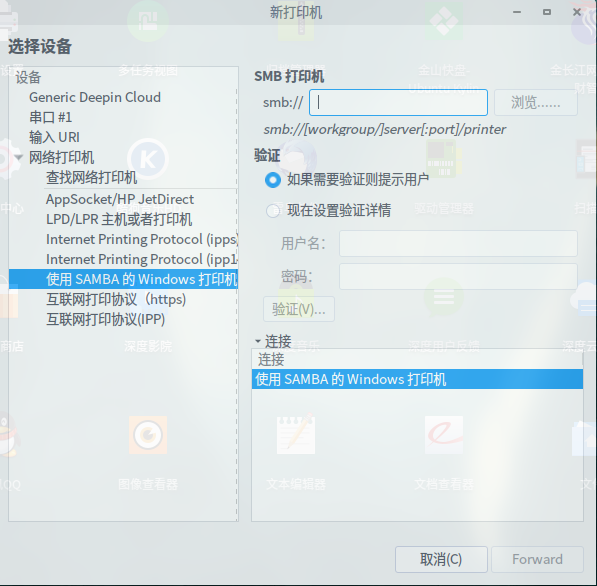
添加网络打印机时,在主机输入ip地址显示没有找到打印机...
Tofloor
poster avatar
xiaogang782
deepin
2016-02-23 22:36
Author
办公室打印机在一台win系统电脑上,添加网络打印机时,在主机输入ip地址显示没有找到打印机,我应该如何才能添加这台局域网打印机?
Reply Favorite View the author
All Replies
avatar
a921528248
deepin
2016-02-23 22:53
#1
用深度云打印来安装
Reply View the author
avatar
xiaogang782
deepin
2016-02-23 23:09
#2
https://bbs.deepin.org/post/37410
用深度云打印来安装

输入ip地址,显示无效的ip地址
Reply View the author
avatar
139******32
deepin
2016-02-23 23:11
#3
首先安装库文件
sudo apt-get install smbclient
sudo apt-get install python-smbc
共享打印机如果驱动没有安装,先安装打印机驱动,可以使用这个
sudo apt-get install printer-driver-all
在smb那里添加IP,然后点右下角“forward”
然后打到你所需要的打印机驱动,一路“forward”,基本就成功了
Reply View the author
avatar
ideepinos
deepin
2016-02-23 23:14
#4
https://bbs.deepin.org/post/37410
输入ip地址,显示无效的ip地址

打开深度云打印 有F1帮助
Reply View the author
avatar
a921528248
deepin
2016-02-23 23:42
#5
本帖最后由 a921528248 于 2016-2-23 15:50 编辑
https://bbs.deepin.org/post/37410
输入ip地址,显示无效的ip地址
我的打印机是10多年前买的,到官方网站上也没有找到LINUX下驱动程序,后来通过以下方式成功安装的。
下载地址:http://pan.baidu.com/s/1bofTyoR
安装视频:http://v.youku.com/v_show/id_XMTQ1OTg2Njg4MA
Reply View the author
avatar
xiaogang782
deepin
2016-02-24 18:26
#6
https://bbs.deepin.org/post/37410
首先安装库文件
sudo apt-get install smbclient
sudo apt-get install python-smbc

谢谢成功了
Reply View the author
avatar
xiaogang782
deepin
2016-02-24 18:26
#7
https://bbs.deepin.org/post/37410
打开深度云打印 有F1帮助

谢谢已成功
Reply View the author
avatar
xiaogang782
deepin
2016-02-24 18:27
#8
https://bbs.deepin.org/post/37410
我的打印机是10多年前买的,到官方网站上也没有找到LINUX下驱动程序,后来通过以下方式成功安装的。
下载地 ...

谢谢,已成功
Reply View the author