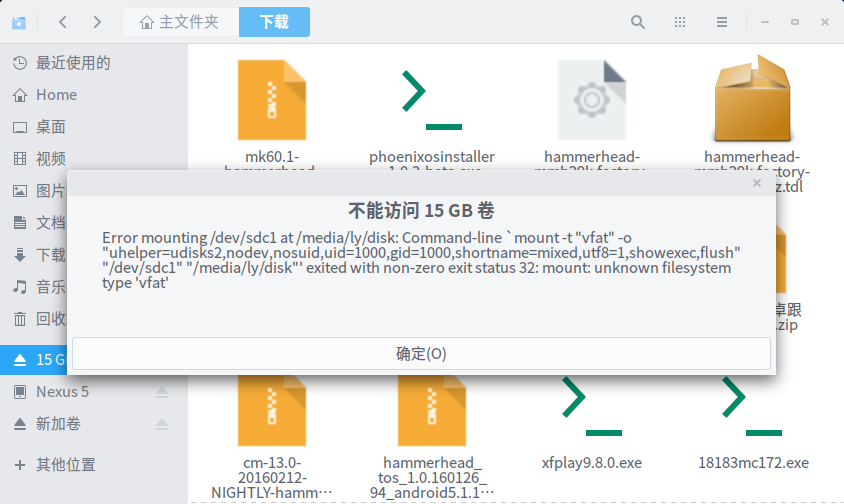
无法访问u盘
Tofloor
poster avatar
Experience
deepin
2016-02-20 03:49
Author
怎么办我还格式化了,依然也是。
Reply Favorite View the author
All Replies
avatar
cxbii
deepin
2016-02-22 18:18
#1
gparted格式化的?
Reply View the author
avatar
Feng Yu
deepin
2016-02-22 19:42
#2
你不是更新过内核,而且没有成功?导致了某些驱动模块未能加载。
if so,重启的时候选择advanced,使用旧版本内核引导系统,再看看还有这个问题吗?
Reply View the author
avatar
Experience
deepin
2016-02-26 17:26
#3
https://bbs.deepin.org/post/37323
你不是更新过内核,而且没有成功?导致了某些驱动模块未能加载。
if so,重启的时候选择advanced,使用旧版 ...

确实更新过内核
Reply View the author
avatar
Experience
deepin
2016-02-26 17:27
#4
https://bbs.deepin.org/post/37323
gparted格式化的?

资源管理器自带的,gparted格式化的,都是这样结果
Reply View the author
avatar
cxbii
deepin
2016-02-26 23:13
#5
https://bbs.deepin.org/post/37323
资源管理器自带的,gparted格式化的,都是这样结果

试试Win下的格式化
Reply View the author
avatar
cxbii
deepin
2016-02-26 23:13
#6
https://bbs.deepin.org/post/37323
确实更新过内核

对了,是不是内核模块少了。。
Reply View the author
avatar
Experience
deepin
2016-03-02 02:42
#7
https://bbs.deepin.org/post/37323
对了,是不是内核模块少了。。

我后来安装deepin原本的内核,就正常了
Reply View the author
avatar
cxbii
deepin
2016-03-02 18:01
#8
https://bbs.deepin.org/post/37323
我后来安装deepin原本的内核,就正常了

你删掉了需要的内核。
Reply View the author
avatar
Experience
deepin
2016-03-03 17:33
#9
https://bbs.deepin.org/post/37323
你删掉了需要的内核。

额,我看你写的百科,对内核略知一二
Reply View the author
avatar
cxbii
deepin
2016-03-03 17:51
#10
https://bbs.deepin.org/post/37323
额,我看你写的百科,对内核略知一二

可以去查下必要的内核模块。。
Reply View the author