Home
Categories
WIKI
Topic
User
LANGUAGE:
中文
English
Deepin15不支持HDMi接口?
Experiences and Insight
2731
views ·
7
replies ·
To
floor
Go
方老四
deepin
2016-02-19 17:09
Author
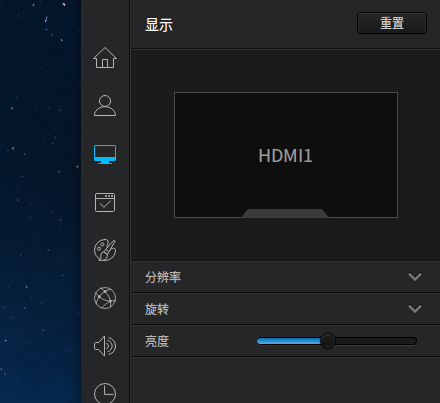
今天准备把笔记本通过HDMi接口连接到大电视上看电影,好像Deepin15不支持,我的笔记本是双系统,win7能很好地支持。
Reply
Like 0
Favorite
View the author
All Replies
180******32
deepin
2016-02-19 17:23
#1
我的支持的很好。
Reply
Like 0
View the author
方老四
deepin
2016-02-19 17:58
#2
本帖最后由 fangling 于 2016-2-19 13:55 编辑
https://bbs.deepin.org/post/37306
我的支持的很好。
开始启动系统的时候电视上能显示Deepin动画,进入Deepin的图形界面后,笔记本显示正常,电视上就不显示了,电视上提示“无信号输入,请检查”,修改显示分辨率也不行。
Reply
Like 0
View the author
Comments
stevenooooo
2016-02-19 18:29
有可能是你笔记本的分辨率,你电视识别不了,在没进入系统之前的图片大多是定制好的,分辨率不高
Experience
deepin
2016-02-19 19:16
#3
Reply
Like 0
View the author
風銜霜
deepin
2016-02-19 19:50
#4
什么显卡?可能是驱动不支持。
Reply
Like 0
View the author
lijiwe24
deepin
2016-02-19 21:17
#5
安装显卡芯片的厂商的驱动
如ati的安装ATI的官方Linux驱动,进官方驱动里面调节显示相关的参数
Reply
Like 0
View the author
方老四
deepin
2016-02-19 21:57
#6
本帖最后由 fangling 于 2016-2-19 14:51 编辑
Dell笔记本电脑,Intel I5 CPU集成的显示核芯,今天中午又试一下,修改显示分辨率也不行,电视提示“无信号输入,请检查”,进入win7系统电视能正常显示,估计是这款显卡的linux驱动不支持双屏显示。
Reply
Like 0
View the author
cxbii
deepin
2016-02-19 22:36
#7
不是所有显卡都支持多屏的,这个是驱动问题。
Reply
Like 0
View the author
Please
sign
in first
Featured Collection
Change
Nuntia - Modern IMAP/SMTP mail client for Deepin (Beta tester wanted!)
[Tutorial] deepin25 WSL Offline Installation Guide
UOS AI 2.8 Released! Three New Intelligent Agents & Major Evolution
Solid Q&A | deepin 25 Common Questions – The Immutable System Edition
New Thread
Popular Ranking
Change
Adding a Dancing Spectrum Bar to the Deepin Taskbar | deepin-spectrum
Popular Events
More