Home
Categories
WIKI
Topic
User
LANGUAGE:
中文
English
【分享】Inxi:获取Linux的系统和硬件信息的神器
Theme area
2534
views ·
8
replies ·
To
floor
Go
chinacia
deepin
2016-02-15 18:37
Author
本帖最后由 chinacia 于 2016-2-15 10:41 编辑
来源:Linux中国
Inxi
是一个可以获取完整的系统和硬件详情信息的命令行工具,内容包括:
硬件
CPU
磁盘驱动器
Xorg
桌面环境
内核
GCC版本
进程
内存占用
和其他有用的信息
安装方法
Inxi在多数现代GNU/Linux操作系统的默认软件仓库中。所以我们可以简单地运行下列命令安装。
在基于Debian的发行版:
sudo apt-get install inxi
在Fedora:
sudo yum install inxi
在基于RHEL的发行版:
安装EPEL软件仓库:
sudo yum install epel-release
然后使用如下命令安装inxi:
sudo yum install inxi
使用方法
在终端运行如下命令可以获取系统的概况信息。
inxi
示例输出:
CPU~Dual core IntelCore i3-2350M CPU (-HT-MCP-) clocked at Min:800.000MhzMax:1200.000MhzKernel~3.13.0-45-generic x86_64 Up~6:41Mem~1537.7/3861.3MB HDD~500.1GB(52.5% used)Procs~183Client~Shell inxi~1.9.17
当然,我们可以获取一个特定硬件的详情信息。比如获取
声音/音频硬件详情信息
,可以运行如下命令:
inxi -A
示例输出:
Audio:Card:Intel6Series/C200 SeriesFamilyHighDefinitionAudioController driver: snd_hda_intel
Sound:AdvancedLinuxSoundArchitecture ver: k3.13.0-45-generic
很酷是吧?
同样的,你可以获取
显卡
的详情信息。
inxi -G
示例输出:
Graphics: Card : Intel2ndGenerationCoreProcessorFamilyIntegratedGraphicsController
X.Org:1.15.1 drivers: intel (unloaded: fbdev,vesa)Resolution:1366x768@60.0hz
GLX Renderer: Mesa DRI IntelSandybridgeMobile GLX Version:3.0Mesa10.3.0
硬盘信息呢?也是可以的。运行如下命令来获取完整的
硬盘
信息。
inxi -D
示例输出:
Drives: HDD TotalSize:500.1GB(52.5% used)1: id:/dev/sda model: ST9601325BD size:500.1GB
显示Bios和主板详情信息:
inxi -M
示例输出:
Machine: System: Dell(portable) product:Inspiron N5050
Mobo: Dell model: 01HXXJ version: A05 Bios: Dell version: A05 date:08/03/2012
不仅是硬性详情信息,它也可以显示我们系统中的
可用软件仓库列表
。
inxi -r
示例输出:
Repos:Active apt sources in file:/etc/apt/sources.list
deb http://Ubuntu.excellmedia.net/archive/ trusty main restricted
deb-src http://ubuntu.excellmedia.net/archive/ trusty main restricted
deb http://ubuntu.excellmedia.net/archive/ trusty-updates main restricted
deb-src http://ubuntu.excellmedia.net/archive/ trusty-updates main restricted
deb http://ubuntu.excellmedia.net/archive/ trusty universe
.
.
Active apt sources in file:/etc/apt/sources.list.d/intellinuxgraphics.list
deb https://download.01.org/gfx/ubuntu/14.04/main trusty main #Intel Graphics drivers
Active apt sources in file:/etc/apt/sources.list.d/linrunner-tlp-trusty.list
Active apt sources in file:/etc/apt/sources.list.d/wseverin-ppa-trusty.list
deb http://ppa.launchpad.net/wseverin/ppa/ubuntu trusty main
Inxi还可以显示你所在位置的天气信息。感到意外吗?是的,它可以。
inxi -W Erode,Tamilnadu
这里
Erode
是地区,
Tamilnadu
是印度的一个邦。
示例输出:
Weather:Conditions:79 F (26 C)-ClearTime:February4,6:00 PM IST
查看完整的硬件详情信息
厌倦了逐一获取每种硬件的信息?你可以使用如下命令将所有信息一次列出:
inxi -F
示例输出:
System:Host: sk Kernel:3.13.0-45-generic x86_64 (64 bit)Desktop: LXDE (Openbox3.5.2)Distro:Ubuntu14.04 trusty
Machine:System: Dell(portable) product:Inspiron N5050
Mobo: Dell model:01HXXJ version: A05 Bios: Dell version: A05 date:08/03/2012
CPU: Dual core IntelCore i3-2350M CPU (-HT-MCP-) cache:3072 KB flags: (lm nx sse sse2 sse3 sse4_1 sse4_2 ssse3 vmx)
ClockSpeeds:1:800.00MHz2:1000.00MHz3:800.00MHz4:800.00MHz
Graphics:Card:Intel2ndGenerationCoreProcessorFamilyIntegratedGraphicsController
X.Org:1.15.1 drivers: intel (unloaded: fbdev,vesa)Resolution:1366x768@60.0hz
GLX Renderer:Mesa DRI IntelSandybridgeMobile GLX Version:3.0Mesa10.3.0
Audio:Card:Intel6Series/C200 SeriesFamilyHighDefinitionAudioController driver: snd_hda_intel
Sound:AdvancedLinuxSoundArchitecture ver: k3.13.0-45-generic
Network:Card-1: QualcommAtheros AR9285 WirelessNetworkAdapter(PCI-Express) driver: ath9k
IF: wlan0 state: up mac:
Card-2:Realtek RTL8101E/RTL8102E PCI ExpressFastEthernet controller driver: r8169
IF: eth0 state: down mac:
Drives: HDD TotalSize:500.1GB(52.5% used)1: id:/dev/sda model: ST9500325AS size:500.1GB
Partition: ID:/ size: 455G used: 245G (57%) fs: ext4 ID: /boot size:236M used:159M(72%) fs: ext2
ID: swap-1 size:4.19GB used:0.00GB(0%) fs: swap
RAID:No RAID devices detected -/proc/mdstat and md_mod kernel raid module present
Sensors:SystemTemperatures: cpu:64.5C mobo: N/A
FanSpeeds(in rpm): cpu: N/A
Info: Processes:186Uptime:6:52Memory:1547.2/3861.3MBClient:Shell(bash) inxi:1.9.17
就像上面你看到的那样,inxi显示出了完整的硬件详情信息。
更多的细节可以参考man手册。
man inxi
结论
你在寻找一个可以显示完整的系统和硬件详情信息的简单工具吗?那么不用再找了,inxi会提供你所需要的。并且,它还是在你系统默认的软件仓库中的轻量级工具。你还想要更多东西吗?试一试它,你不会失望。
欢呼吧!
via: http://www.unixmen.com/inxi-find-system-hardware-information-linux/
作者:SK 译者:goreliu 校对:wxy
本文由 LCTT 原创翻译,Linux中国 荣誉推出
来源:http://linux.cn/article-5503-1.html
本文永久更新链接地址
:http://www.linuxidc.com/Linux/2015-05/117958.htm
Reply
Like 0
Favorite
View the author
All Replies
kingskill
deepin
2016-02-15 18:58
#1
进来按个爪~
Reply
Like 0
View the author
u855697021
deepin
2016-02-15 19:41
#2
我只想知道这货跟lshw比有没有什么优势?
Reply
Like 0
View the author
Comments
zzz19760225
2016-02-15 21:19
这个命令很简单啊,谢谢分享
chinacia
deepin
2016-02-15 19:59
#3
易读性。
Reply
Like 0
View the author
luxwen
deepin
2016-02-15 20:51
#4
好东西 顶一个
Reply
Like 0
View the author
zzz19760225
deepin
2016-02-15 21:18
#5
没分了,顶一下,加收藏
Reply
Like 0
View the author
水之无根
deepin
2016-02-15 21:50
#6
不错。顶一下。
Reply
Like 0
View the author
探索
deepin
2016-02-16 03:13
#7
简单好用!!!
Reply
Like 0
View the author
132******13
deepin
2016-02-16 19:32
#8
多谢分享哦
顺便也推荐一个
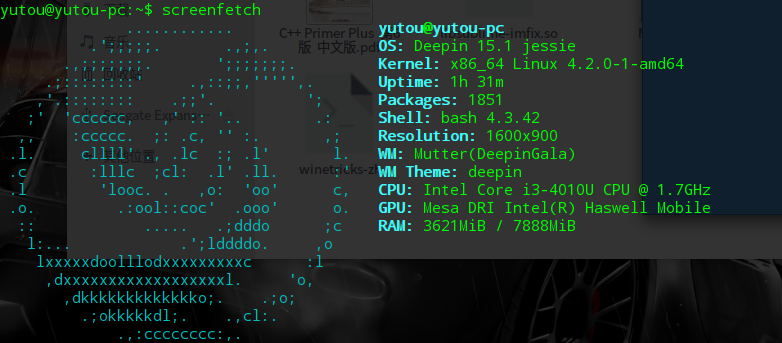
sudo apt-get install screenfetch
Reply
Like 0
View the author
Please
sign
in first
Featured Collection
Change
Nuntia - Modern IMAP/SMTP mail client for Deepin (Beta tester wanted!)
[Tutorial] deepin25 WSL Offline Installation Guide
UOS AI 2.8 Released! Three New Intelligent Agents & Major Evolution
Solid Q&A | deepin 25 Common Questions – The Immutable System Edition
New Thread
Popular Ranking
Change
Adding a Dancing Spectrum Bar to the Deepin Taskbar | deepin-spectrum
Popular Events
More


 中文

 deepin deepin
 deepin
 deepin

 deepin deepin deepin

 deepin
 deepin

 deepin


 Adding a Dancing Spectrum Bar to the Deepin Taskbar | deepin-spectrum
来源:Linux中国
Inxi是一个可以获取完整的系统和硬件详情信息的命令行工具,内容包括:
安装方法Inxi在多数现代GNU/Linux操作系统的默认软件仓库中。所以我们可以简单地运行下列命令安装。
在基于Debian的发行版:
- sudo apt-get install inxi
在Fedora:- sudo yum install inxi
在基于RHEL的发行版:安装EPEL软件仓库:
- sudo yum install epel-release
然后使用如下命令安装inxi:使用方法在终端运行如下命令可以获取系统的概况信息。
- inxi
示例输出:- CPU~Dual core IntelCore i3-2350M CPU (-HT-MCP-) clocked at Min:800.000MhzMax:1200.000MhzKernel~3.13.0-45-generic x86_64 Up~6:41Mem~1537.7/3861.3MB HDD~500.1GB(52.5% used)Procs~183Client~Shell inxi~1.9.17
当然,我们可以获取一个特定硬件的详情信息。比如获取声音/音频硬件详情信息,可以运行如下命令:- inxi -A
示例输出:- Audio:Card:Intel6Series/C200 SeriesFamilyHighDefinitionAudioController driver: snd_hda_intel
- Sound:AdvancedLinuxSoundArchitecture ver: k3.13.0-45-generic
很酷是吧?同样的,你可以获取显卡的详情信息。
- inxi -G
示例输出:- Graphics: Card : Intel2ndGenerationCoreProcessorFamilyIntegratedGraphicsController
- X.Org:1.15.1 drivers: intel (unloaded: fbdev,vesa)Resolution:1366x768@60.0hz
- GLX Renderer: Mesa DRI IntelSandybridgeMobile GLX Version:3.0Mesa10.3.0
硬盘信息呢?也是可以的。运行如下命令来获取完整的硬盘信息。- inxi -D
示例输出:- Drives: HDD TotalSize:500.1GB(52.5% used)1: id:/dev/sda model: ST9601325BD size:500.1GB
显示Bios和主板详情信息:- inxi -M
示例输出:- Machine: System: Dell(portable) product:Inspiron N5050
- Mobo: Dell model: 01HXXJ version: A05 Bios: Dell version: A05 date:08/03/2012
不仅是硬性详情信息,它也可以显示我们系统中的可用软件仓库列表。- inxi -r
示例输出:- Repos:Active apt sources in file:/etc/apt/sources.list
- deb http://Ubuntu.excellmedia.net/archive/ trusty main restricted
- deb-src http://ubuntu.excellmedia.net/archive/ trusty main restricted
- deb http://ubuntu.excellmedia.net/archive/ trusty-updates main restricted
- deb-src http://ubuntu.excellmedia.net/archive/ trusty-updates main restricted
- deb http://ubuntu.excellmedia.net/archive/ trusty universe
- .
- .
- Active apt sources in file:/etc/apt/sources.list.d/intellinuxgraphics.list
- deb https://download.01.org/gfx/ubuntu/14.04/main trusty main #Intel Graphics drivers
- Active apt sources in file:/etc/apt/sources.list.d/linrunner-tlp-trusty.list
- Active apt sources in file:/etc/apt/sources.list.d/wseverin-ppa-trusty.list
- deb http://ppa.launchpad.net/wseverin/ppa/ubuntu trusty main
Inxi还可以显示你所在位置的天气信息。感到意外吗?是的,它可以。- inxi -W Erode,Tamilnadu
这里Erode是地区,Tamilnadu是印度的一个邦。示例输出:
查看完整的硬件详情信息厌倦了逐一获取每种硬件的信息?你可以使用如下命令将所有信息一次列出:
- inxi -F
示例输出:- System:Host: sk Kernel:3.13.0-45-generic x86_64 (64 bit)Desktop: LXDE (Openbox3.5.2)Distro:Ubuntu14.04 trusty
- Machine:System: Dell(portable) product:Inspiron N5050
- Mobo: Dell model:01HXXJ version: A05 Bios: Dell version: A05 date:08/03/2012
- CPU: Dual core IntelCore i3-2350M CPU (-HT-MCP-) cache:3072 KB flags: (lm nx sse sse2 sse3 sse4_1 sse4_2 ssse3 vmx)
- ClockSpeeds:1:800.00MHz2:1000.00MHz3:800.00MHz4:800.00MHz
- Graphics:Card:Intel2ndGenerationCoreProcessorFamilyIntegratedGraphicsController
- X.Org:1.15.1 drivers: intel (unloaded: fbdev,vesa)Resolution:1366x768@60.0hz
- GLX Renderer:Mesa DRI IntelSandybridgeMobile GLX Version:3.0Mesa10.3.0
- Audio:Card:Intel6Series/C200 SeriesFamilyHighDefinitionAudioController driver: snd_hda_intel
- Sound:AdvancedLinuxSoundArchitecture ver: k3.13.0-45-generic
- Network:Card-1: QualcommAtheros AR9285 WirelessNetworkAdapter(PCI-Express) driver: ath9k
- IF: wlan0 state: up mac:
- Card-2:Realtek RTL8101E/RTL8102E PCI ExpressFastEthernet controller driver: r8169
- IF: eth0 state: down mac:
- Drives: HDD TotalSize:500.1GB(52.5% used)1: id:/dev/sda model: ST9500325AS size:500.1GB
- Partition: ID:/ size: 455G used: 245G (57%) fs: ext4 ID: /boot size:236M used:159M(72%) fs: ext2
- ID: swap-1 size:4.19GB used:0.00GB(0%) fs: swap
- RAID:No RAID devices detected -/proc/mdstat and md_mod kernel raid module present
- Sensors:SystemTemperatures: cpu:64.5C mobo: N/A
- FanSpeeds(in rpm): cpu: N/A
- Info: Processes:186Uptime:6:52Memory:1547.2/3861.3MBClient:Shell(bash) inxi:1.9.17
就像上面你看到的那样,inxi显示出了完整的硬件详情信息。更多的细节可以参考man手册。
结论你在寻找一个可以显示完整的系统和硬件详情信息的简单工具吗?那么不用再找了,inxi会提供你所需要的。并且,它还是在你系统默认的软件仓库中的轻量级工具。你还想要更多东西吗?试一试它,你不会失望。
欢呼吧!
via: http://www.unixmen.com/inxi-find-system-hardware-information-linux/
作者:SK 译者:goreliu 校对:wxy
本文由 LCTT 原创翻译,Linux中国 荣誉推出
来源:http://linux.cn/article-5503-1.html
本文永久更新链接地址:http://www.linuxidc.com/Linux/2015-05/117958.htm