求助!粗大事了!熊熊速度看过来~~
Tofloor
poster avatar
kingskill
deepin
2015-12-10 04:03
Author
昨天关机的时候还好好的……今天晚上回家开机,进了grub2,选a2,回车,

deepin蓝色开机画面是有的,画面过后就成了这样子。。出现下图。。。


按了回车又继续重复。。。Welcome to emergency....

我机子是win10+a2,win10之前已经关闭快速启动,因为在a2中无法挂载ntfs分区,所以打过ntfsfix命令挂载。

我唯一担心的就是这个ntfsfix。除此之外我没有做过任何危险操作。
Reply Favorite View the author
All Replies
2 / 3
To page
avatar
sunlinyao
deepin
2015-12-10 05:35
#21
另外,提醒一下,想挂载windows分区,两个方法,一个是挂载成只读模式(使用-o ro参数),或者是重启windows(不是关机),然后进入linux系统挂载。
Reply View the author
avatar
laoguang
deepin
2015-12-10 05:37
#22
问题可能出在你挂在的那个分区。
Reply View the author
avatar
sunlinyao
deepin
2015-12-10 05:39
#23
对了不要尝试自动挂载windows分区,这样当windows磁盘被锁的情况下,会导致linux启动不起来
Reply View the author
avatar
kingskill
deepin
2015-12-10 05:49
#24
https://bbs.deepin.org/post/33945
live usb,先看一下/etc/fstab, 用gparted看一下有没有不同的uuid
到/etc/passwd,看一下根用户是不是/b ...

求具体命令和步骤。
Reply View the author
avatar
laoguang
deepin
2015-12-10 06:06
#25
https://bbs.deepin.org/post/33945
求具体命令和步骤。

你先搞一个live usb
进去,把深度的分区里面的etc文件夹打开,找fstab文件,打开,把内容发一下。
Reply View the author
avatar
laoguang
deepin
2015-12-10 06:08
#26
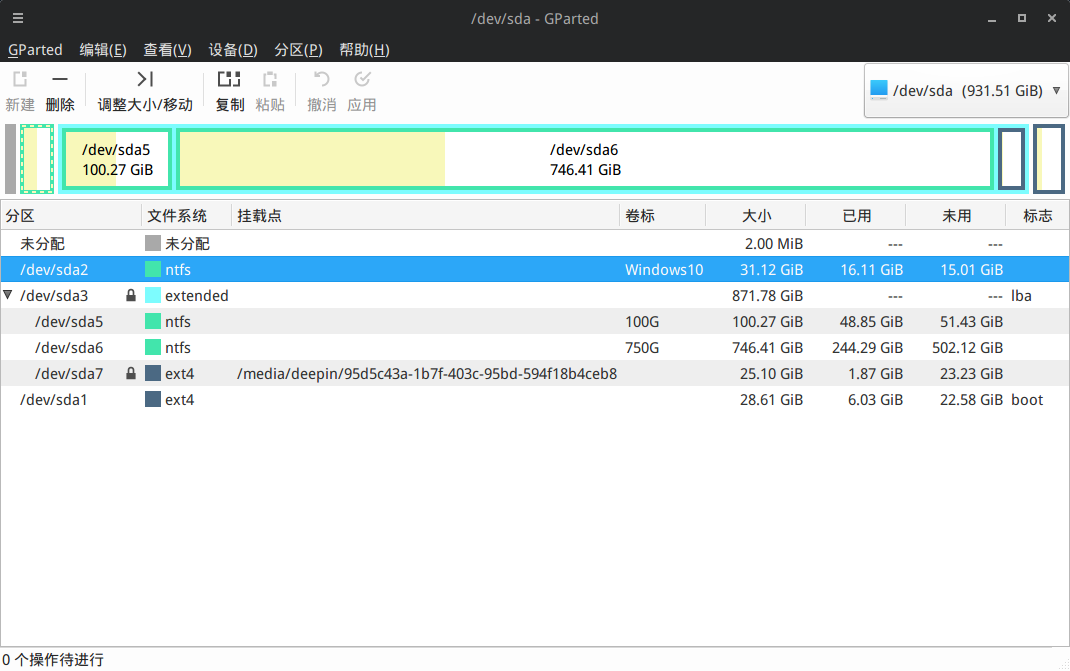
然后打开终端,执行gparted,找到你电脑的硬盘,发个图。
Reply View the author
avatar
laoguang
deepin
2015-12-10 06:10
#27
莫要告诉我你不资道啥是live usb。。。
Reply View the author
avatar
kingskill
deepin
2015-12-10 06:13
#28
laoguang 发表于 2015-12-9 22:10
莫要告诉我你不资道啥是live usb。。。

我进了tty1,打xstart,没反应~~(╯‵□′)╯︵┴─┴
Reply View the author
avatar
laoguang
deepin
2015-12-10 06:22
#29
https://bbs.deepin.org/post/33945
我进了tty1,打xstart,没反应~~(╯‵□′)╯︵┴─┴

你进了tty!真的!太好了!
Reply View the author
avatar
laoguang
deepin
2015-12-10 06:23
#30
运行cat /etc/passwd,
看看根用户是不是/bin/nologin
如果不是的话,cat /etc/fstab
把结果拍个照发过来。
Reply View the author
avatar
kingskill
deepin
2015-12-10 06:31
#31
https://bbs.deepin.org/post/33945
运行cat /etc/passwd,
看看根用户是不是/bin/nologin
如果不是的话,cat /etc/fstab

deepin@Deepin:~$ cat /etc/fstab
# UNCONFIGURED FSTAB FOR BASE SYSTEM
overlay / overlay rw 0 0
tmpfs /tmp tmpfs nosuid,nodev 0 0
deepin@Deepin:~$

Reply View the author
avatar
kingskill
deepin
2015-12-10 06:33
#32
https://bbs.deepin.org/post/33945
运行cat /etc/passwd,
看看根用户是不是/bin/nologin
如果不是的话,cat /etc/fstab

deepin@Deepin:~$ cat /etc/passwd
root:x:0:0:root:/root:/bin/bash
daemon:x:1:1:daemon:/usr/sbin:/usr/sbin/nologin
bin:x:2:2:bin:/bin:/usr/sbin/nologin
sys:x:3:3:sys:/dev:/usr/sbin/nologin
sync:x:4:65534:sync:/bin:/bin/sync
games:x:5:60:games:/usr/games:/usr/sbin/nologin
man:x:6:12:man:/var/cache/man:/usr/sbin/nologin
lp:x:7:7:lp:/var/spool/lpd:/usr/sbin/nologin
mail:x:8:8:mail:/var/mail:/usr/sbin/nologin
news:x:9:9:news:/var/spool/news:/usr/sbin/nologin
uucp:x:10:10:uucp:/var/spool/uucp:/usr/sbin/nologin
proxy:x:13:13:proxy:/bin:/usr/sbin/nologin
www-data:x:33:33:www-data:/var/www:/usr/sbin/nologin
backup:x:34:34:backup:/var/backups:/usr/sbin/nologin
list:x:38:38:Mailing List Manager:/var/list:/usr/sbin/nologin
irc:x:39:39:ircd:/var/run/ircd:/usr/sbin/nologin
gnats:x:41:41:Gnats Bug-Reporting System (admin):/var/lib/gnats:/usr/sbin/nologin
nobody:x:65534:65534:nobody:/nonexistent:/usr/sbin/nologin
systemd-timesync:x:100:102:systemd Time Synchronization,,,:/run/systemd:/bin/false
systemd-network:x:101:103:systemd Network Management,,,:/run/systemd/netif:/bin/false
systemd-resolve:x:102:104:systemd Resolver,,,:/run/systemd/resolve:/bin/false
systemd-bus-proxy:x:103:105:systemd Bus Proxy,,,:/run/systemd:/bin/false
messagebus:x:104:109::/var/run/dbus:/bin/false
pulse:x:105:114ulseAudio daemon,,,:/var/run/pulse:/bin/false
lightdm:x:106:116ight Display Manager:/var/lib/lightdm:/bin/false
nm-openconnect:x:107:117:NetworkManager OpenConnect plugin,,,:/var/lib/NetworkManager:/bin/false
nm-openvpn:x:108:118:NetworkManager OpenVPN,,,:/var/lib/openvpn/chroot:/bin/false
deepin-daemon:x:109:121::/home/deepin-daemon:/bin/false
deepin:x:1000:1000eepin Live User,,,:/home/deepin:/bin/bash
deepin@Deepin:~$
Reply View the author
avatar
kingskill
deepin
2015-12-10 06:38
#33
https://bbs.deepin.org/post/33945
运行cat /etc/passwd,
看看根用户是不是/bin/nologin
如果不是的话,cat /etc/fstab


Reply View the author
avatar
kingskill
deepin
2015-12-10 06:46
#34
https://bbs.deepin.org/post/33945
运行cat /etc/passwd,
看看根用户是不是/bin/nologin
如果不是的话,cat /etc/fstab

zhe shi ying pan gen mu lu /etc/fstab de nei rong

# /etc/fstab: static file system information.
#
#               

#Entry for /dev/sda1 :
UUID=aa8a4893-cafb-4c64-9429-fde31a25c689        /        ext4        rw,relatime,data=ordered        0        1
#Entry for /dev/sda7 :
UUID=95d5c43a-1b7f-403c-95bd-594f18b4ceb8        /home        ext4        rw,relatime,data=ordered        0        2
#Entry for /dev/sda5 :
UUID=3EC430B9C430756D        /media/100G        ntfs-3g        defaults,locale=zh_CN.UTF-8        0        0
#Entry for /dev/sda6 :
UUID=1854198454196632        /media/750G        ntfs-3g        defaults,locale=zh_CN.UTF-8        0        0
#Entry for /dev/sda2 :
UUID=12AA1066AA10491D        /media/Windows10        ntfs-3g        defaults,locale=zh_CN.UTF-8        0        0
Reply View the author
avatar
laoguang
deepin
2015-12-10 07:09
#35
https://bbs.deepin.org/post/33945
zhe shi ying pan gen mu lu /etc/fstab de nei rong

# /etc/fstab: static file system information.

次奥,我都洗洗睡了。。。
比对一下uuid,把不对的修改,没有的删掉。
比如UUID=aa8a4893-cafb-4c64-9429-fde31a25c689不对,
就要删#Entry for /dev/sda1 :
UUID=aa8a4893-cafb-4c64-9429-fde31a25c689        /        ext4        rw,relatime,data=ordered        0        1
Reply View the author
avatar
cxbii
deepin
2015-12-10 17:05
#36
用U盘的Live cd,把/etc/fstab有问题的挂载直接注释掉就行了
Reply View the author
avatar
sunlinyao
deepin
2015-12-10 18:26
#37
最后三个uuid禁用。
Reply View the author
avatar
shulun743
deepin
2015-12-10 18:54
#38
https://bbs.deepin.org/post/33945
我进了tty1,打xstart,没反应~~(╯‵□′)╯︵┴─┴

打错了 , 应该是  startx
Reply View the author
avatar
kingskill
deepin
2015-12-10 19:22
#39
谢谢大家支持。俺重装了。。。。。。{:4_116:}
Reply View the author
avatar
laoguang
deepin
2015-12-10 19:40
#40
https://bbs.deepin.org/post/33945
谢谢大家支持。俺重装了。。。。。。

卧槽。。。
白费了俺们一片良苦之心。。。
{:4_88:}{:4_88:}{:4_88:}
Reply View the author
2 / 3
To page