

 中文

Feng Yu deepin
2015-12-09 21:55 deepin sudo update-grub看看能检测到windows的启动项不?
Reply Like 0 View the author
 deepin
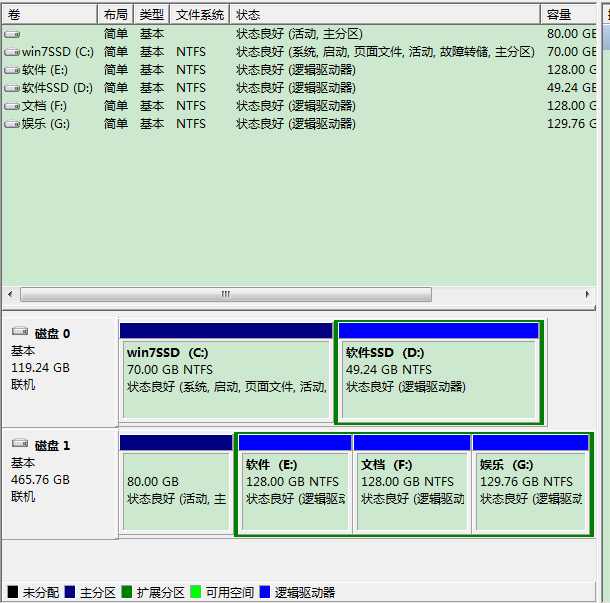 我安装的时候选择的是ext4的,所以windows下并看不到那个磁盘 也没有盘符了 ,百科里面的方法说是2014以后无法使用。那我怎么把deepin的启动找回来之前,开机时是deepin的启动选择器。现在直接没了。

 deepin
 deepin

 deepin deepin
https://bbs.deepin.org/post/33931
sudo update-grub看看能检测到windows的启动项不?
deepin https://bbs.deepin.org/post/33931
那是 grub 启动好不好?
能进入 win 吗?
deepin deepin deepin https://bbs.deepin.org/post/33931
首先启动linux的live版本(live cd 和live usb都可以)。
然后挂载你的Linux分区,如果有boot分区就挂载boot ...
deepin https://bbs.deepin.org/post/33931
首先启动linux的live版本(live cd 和live usb都可以)。
然后挂载你的Linux分区,如果有boot分区就挂载boot ...
deepin https://bbs.deepin.org/post/33931
可以进windows 直接进
deepin https://bbs.deepin.org/post/33931
那个80G的是分给deepin的 ext4的 windows读取不出来 deepin装在那里
deepin https://bbs.deepin.org/post/33931
那个80G的是分给deepin的 ext4的 windows读取不出来 deepin装在那里
deepin https://bbs.deepin.org/post/33931
你之前是使用usb安装的吧,那就用USB启动你的U盘的deepin,然后使用gparted这个工具可以直观的看到你的分 ...
deepin https://bbs.deepin.org/post/33931
你之前是使用usb安装的吧,那就用USB启动你的U盘的deepin,然后使用gparted这个工具可以直观的看到你的分 ...
懂得太少了 deepin https://bbs.deepin.org/post/33931
还有 你上面说的这些我不知道怎么操作 虽然我知道是要干嘛 懂得太少了 ...
deepin deepin https://bbs.deepin.org/post/33931
我猜测是这样的:easyBCD可能使用的是grub2dos。你电脑默认使用grub2dos(也就是easyBCD设置的引导菜单)引 ...
deepin https://bbs.deepin.org/post/33931
能不能恢复到最初的那个蓝色底的启动选择界面 我刚刚easybcd里面将deepin的那个可以打开了 不过是先黑窗 ...
deepin https://bbs.deepin.org/post/33931
提示miss operation system
deepin https://bbs.deepin.org/post/33931
那就先进deepin,然后
Popular Ranking
ChangePopular Events
More


 Adding a Dancing Spectrum Bar to the Deepin Taskbar | deepin-spectrum