

 中文
中文 
181******22 deepin
2026-09-25 21:08 deepin CachyOS内核 7.1.4-cachyos1 版本内核在我机子上运行的deepin v25工作正常, 特此发布版本
@mozixun 这句话有问题
Reply Like 0 View the author
 deepin
 CachyOS内核 7.1.4-cachyos1 版本内核在我机子上运行的deepin v25工作正常, 特此发布版本
@mozixun 这句话有问题

CachyOS内核 7.1.4-cachyos1 版本内核在我机子上运行的deepin v25工作正常, 特此发布版本
@mozixun 这句话有问题
复制了忘记改了,我疏忽了
感谢指出,已更正
 deepin
 更新了点什么?我现在是6.18,敢直接更新吗
deepin @mozixun 可以加入一个源包
比如linux-image-cachyos-x64v2
deepin 成功过安装
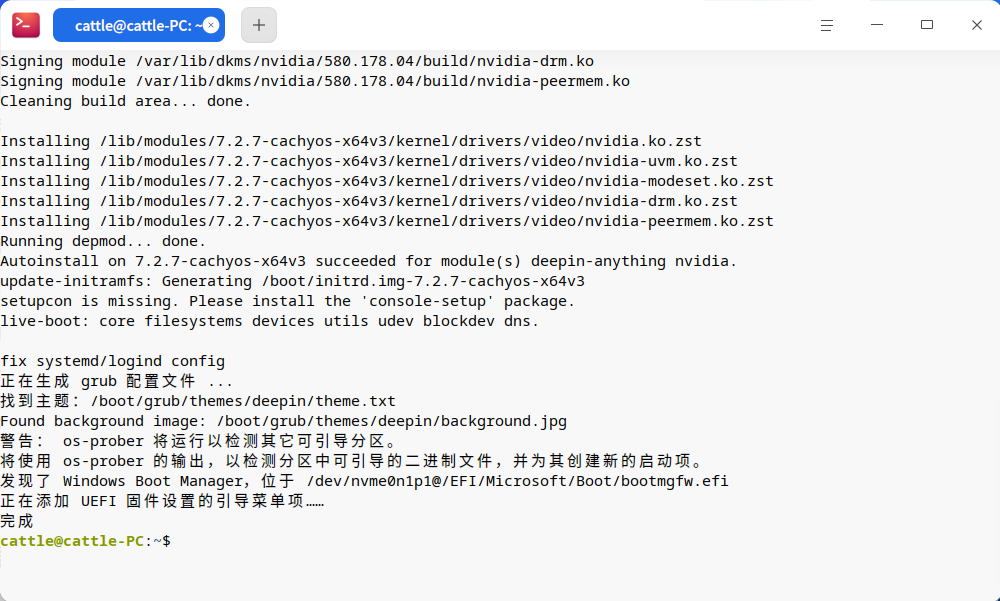

 deepin
 经过折腾,终于可以基本确定这个主力系统了
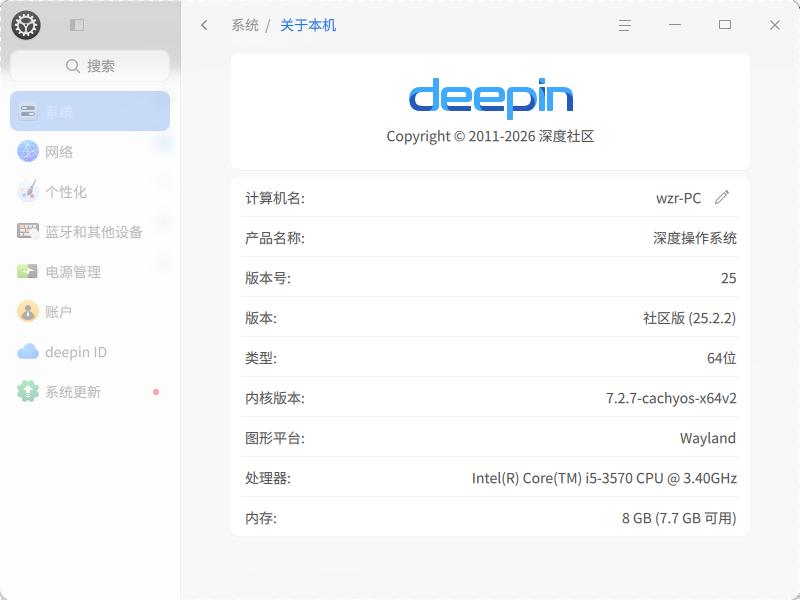
经过折腾,终于可以基本确定这个主力系统了
用的我的无磐石版本吗。
deepin 用的我的无磐石版本吗。
是的,deepin25.2磐石移除版本三。希望有deepin25.3磐石移除版本
经过折腾,终于可以基本确定这个主力系统了
如果可以,烦请帮忙测试一下treeland的Vulkan后端表现如何
方法: 把/bin/treeland.sh文件替换为以下内容后重启电脑即可:
#!/usr/bin/env sh

script_path=$(realpath $(dirname "$0"))
cmd="$script_path/treeland"
# Include all user arguments in test to ensure consistent environment
output=$($cmd --try-exec "$@" 2>&1)
exit_code=$?

if [ $exit_code -ne 0 ] && echo "$output" | grep -q "failed to create dri2 screen"; then
    # In VirtualBox, if 3D acceleration is not enabled, calling `eglInitialize` will cause
    # the program to crash. Therefore, a preliminary check is performed here: if `treeland`
    # fails to exit normally, it falls back to pixman renderer mode.
    export WLR_RENDERER=pixman
    echo "Treeland crash, try fallback to software renderer."
fi

# Use exec to replace current process instead of creating a subprocess
# This ensures treeland directly replaces treeland.sh process, avoiding dual processes
export WLR_RENDERER=vulkan
exec $cmd "$@"
如果可以,烦请帮忙测试一下treeland的Vulkan后端表现如何
方法: 把/bin/treeland.sh文件替换为以下内容后重启电脑即可:
#!/usr/bin/env sh

script_path=$(realpath $(dirname "$0"))
cmd="$script_path/treeland"
# Include all user arguments in test to ensure consistent environment
output=$($cmd --try-exec "$@" 2>&1)
exit_code=$?

if [ $exit_code -ne 0 ] && echo "$output" | grep -q "failed to create dri2 screen"; then
    # In VirtualBox, if 3D acceleration is not enabled, calling `eglInitialize` will cause
    # the program to crash. Therefore, a preliminary check is performed here: if `treeland`
    # fails to exit normally, it falls back to pixman renderer mode.
    export WLR_RENDERER=pixman
    echo "Treeland crash, try fallback to software renderer."
fi

# Use exec to replace current process instead of creating a subprocess
# This ensures treeland directly replaces treeland.sh process, avoiding dual processes
export WLR_RENDERER=vulkan
exec $cmd "$@"
这代码不能复制,这是个问题啊
 deepin
 经过折腾,终于可以基本确定这个主力系统了
更新了以后,你有没有此类问题:
一、任务栏点开的应用,没有显示啦,再次点击是再打开一个窗口
二、有一个系统更新始终更新不了,但一直提示
deepin 如果可以,烦请帮忙测试一下treeland的Vulkan后端表现如何
方法: 把/bin/treeland.sh文件替换为以下内容后重启电脑即可:
#!/usr/bin/env sh

script_path=$(realpath $(dirname "$0"))
cmd="$script_path/treeland"
# Include all user arguments in test to ensure consistent environment
output=$($cmd --try-exec "$@" 2>&1)
exit_code=$?

if [ $exit_code -ne 0 ] && echo "$output" | grep -q "failed to create dri2 screen"; then
    # In VirtualBox, if 3D acceleration is not enabled, calling `eglInitialize` will cause
    # the program to crash. Therefore, a preliminary check is performed here: if `treeland`
    # fails to exit normally, it falls back to pixman renderer mode.
    export WLR_RENDERER=pixman
    echo "Treeland crash, try fallback to software renderer."
fi

# Use exec to replace current process instead of creating a subprocess
# This ensures treeland directly replaces treeland.sh process, avoiding dual processes
export WLR_RENDERER=vulkan
exec $cmd "$@"
另用个系统进入予备份那文件并修改后,重启进入花屏。
deepin 另用个系统进入予备份那文件并修改后,重启进入花屏。
重启再另用个系统进入予恢复那文件后,重启进入恢复了原来状态。
deepin 更新了以后,你有没有此类问题:
一、任务栏点开的应用,没有显示啦,再次点击是再打开一个窗口
二、有一个系统更新始终更新不了,但一直提示
一、任务栏点开的应用,我的基本正常。
二、有一个系统更新始终更新不了,但一直提示。这个问题确实存在,不管是从控制中心更新还是终端命令更新,重启进入后还是一直提示。
三、搜狗输入法不能显示待选词,只能凭印象输入汉字。
deepin 用的我的无磐石版本吗。
你的无磐石版本和官方版本一样,原始安装的不能显示双屏。我是用470显卡驱动补丁安装器安装驱动后才能显示双屏,并且分辨率正常。但要用treeland显示的话,还得再卸载驱动。你的无磐石版本在卸载驱动后还能保持双屏显示,但一个小电视屏的分辨率只有1024X768,不能正常显示1368X768。官方版本在卸载驱动后不能显示小电视屏了,并且还不能用7.2.7内核。
deepin 更新了以后,你有没有此类问题:
一、任务栏点开的应用,没有显示啦,再次点击是再打开一个窗口
二、有一个系统更新始终更新不了,但一直提示
点开的应用可以在桌面使用,但在任务栏中没有显示。


注意: 安装前建议禁用deepin-anything-server服务, 否则进系统卡在桌面加载概不负责
虽然你不禁用问题也许不大, 但是炸了我概不负责
禁用命令:
sudo systemctl disable deepin-anything-server其次, 该源集成进了Better Deepin Repo中, 原有内核源已废弃, 详见: https://bbs.deepin.org.cn/post/298245
经过本人测试, CachyOS内核 7.2.7-cachyos1 版本内核在我机子上运行的deepin v25工作正常, 特此发布版本
警告: VirtualBox的dkms目前似乎没有适配7.2内核,有VBox的用户请时刻确认有官方内核作为备用内核启动!
[安装方式]
x86_64 ISA V2 (SSE4.2) 处理器安装方式;
x86_64 ISA V3 (AVX2) 处理器安装方式;
x86_64 ISA V4 (AVX512) 处理器安装方式;
一些FAQ
sudo apt update && sudo apt full-upgrade -y)内核更新内容/特性
最大更新: 不再使用LLVM构建内核, 而是使用deepin增强源里最新的的GCC-16, 同时内核理论上支持UEFI安全启动签名
我的私货:
因为懒)详细链接: https://github.com/CachyOS/linux/releases/tag/cachyos-7.2.7-1