

 中文
中文 
庸俗的浪漫着 deepin
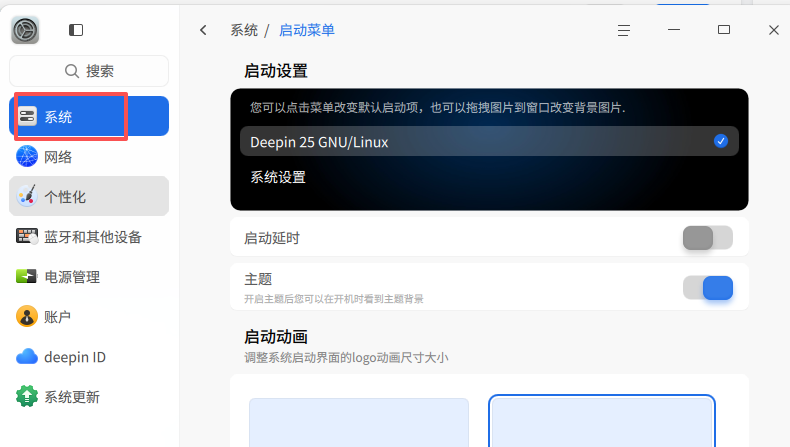
2026-09-23 17:00 deepin 在控制中心-系统-启动菜单中打开启动延时(启动延时可以让你有足够的时间选择进入哪个操作系统),如果想自动启动windows,在启动设置中修改默认启动项
Reply Like 0 View the author
 deepin
 在控制中心-系统-启动菜单中打开启动延时(启动延时可以让你有足够的时间选择进入哪个操作系统),如果想自动启动windows,在启动设置中修改默认启动项
刚启动是确实有grub让选择,不过安装完deepin后的第一次启动没有windows选项,得第二次以后启动才会有。

 deepin
 试试手动运行sudo update-grub2刷新菜单列表

如果肯定是双系统成功的话,在启动过程中快速选择需要的启动的系统。按2楼设置成延时启动最好。如果没有设置,就看手速了。我现在一般就是利用手速选择。因为win系统很少用到了。
 deepin
 一般来说deepin启动菜单会包含别的操作系统项目,如果没有可以运行sudo update-grub,如果无法生成,请确保ESP分区下EFI文件夹里包含Windows的bootmgrfw.efi文件,或者在BIOS里设置
 deepin
 efibootmgr
 deepin
 请确保你的windows系统还在,你也可以在bios里设置
 deepin
 如果肯定是双系统成功的话,在启动过程中快速选择需要的启动的系统。按2楼设置成延时启动最好。如果没有设置,就看手速了。我现在一般就是利用手速选择。因为win系统很少用到了。
可以更改时间


请问,安装完deepin后,怎么选择启动原来的windows系统? 还是有一个grub的启动程序让择呢?