[App Sharing] 弄了个linux版抖音客户端 Resolved
Tofloor
poster avatar
米饭虚拟机
deepin
2026-01-07 01:14
Author

众所周知,deepin上有抖音的Wine版。虽然抖音上架了商店,但体验不佳:卡顿,加载慢,甚至字体乱码等等。

向抖音官方反馈出个原生版却石沉大海。。。。。。doubt

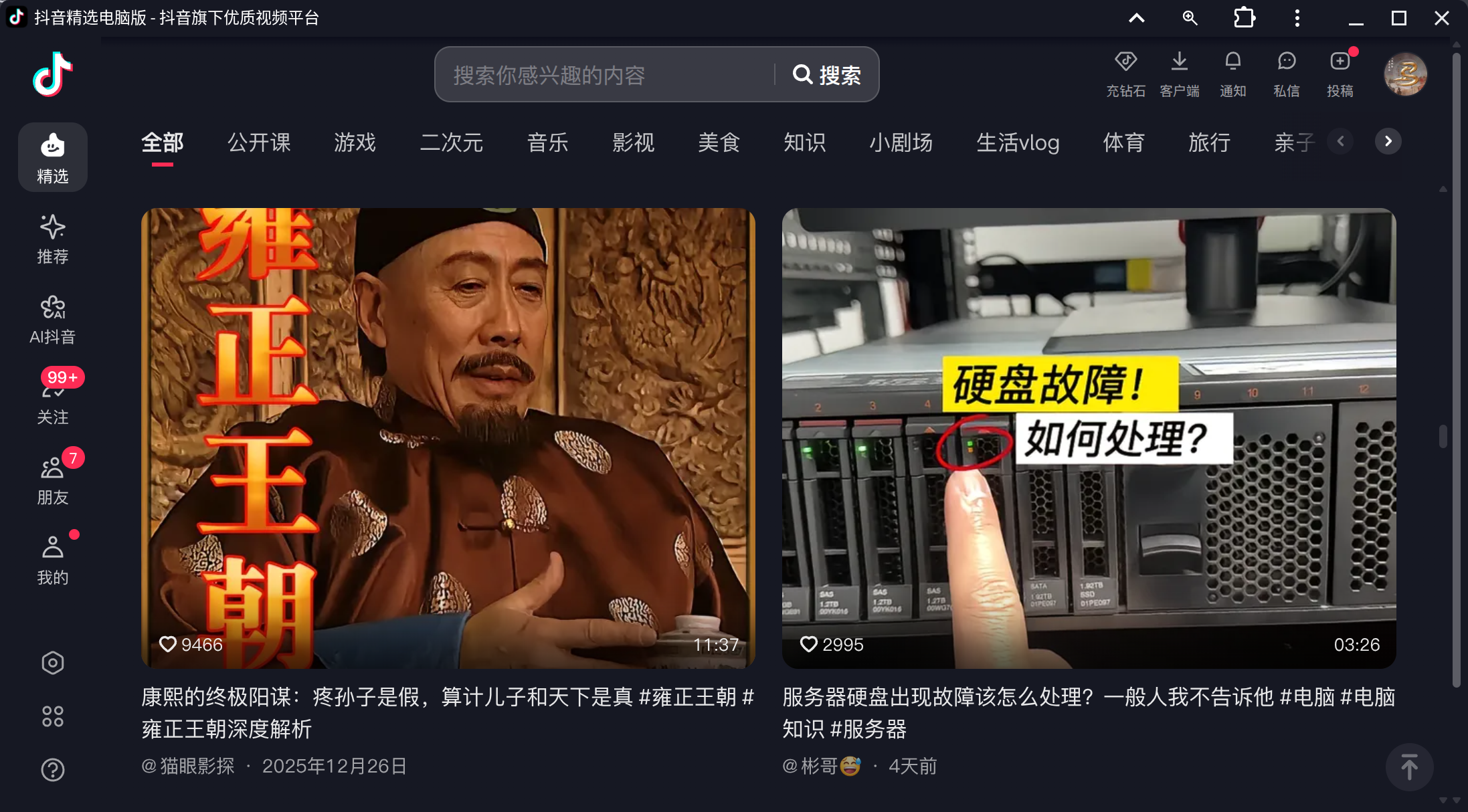
经常冲浪的我们不难发现,Windows版抖音和网页版的抖音几乎一模一样。恰好我在研究electron,就这么整合了一下,弄出了linux版抖音客户端↓

dy5.png

特点:

->相比于Wine版,linux版包体有所缩小,流畅度提升

->适配amd64、arm64和龙架构

->支持看视频和看直播

->支持快捷键操作

->支持AI抖音

->支持投稿视频

->可登录账号

->没有强制更新

下载地址:

123分流:https://www.123865.com/s/Jd4XTd-WhFih

保健室分流:https://github.com/kota-rina3/hokeshi/releases/tag/douyin7.0.0

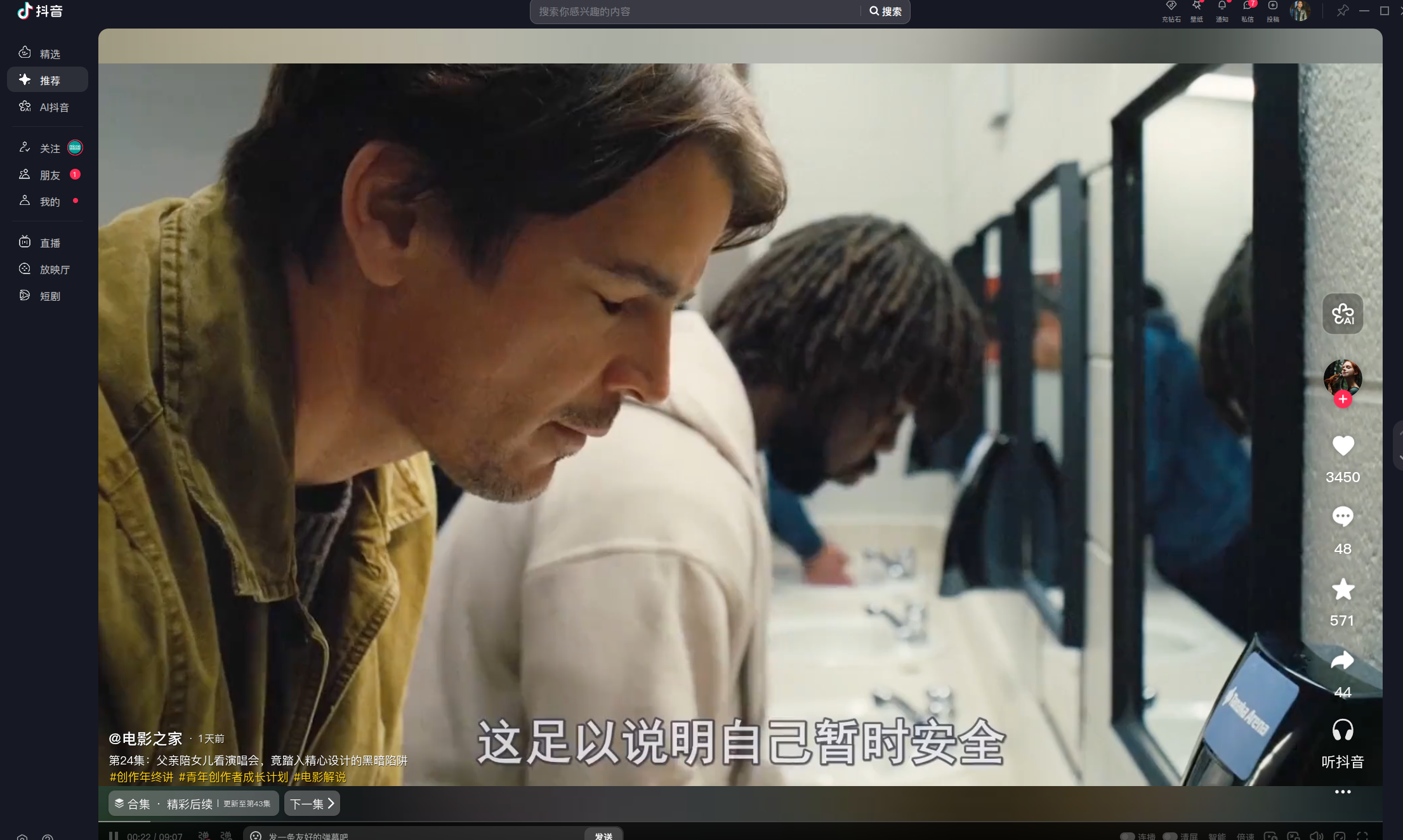
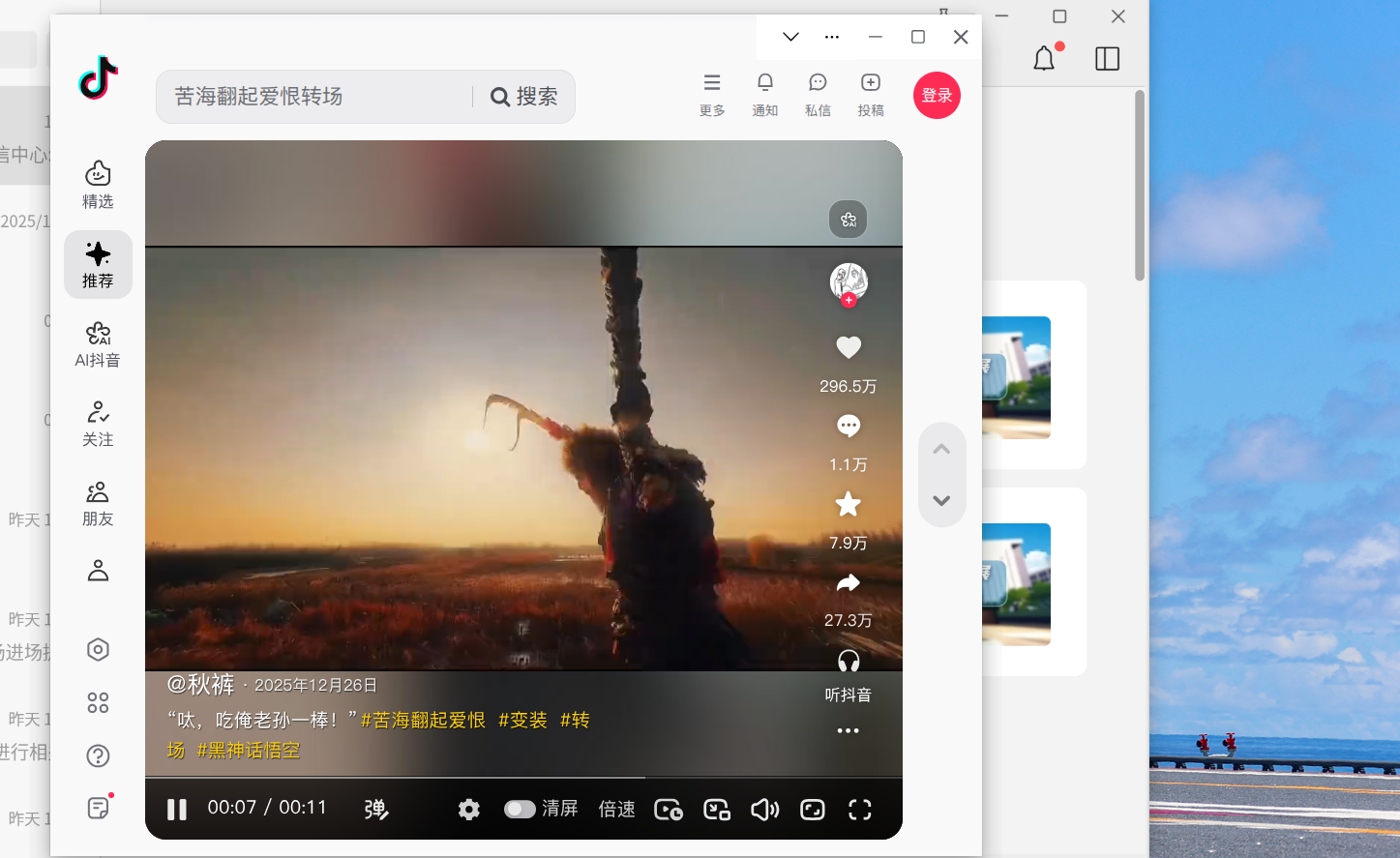
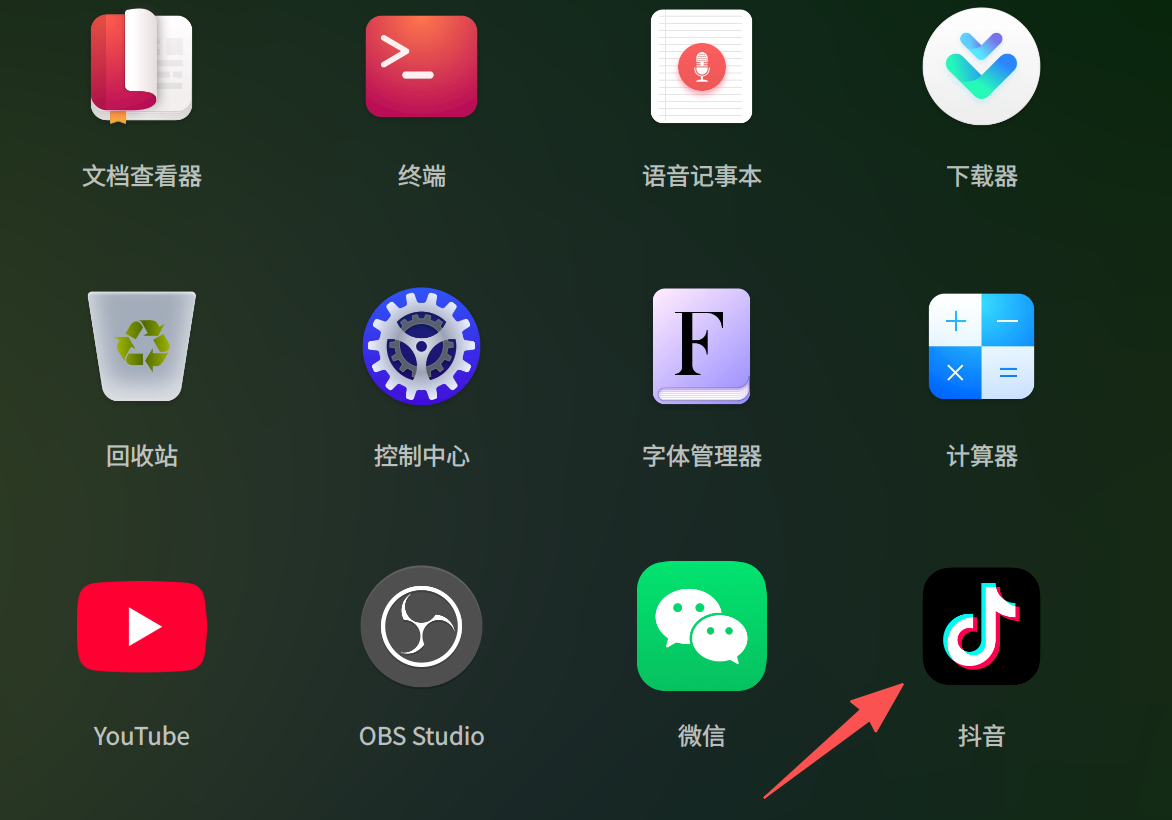
运行截图:

dy1.png

dy2.png

dy3.png

dy4.png

提问:

1)有网页版就行了,为何要弄客户端出来?

部分用户认为开客户端比上浏览器更方便

2)功能是否完美复刻?

因自身能力有限,未完美复刻。还有,我不想复刻“抖音壁纸”和那个“抖音挂件”,这两玩意是鸡肋

3)会强制更新吗?

不会,因为不会有强制更新功能。

4)上架商店吗?

会,替代原先的Wine版。(不知官方是否允许“撞坑”?)

软件已适配龙芯。龙芯用户可以帮忙测试一下吗?并把运行截图发评论区,谢谢了!kissing_heart

Reply Favorite View the author
All Replies
2 / 3
To page
晚秋(lateautumn)
Moderator
2026-01-07 15:09
#21

居然龙芯都适配了!感恩!龙架构运行正常。

image.png

Reply View the author
米饭虚拟机
deepin
2026-01-07 15:13
#22
穿西装的万斯在统亻言

electron不知道能不能读取粘贴板的数据然后传递到抖音的搜索框

能,得有相应代码

Reply View the author
米饭虚拟机
deepin
2026-01-07 15:14
#23
晚秋(lateautumn)

居然龙芯都适配了!感恩!龙架构运行正常。

image.png

谢谢!proud

Reply View the author
晚秋(lateautumn)
Moderator
2026-01-07 15:21
#24
米饭虚拟机

谢谢!proud

应该感谢大佬,让我们龙芯爱好者又多了一个原生应用。applaud

Reply View the author
waittingsummer
deepin
2026-01-07 15:39
#25

感谢楼主让生态更完善

Reply View the author
锵锵枪ᯤ
deepin
2026-01-08 10:31
#26

哪里需要这么复杂,浏览器点以应用安装就可以了。
image.png

image.png

Reply View the author
米饭虚拟机
deepin
2026-01-08 10:34
#27
锵锵枪ᯤ

哪里需要这么复杂,浏览器点以应用安装就可以了。
image.png

image.png

部分用户更喜欢用客户端刷抖音proud

Reply View the author
CTZ老斑鸠
deepin
2026-01-08 16:23
#28

用浏览器安装为应用也是一样的效果

Reply View the author
LINUX小白菜
deepin
2026-01-08 16:44
#29

看到大佬这个APP我立马在麒麟V10 2503版上安装,安装后发现找不到这个APP,怎么找也没影,然后我在家里的电脑上也安装,安装后有快捷方式,就是点击后没有反应。希望大佬能对这个软件再次改进,能在更多系统使用。

Reply View the author
米饭虚拟机
deepin
2026-01-08 17:44
#30
LINUX小白菜

看到大佬这个APP我立马在麒麟V10 2503版上安装,安装后发现找不到这个APP,怎么找也没影,然后我在家里的电脑上也安装,安装后有快捷方式,就是点击后没有反应。希望大佬能对这个软件再次改进,能在更多系统使用。

这个包是用统信标准打包的,麒麟电脑要装星火商店的补丁才能显示图标

打不开抖音,在终端执行下面的命令看看报错?

/opt/apps/com.douyin.deepin/files/douyin

Reply View the author
克亮
Moderator
2026-01-08 18:35
#31
LINUX小白菜

看到大佬这个APP我立马在麒麟V10 2503版上安装,安装后发现找不到这个APP,怎么找也没影,然后我在家里的电脑上也安装,安装后有快捷方式,就是点击后没有反应。希望大佬能对这个软件再次改进,能在更多系统使用。

ky-buding.zip

安装这个补丁就可以了。

Reply View the author
192******01
deepin
21 hours ago
#32

image.png

edge版用着也挺好,哈哈

Reply View the author
192******01
deepin
21 hours ago
#33
192******01

image.png

edge版用着也挺好,哈哈

image.png

还是有图标

Reply View the author
LINUX小白菜
deepin
9 hours ago
#34
米饭虚拟机

这个包是用统信标准打包的,麒麟电脑要装星火商店的补丁才能显示图标

打不开抖音,在终端执行下面的命令看看报错?

/opt/apps/com.douyin.deepin/files/douyin

xnjcyzou@xnjcyzou-pc:~/桌面$ /opt/apps/com.douyin.deepin/files/douyin
MESA-INTEL: warning: Performance support disabled, consider sysctl dev.i915.perf_stream_paranoid=0

[30328:0109/105544.242452:ERROR:media/gpu/vaapi/vaapi_wrapper.cc:1653] Installed VAAPI version is too old. min supported version: 1.17 installed version: 1.7
(node:30338) [DEP0005] DeprecationWarning: Buffer() is deprecated due to security and usability issues. Please use the Buffer.alloc(), Buffer.allocUnsafe(), or Buffer.from() methods instead.
(Use exe --trace-deprecation ... to show where the warning was created)
xnjcyzou@xnjcyzou-pc:~/桌面$

Reply View the author
LINUX小白菜
deepin
8 hours ago
#35
克亮

ky-buding.zip

安装这个补丁就可以了。

论坛的大佬真的是热心、厉害,安装大佬提供的补丁包后,重新安装楼主大佬的app,果然能看到快捷方式,可以正常使用,谢谢各位linux大佬。

Reply View the author
LINUX小白菜
deepin
8 hours ago
#36

比WINE版的抖音好用多了,不卡,一点也不卡,流畅,好棒哇。

Reply View the author
米饭虚拟机
deepin
8 hours ago
#37
LINUX小白菜

xnjcyzou@xnjcyzou-pc:~/桌面$ /opt/apps/com.douyin.deepin/files/douyin
MESA-INTEL: warning: Performance support disabled, consider sysctl dev.i915.perf_stream_paranoid=0

[30328:0109/105544.242452:ERROR:media/gpu/vaapi/vaapi_wrapper.cc:1653] Installed VAAPI version is too old. min supported version: 1.17 installed version: 1.7
(node:30338) [DEP0005] DeprecationWarning: Buffer() is deprecated due to security and usability issues. Please use the Buffer.alloc(), Buffer.allocUnsafe(), or Buffer.from() methods instead.
(Use exe --trace-deprecation ... to show where the warning was created)
xnjcyzou@xnjcyzou-pc:~/桌面$

更新下驱动吧:sudo apt update && sudo apt install intel-media-va-driver-non-free libva-drm2 libva-x11-2 vainfo

还不行就在启动命令后面加 --disable-gpu

Reply View the author
LINUX小白菜
deepin
8 hours ago
#38
米饭虚拟机

更新下驱动吧:sudo apt update && sudo apt install intel-media-va-driver-non-free libva-drm2 libva-x11-2 vainfo

还不行就在启动命令后面加 --disable-gpu

xnjcyzou@xnjcyzou-pc:~/桌面$ sudo apt update && sudo apt install intel-media-va-driver-non-free libva-drm2 libva-x11-2 vainfo
输入密码
对不起,请重试。
输入密码
命中:1 http://archive2.kylinos.cn/deb/kylin/production/PART-V10-SP1/custom/partner/V10-SP1 default InRelease
命中:2 http://archive.kylinos.cn/kylin/KYLIN-ALL 10.1-kylin InRelease
命中:3 http://archive.kylinos.cn/kylin/KYLIN-ALL 10.1-kylin-2503 InRelease
命中:4 http://archive.kylinos.cn/kylin/KYLIN-ALL 10.1-kylin-2503-hwe InRelease
命中:5 http://archive.kylinos.cn/kylin/KYLIN-ALL 10.1-2503-bugfix-limit InRelease
命中:6 http://archive.kylinos.cn/kylin/KYLIN-ALL 10.1-2503-hwe-bugfix-limit InRelease
正在读取软件包列表... 完成
正在分析软件包的依赖关系树
正在读取状态信息... 完成
所有软件包均为最新。
W: 鉴于仓库 'http://archive.kylinos.cn/kylin/KYLIN-ALL 10.1-2503-hwe-bugfix-limit InRelease' 不含有 'restricted' 组件,跳过配置文件 'restricted/binary-i386/Packages' 的获取。(sources.list 中的组件名称是否拼写错误?)
W: 鉴于仓库 'http://archive.kylinos.cn/kylin/KYLIN-ALL 10.1-2503-hwe-bugfix-limit InRelease' 不含有 'restricted' 组件,跳过配置文件 'restricted/binary-amd64/Packages' 的获取。(sources.list 中的组件名称是否拼写错误?)
W: 鉴于仓库 'http://archive.kylinos.cn/kylin/KYLIN-ALL 10.1-2503-hwe-bugfix-limit InRelease' 不含有 'restricted' 组件,跳过配置文件 'restricted/i18n/Translation-zh_CN' 的获取。(sources.list 中的组件名称是否拼写错误?)
W: 鉴于仓库 'http://archive.kylinos.cn/kylin/KYLIN-ALL 10.1-2503-hwe-bugfix-limit InRelease' 不含有 'restricted' 组件,跳过配置文件 'restricted/i18n/Translation-zh' 的获取。(sources.list 中的组件名称是否拼写错误?)
W: 鉴于仓库 'http://archive.kylinos.cn/kylin/KYLIN-ALL 10.1-2503-hwe-bugfix-limit InRelease' 不含有 'restricted' 组件,跳过配置文件 'restricted/i18n/Translation-en' 的获取。(sources.list 中的组件名称是否拼写错误?)
W: 鉴于仓库 'http://archive.kylinos.cn/kylin/KYLIN-ALL 10.1-2503-hwe-bugfix-limit InRelease' 不含有 'restricted' 组件,跳过配置文件 'restricted/cnf/Commands-amd64' 的获取。(sources.list 中的组件名称是否拼写错误?)
W: 鉴于仓库 'http://archive.kylinos.cn/kylin/KYLIN-ALL 10.1-2503-hwe-bugfix-limit InRelease' 不含有 'universe' 组件,跳过配置文件 'universe/binary-i386/Packages' 的获取。(sources.list 中的组件名称是否拼写错误?)
W: 鉴于仓库 'http://archive.kylinos.cn/kylin/KYLIN-ALL 10.1-2503-hwe-bugfix-limit InRelease' 不含有 'universe' 组件,跳过配置文件 'universe/binary-amd64/Packages' 的获取。(sources.list 中的组件名称是否拼写错误?)
W: 鉴于仓库 'http://archive.kylinos.cn/kylin/KYLIN-ALL 10.1-2503-hwe-bugfix-limit InRelease' 不含有 'universe' 组件,跳过配置文件 'universe/i18n/Translation-zh' 的获取。(sources.list 中的组件名称是否拼写错误?)
W: 鉴于仓库 'http://archive.kylinos.cn/kylin/KYLIN-ALL 10.1-2503-hwe-bugfix-limit InRelease' 不含有 'universe' 组件,跳过配置文件 'universe/i18n/Translation-en' 的获取。(sources.list 中的组件名称是否拼写错误?)
W: 鉴于仓库 'http://archive.kylinos.cn/kylin/KYLIN-ALL 10.1-2503-hwe-bugfix-limit InRelease' 不含有 'universe' 组件,跳过配置文件 'universe/i18n/Translation-zh_CN' 的获取。(sources.list 中的组件名称是否拼写错误?)
W: 鉴于仓库 'http://archive.kylinos.cn/kylin/KYLIN-ALL 10.1-2503-hwe-bugfix-limit InRelease' 不含有 'universe' 组件,跳过配置文件 'universe/cnf/Commands-amd64' 的获取。(sources.list 中的组件名称是否拼写错误?)
W: 鉴于仓库 'http://archive.kylinos.cn/kylin/KYLIN-ALL 10.1-2503-hwe-bugfix-limit InRelease' 不含有 'multiverse' 组件,跳过配置文件 'multiverse/binary-i386/Packages' 的获取。(sources.list 中的组件名称是否拼写错误?)
W: 鉴于仓库 'http://archive.kylinos.cn/kylin/KYLIN-ALL 10.1-2503-hwe-bugfix-limit InRelease' 不含有 'multiverse' 组件,跳过配置文件 'multiverse/binary-amd64/Packages' 的获取。(sources.list 中的组件名称是否拼写错误?)
W: 鉴于仓库 'http://archive.kylinos.cn/kylin/KYLIN-ALL 10.1-2503-hwe-bugfix-limit InRelease' 不含有 'multiverse' 组件,跳过配置文件 'multiverse/i18n/Translation-zh_CN' 的获取。(sources.list 中的组件名称是否拼写错误?)
W: 鉴于仓库 'http://archive.kylinos.cn/kylin/KYLIN-ALL 10.1-2503-hwe-bugfix-limit InRelease' 不含有 'multiverse' 组件,跳过配置文件 'multiverse/i18n/Translation-en' 的获取。(sources.list 中的组件名称是否拼写错误?)
W: 鉴于仓库 'http://archive.kylinos.cn/kylin/KYLIN-ALL 10.1-2503-hwe-bugfix-limit InRelease' 不含有 'multiverse' 组件,跳过配置文件 'multiverse/i18n/Translation-zh' 的获取。(sources.list 中的组件名称是否拼写错误?)
W: 鉴于仓库 'http://archive.kylinos.cn/kylin/KYLIN-ALL 10.1-2503-hwe-bugfix-limit InRelease' 不含有 'multiverse' 组件,跳过配置文件 'multiverse/cnf/Commands-amd64' 的获取。(sources.list 中的组件名称是否拼写错误?)
正在读取软件包列表... 完成
正在分析软件包的依赖关系树
正在读取状态信息... 完成
libva-drm2 已经是最新版 (2.7.0-2kylin0k1.0)。
libva-x11-2 已经是最新版 (2.7.0-2kylin0k1.0)。
下列软件包是自动安装的并且现在不需要了:
aptdaemon-data aria2 cabextract debhelper devscripts dh-autoreconf dh-make
dh-strip-nondeterminism dwz gir1.2*coregtk-4.0 gir1.2-snapd-1
gir1.2-soup-2.4 gir1.2-webkit2-4.0 icoutils intltool-debian
libarchive-zip-perl libaria2-0 libb-hooks-op-check-perl
libclass-method-modifiers-perl libdebhelper-perl libdevel-callchecker-perl
libdynaloader-functions-perl libfile-homedir-perl
libfile-stripnondeterminism-perl libfile-which-perl libimport-into-perl
libio-pty-perl libipc-run-perl libmodule-runtime-perl libmoo-perl
libparams-classify-perl librole-tiny-perl libsnapd-glib1 libstrictures-perl
libsub-override-perl libsub-quote-perl patchutils po-debconf
python3-aptdaemon.gtk3widgets python3-debconf python3-debian
python3-distupgrade python3-update-manager ubuntu-release-upgrader-core
ubuntu-release-upgrader-gtk update-manager update-manager-core
update-notifier update-notifier-common
使用'sudo apt autoremove'来卸载它(它们)。
下列软件包将被【卸载】:
intel-media-va-driver
下列【新】软件包将被安装:
intel-media-va-driver-non-free vainfo
升级了 0 个软件包,新安装了 2 个软件包,要卸载 1 个软件包,有 0 个软件包未被升级。
需要下载 5,107 kB 的归档。
解压缩后会消耗 27.8 MB 的额外空间。
您希望继续执行吗? [Y/n] y
获取:1 http://archive.kylinos.cn/kylin/KYLIN-ALL 10.1-kylin/multiverse amd64 intel-media-va-driver-non-free amd64 20.1.1+ds1-1build1 [5,087 kB]
获取:2 http://archive.kylinos.cn/kylin/KYLIN-ALL 10.1-kylin/universe amd64 vainfo amd64 2.6.0+ds1-1 [20.6 kB]
已下载 5,107 kB,耗时 2分 5秒 (40.9 kB/s)
dpkg: intel-media-va-driver:amd64:有依赖问题,但是如您所愿,将继续卸载:
va-driver-all:amd64 依赖于 intel-media-va-driver | intel-media-va-driver-non-fr
ee;然而:
即将删除 intel-media-va-driver:amd64。
未安装软件包 intel-media-va-driver-non-free。

(正在读取数据库 ... 系统当前共安装有 264498 个文件和目录。)
正在卸载 intel-media-va-driver:amd64 (20.1.1+dfsg1-1) ...
正在选中未选择的软件包 intel-media-va-driver-non-free:amd64。
(正在读取数据库 ... 系统当前共安装有 264494 个文件和目录。)
准备解压 .../intel-media-va-driver-non-free_20.1.1+ds1-1build1_amd64.deb ...
正在解压 intel-media-va-driver-non-free:amd64 (20.1.1+ds1-1build1) ...
正在选中未选择的软件包 vainfo。
准备解压 .../vainfo_2.6.0+ds1-1_amd64.deb ...
正在解压 vainfo (2.6.0+ds1-1) ...
正在设置 intel-media-va-driver-non-free:amd64 (20.1.1+ds1-1build1) ...
正在设置 vainfo (2.6.0+ds1-1) ...
正在处理用于 man-db (2.9.1-1kylin0k1.0) 的触发器 ...
xnjcyzou@xnjcyzou-pc:~/桌面$

Reply View the author
米饭虚拟机
deepin
8 hours ago
#39
LINUX小白菜

xnjcyzou@xnjcyzou-pc:~/桌面$ sudo apt update && sudo apt install intel-media-va-driver-non-free libva-drm2 libva-x11-2 vainfo
输入密码
对不起,请重试。
输入密码
命中:1 http://archive2.kylinos.cn/deb/kylin/production/PART-V10-SP1/custom/partner/V10-SP1 default InRelease
命中:2 http://archive.kylinos.cn/kylin/KYLIN-ALL 10.1-kylin InRelease
命中:3 http://archive.kylinos.cn/kylin/KYLIN-ALL 10.1-kylin-2503 InRelease
命中:4 http://archive.kylinos.cn/kylin/KYLIN-ALL 10.1-kylin-2503-hwe InRelease
命中:5 http://archive.kylinos.cn/kylin/KYLIN-ALL 10.1-2503-bugfix-limit InRelease
命中:6 http://archive.kylinos.cn/kylin/KYLIN-ALL 10.1-2503-hwe-bugfix-limit InRelease
正在读取软件包列表... 完成
正在分析软件包的依赖关系树
正在读取状态信息... 完成
所有软件包均为最新。
W: 鉴于仓库 'http://archive.kylinos.cn/kylin/KYLIN-ALL 10.1-2503-hwe-bugfix-limit InRelease' 不含有 'restricted' 组件,跳过配置文件 'restricted/binary-i386/Packages' 的获取。(sources.list 中的组件名称是否拼写错误?)
W: 鉴于仓库 'http://archive.kylinos.cn/kylin/KYLIN-ALL 10.1-2503-hwe-bugfix-limit InRelease' 不含有 'restricted' 组件,跳过配置文件 'restricted/binary-amd64/Packages' 的获取。(sources.list 中的组件名称是否拼写错误?)
W: 鉴于仓库 'http://archive.kylinos.cn/kylin/KYLIN-ALL 10.1-2503-hwe-bugfix-limit InRelease' 不含有 'restricted' 组件,跳过配置文件 'restricted/i18n/Translation-zh_CN' 的获取。(sources.list 中的组件名称是否拼写错误?)
W: 鉴于仓库 'http://archive.kylinos.cn/kylin/KYLIN-ALL 10.1-2503-hwe-bugfix-limit InRelease' 不含有 'restricted' 组件,跳过配置文件 'restricted/i18n/Translation-zh' 的获取。(sources.list 中的组件名称是否拼写错误?)
W: 鉴于仓库 'http://archive.kylinos.cn/kylin/KYLIN-ALL 10.1-2503-hwe-bugfix-limit InRelease' 不含有 'restricted' 组件,跳过配置文件 'restricted/i18n/Translation-en' 的获取。(sources.list 中的组件名称是否拼写错误?)
W: 鉴于仓库 'http://archive.kylinos.cn/kylin/KYLIN-ALL 10.1-2503-hwe-bugfix-limit InRelease' 不含有 'restricted' 组件,跳过配置文件 'restricted/cnf/Commands-amd64' 的获取。(sources.list 中的组件名称是否拼写错误?)
W: 鉴于仓库 'http://archive.kylinos.cn/kylin/KYLIN-ALL 10.1-2503-hwe-bugfix-limit InRelease' 不含有 'universe' 组件,跳过配置文件 'universe/binary-i386/Packages' 的获取。(sources.list 中的组件名称是否拼写错误?)
W: 鉴于仓库 'http://archive.kylinos.cn/kylin/KYLIN-ALL 10.1-2503-hwe-bugfix-limit InRelease' 不含有 'universe' 组件,跳过配置文件 'universe/binary-amd64/Packages' 的获取。(sources.list 中的组件名称是否拼写错误?)
W: 鉴于仓库 'http://archive.kylinos.cn/kylin/KYLIN-ALL 10.1-2503-hwe-bugfix-limit InRelease' 不含有 'universe' 组件,跳过配置文件 'universe/i18n/Translation-zh' 的获取。(sources.list 中的组件名称是否拼写错误?)
W: 鉴于仓库 'http://archive.kylinos.cn/kylin/KYLIN-ALL 10.1-2503-hwe-bugfix-limit InRelease' 不含有 'universe' 组件,跳过配置文件 'universe/i18n/Translation-en' 的获取。(sources.list 中的组件名称是否拼写错误?)
W: 鉴于仓库 'http://archive.kylinos.cn/kylin/KYLIN-ALL 10.1-2503-hwe-bugfix-limit InRelease' 不含有 'universe' 组件,跳过配置文件 'universe/i18n/Translation-zh_CN' 的获取。(sources.list 中的组件名称是否拼写错误?)
W: 鉴于仓库 'http://archive.kylinos.cn/kylin/KYLIN-ALL 10.1-2503-hwe-bugfix-limit InRelease' 不含有 'universe' 组件,跳过配置文件 'universe/cnf/Commands-amd64' 的获取。(sources.list 中的组件名称是否拼写错误?)
W: 鉴于仓库 'http://archive.kylinos.cn/kylin/KYLIN-ALL 10.1-2503-hwe-bugfix-limit InRelease' 不含有 'multiverse' 组件,跳过配置文件 'multiverse/binary-i386/Packages' 的获取。(sources.list 中的组件名称是否拼写错误?)
W: 鉴于仓库 'http://archive.kylinos.cn/kylin/KYLIN-ALL 10.1-2503-hwe-bugfix-limit InRelease' 不含有 'multiverse' 组件,跳过配置文件 'multiverse/binary-amd64/Packages' 的获取。(sources.list 中的组件名称是否拼写错误?)
W: 鉴于仓库 'http://archive.kylinos.cn/kylin/KYLIN-ALL 10.1-2503-hwe-bugfix-limit InRelease' 不含有 'multiverse' 组件,跳过配置文件 'multiverse/i18n/Translation-zh_CN' 的获取。(sources.list 中的组件名称是否拼写错误?)
W: 鉴于仓库 'http://archive.kylinos.cn/kylin/KYLIN-ALL 10.1-2503-hwe-bugfix-limit InRelease' 不含有 'multiverse' 组件,跳过配置文件 'multiverse/i18n/Translation-en' 的获取。(sources.list 中的组件名称是否拼写错误?)
W: 鉴于仓库 'http://archive.kylinos.cn/kylin/KYLIN-ALL 10.1-2503-hwe-bugfix-limit InRelease' 不含有 'multiverse' 组件,跳过配置文件 'multiverse/i18n/Translation-zh' 的获取。(sources.list 中的组件名称是否拼写错误?)
W: 鉴于仓库 'http://archive.kylinos.cn/kylin/KYLIN-ALL 10.1-2503-hwe-bugfix-limit InRelease' 不含有 'multiverse' 组件,跳过配置文件 'multiverse/cnf/Commands-amd64' 的获取。(sources.list 中的组件名称是否拼写错误?)
正在读取软件包列表... 完成
正在分析软件包的依赖关系树
正在读取状态信息... 完成
libva-drm2 已经是最新版 (2.7.0-2kylin0k1.0)。
libva-x11-2 已经是最新版 (2.7.0-2kylin0k1.0)。
下列软件包是自动安装的并且现在不需要了:
aptdaemon-data aria2 cabextract debhelper devscripts dh-autoreconf dh-make
dh-strip-nondeterminism dwz gir1.2*coregtk-4.0 gir1.2-snapd-1
gir1.2-soup-2.4 gir1.2-webkit2-4.0 icoutils intltool-debian
libarchive-zip-perl libaria2-0 libb-hooks-op-check-perl
libclass-method-modifiers-perl libdebhelper-perl libdevel-callchecker-perl
libdynaloader-functions-perl libfile-homedir-perl
libfile-stripnondeterminism-perl libfile-which-perl libimport-into-perl
libio-pty-perl libipc-run-perl libmodule-runtime-perl libmoo-perl
libparams-classify-perl librole-tiny-perl libsnapd-glib1 libstrictures-perl
libsub-override-perl libsub-quote-perl patchutils po-debconf
python3-aptdaemon.gtk3widgets python3-debconf python3-debian
python3-distupgrade python3-update-manager ubuntu-release-upgrader-core
ubuntu-release-upgrader-gtk update-manager update-manager-core
update-notifier update-notifier-common
使用'sudo apt autoremove'来卸载它(它们)。
下列软件包将被【卸载】:
intel-media-va-driver
下列【新】软件包将被安装:
intel-media-va-driver-non-free vainfo
升级了 0 个软件包,新安装了 2 个软件包,要卸载 1 个软件包,有 0 个软件包未被升级。
需要下载 5,107 kB 的归档。
解压缩后会消耗 27.8 MB 的额外空间。
您希望继续执行吗? [Y/n] y
获取:1 http://archive.kylinos.cn/kylin/KYLIN-ALL 10.1-kylin/multiverse amd64 intel-media-va-driver-non-free amd64 20.1.1+ds1-1build1 [5,087 kB]
获取:2 http://archive.kylinos.cn/kylin/KYLIN-ALL 10.1-kylin/universe amd64 vainfo amd64 2.6.0+ds1-1 [20.6 kB]
已下载 5,107 kB,耗时 2分 5秒 (40.9 kB/s)
dpkg: intel-media-va-driver:amd64:有依赖问题,但是如您所愿,将继续卸载:
va-driver-all:amd64 依赖于 intel-media-va-driver | intel-media-va-driver-non-fr
ee;然而:
即将删除 intel-media-va-driver:amd64。
未安装软件包 intel-media-va-driver-non-free。

(正在读取数据库 ... 系统当前共安装有 264498 个文件和目录。)
正在卸载 intel-media-va-driver:amd64 (20.1.1+dfsg1-1) ...
正在选中未选择的软件包 intel-media-va-driver-non-free:amd64。
(正在读取数据库 ... 系统当前共安装有 264494 个文件和目录。)
准备解压 .../intel-media-va-driver-non-free_20.1.1+ds1-1build1_amd64.deb ...
正在解压 intel-media-va-driver-non-free:amd64 (20.1.1+ds1-1build1) ...
正在选中未选择的软件包 vainfo。
准备解压 .../vainfo_2.6.0+ds1-1_amd64.deb ...
正在解压 vainfo (2.6.0+ds1-1) ...
正在设置 intel-media-va-driver-non-free:amd64 (20.1.1+ds1-1build1) ...
正在设置 vainfo (2.6.0+ds1-1) ...
正在处理用于 man-db (2.9.1-1kylin0k1.0) 的触发器 ...
xnjcyzou@xnjcyzou-pc:~/桌面$

麒麟的系统啊?是工作电脑吗?

是的话直接在终端执行:/opt/apps/com.douyin.deepin/files/douyin --disable-gpu

不过,麒麟系统还是建议Wine版,毕竟我这个包只适配了深度和统信

Reply View the author
LINUX小白菜
deepin
4 hours ago
#40
米饭虚拟机

麒麟的系统啊?是工作电脑吗?

是的话直接在终端执行:/opt/apps/com.douyin.deepin/files/douyin --disable-gpu

不过,麒麟系统还是建议Wine版,毕竟我这个包只适配了深度和统信

大佬,你这个民间版抖音现在在我的电脑上相当好用,我干嘛去用wine版的啊,好用就是王道。

Reply View the author
2 / 3
To page