

 中文
中文 
ksgt0025 deepin
2025-12-21 16:56 deepin It has been deleted!
 deepin
  deepin
 当界面显示时,眼疾手快进行设置,我就是通过这个方式安装好的。只要安装好后,就没有闪屏问题了😂
deepin 当界面显示时,眼疾手快进行设置,我就是通过这个方式安装好的。只要安装好后,就没有闪屏问题了😂
没看明白进行什么设置

 deepin
 真的想玩的话,买块龙芯主板不就得了,显卡都不需要,八分钟就安装完毕了。

什么显卡呢?出现这种情况的话应该是显卡不支持
deepin 什么显卡呢?出现这种情况的话应该是显卡不支持
CPU J4105,集成显卡
https://www.intel.cn/content/www/cn/zh/products/sku/128989/intel-celeron-j4105-processor-4m-cache-up-to-2-50-ghz/specifications.html
CPU J4105,集成显卡
https://www.intel.cn/content/www/cn/zh/products/sku/128989/intel-celeron-j4105-processor-4m-cache-up-to-2-50-ghz/specifications.html
工控机的这个CPU目前deepin不支持哈
https://www.deepin.org/zh/deepin-25-installation/
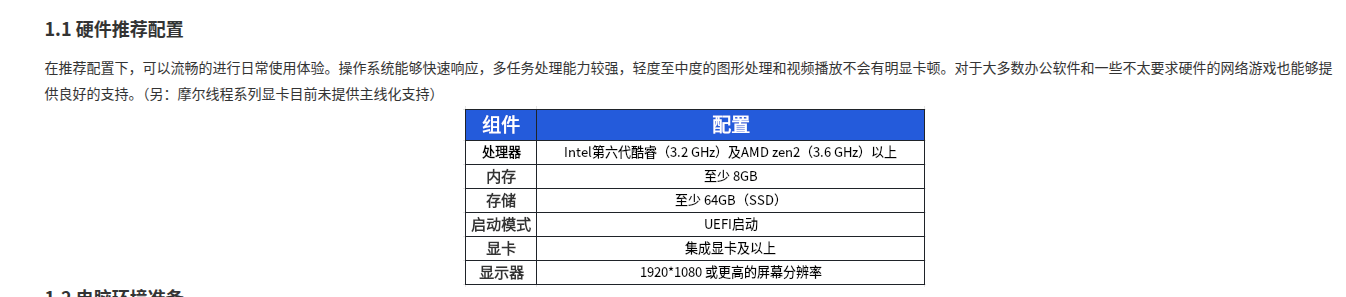
deepin 工控机的这个CPU目前deepin不支持哈
https://www.deepin.org/zh/deepin-25-installation/
Popular Ranking
ChangePopular Events
More


 Frequent kernel panic error since the last kernel update.
我正在尝试在我的设备上使用 USB启动盘安装 Deepin,但是:
一、直接使用 GRUB 菜单里面的 Try Deepin Desktop 25(好像是这个名字来着)启动,出现闪屏,亮一秒闪一秒大概。
二、在 GRUB 菜单中按E进入编辑界面,添加 i915.enable_psr=0 i915.modeset=0 内核参数之后,闪屏解决,开机界面动画正常,但是后续卡在 TTY 中继续闪屏。再加上 systemd.unit=multi-user.target 后发现,TTY 正常。怀疑是图形界面与内核参数冲突
现在问题来了:不加内核参数的话,显示器闪屏,加了内核参数的话,不能进入图形界面。我还有什么办法可以安装 Deepin 到我的设备上?
补充细节:
镜像文件 sha256 验证正常,GRUB菜单checksum表示成功