
Home
Categories
WIKI
Topic
User
LANGUAGE:
中文
English
[Others]
无法访问smb协议高载的路径
V25.0.9
Product Feedback
226
views ·
2
replies ·
To
floor
Go
深度之家
deepin
2025-12-11 11:00
Author
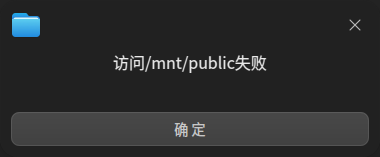
【系统环境】: deepin V25.0.9 【前置条件】: 采用以下指令高载硬盘: sudo mount -t cifs //x.x.x.x/public /mnt/public -o username=xxx,password='xxx',port=1445,uid=1000,gid=1000,noserverino,file_mode=0777,dir_mode=0777 【复现步骤】: 开机后通过命令直接挂载即可 【预期结果】: 挂载后,通过系统自己的文件管理器,可直接访问 【实际结果】: 双击后,文件管理器卡住数秒,然后弹出附件所示弹窗
Reply
Like 0
Favorite
View the author
All Replies
深度之家
deepin
2025-12-11 11:00
#1
您好,感谢反馈,内测通过相同的命令挂载smb可正常访问,需要您排查下命令是否正确,smb默认端口是:445,您检查下是否修改过默认端口,如果确实修改为1445端口,需要您提供通过文管访问smb的错误截图。
Reply
Like 0
View the author

176******99
deepin
2025-12-11 13:50
#2
smb用的就是1445端口,而不是默认的445端口。
下图为错误弹窗,deepin23和25的错误提示是相同的
Reply
Like 0
View the author
Please
sign
in first
Featured Collection
Change
UOS AI 2.8 Released! Three New Intelligent Agents & Major Evolution
Solid Q&A | deepin 25 Common Questions – The Immutable System Edition
New Thread
Popular Events
More