

 中文
中文 
壴善 deepin
2025-10-28 09:13 deepin 用6.6内核 不要勾选安装独显驱动 一般都能成功
Reply Like 0 View the author
 deepin
 用6.6内核 不要勾选安装独显驱动 一般都能成功

在安装器界面进入正式安装前,有个勾选项,取消勾选安装显卡驱动即可正常安装,50系显卡目前需要进入系统后手动安装显卡驱动,后续25.1的新版镜像预计会集成最新英伟达闭源显卡驱动。
论坛安装N卡的教程还挺多的可以参考(任选其一即可):
https://bbs.deepin.org/zh/post/291962(忽略cuda部分)
https://bbs.deepin.org/zh/post/292118
https://bbs.deepin.org.cn/post/284877
另外目前社区研发已经在测试最新的英伟达580显卡驱动,如果感兴趣,也可以添加仓库后用命令安装:
https://github.com/linuxdeepin/developer-center/issues/12347
echo 'deb [trusted=yes] https://ci.deepin.com/repo/obs/deepin:/CI:/TestingIntegration:/test-integration-pr-3132:/nvidia-graphics-driver/testing/ ./' |
sudo tee -a /etc/apt/sources.list > /dev/null
sudo apt update && sudo apt install nvidia-drivers
dmesg发一下内核的日志,应该是驱动没有正常probe导致的。
 deepin
 在安装器界面进入正式安装前,有个勾选项,取消勾选安装显卡驱动即可正常安装,50系显卡目前需要进入系统后手动安装显卡驱动,后续25.1的新版镜像预计会集成最新英伟达闭源显卡驱动。
论坛安装N卡的教程还挺多的可以参考(任选其一即可):
https://bbs.deepin.org/zh/post/291962(忽略cuda部分)
https://bbs.deepin.org/zh/post/292118
https://bbs.deepin.org.cn/post/284877
另外目前社区研发已经在测试最新的英伟达580显卡驱动,如果感兴趣,也可以添加仓库后用命令安装:
https://github.com/linuxdeepin/developer-center/issues/12347
echo 'deb [trusted=yes] https://ci.deepin.com/repo/obs/deepin:/CI:/TestingIntegration:/test-integration-pr-3132:/nvidia-graphics-driver/testing/ ./' |
sudo tee -a /etc/apt/sources.list > /dev/null
sudo apt update && sudo apt install nvidia-drivers
说的是这个吗,这里面的4个install都试了,都不行
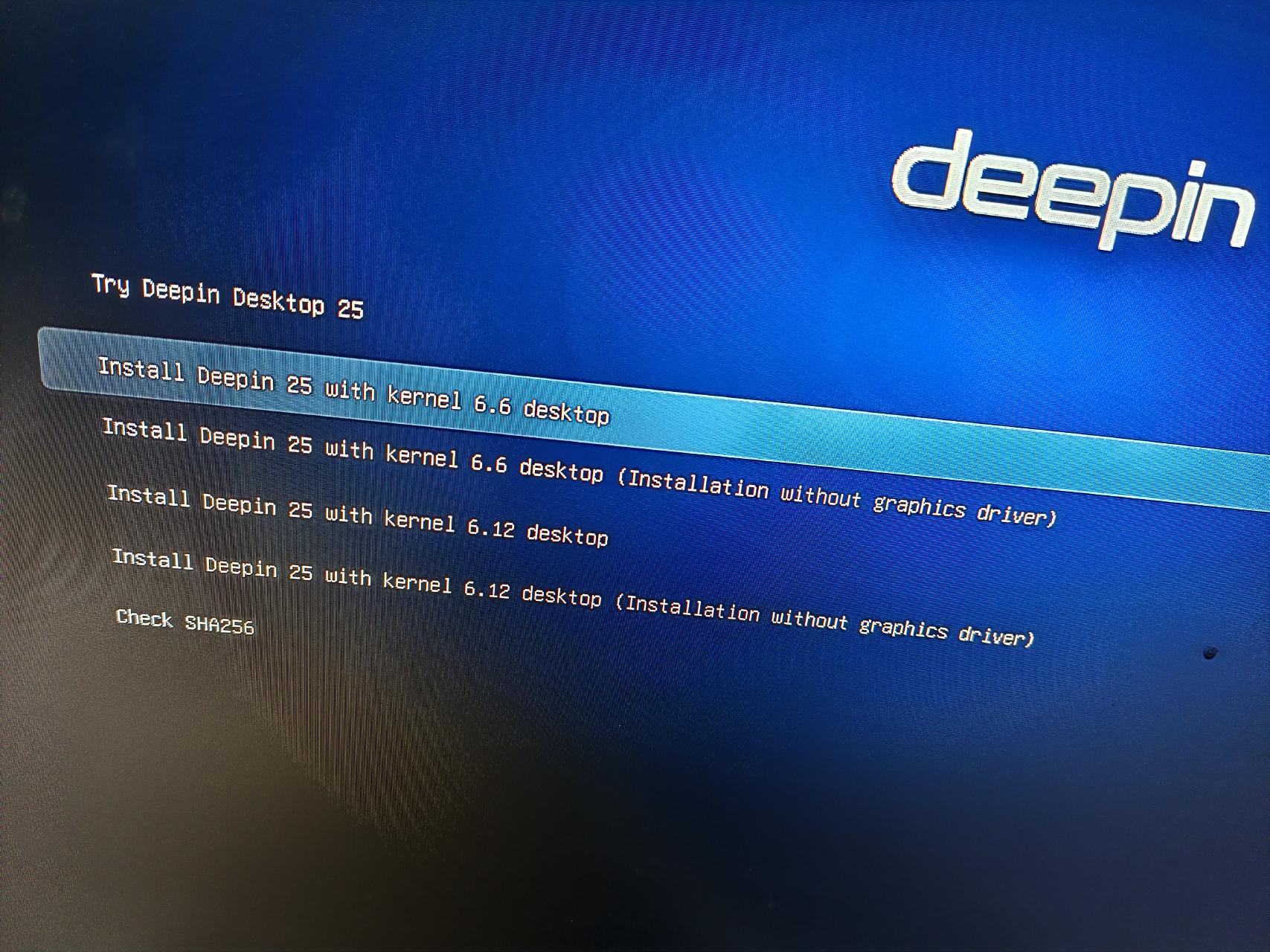
deepin 在安装器界面进入正式安装前,有个勾选项,取消勾选安装显卡驱动即可正常安装,50系显卡目前需要进入系统后手动安装显卡驱动,后续25.1的新版镜像预计会集成最新英伟达闭源显卡驱动。
论坛安装N卡的教程还挺多的可以参考(任选其一即可):
https://bbs.deepin.org/zh/post/291962(忽略cuda部分)
https://bbs.deepin.org/zh/post/292118
https://bbs.deepin.org.cn/post/284877
另外目前社区研发已经在测试最新的英伟达580显卡驱动,如果感兴趣,也可以添加仓库后用命令安装:
https://github.com/linuxdeepin/developer-center/issues/12347
echo 'deb [trusted=yes] https://ci.deepin.com/repo/obs/deepin:/CI:/TestingIntegration:/test-integration-pr-3132:/nvidia-graphics-driver/testing/ ./' |
sudo tee -a /etc/apt/sources.list > /dev/null
sudo apt update && sudo apt install nvidia-drivers
我这个失败都到不了选择语言的界面,开始安装deepin的logo跳出来之后,立马又出来那个跑码界面,然后就一直卡着
deepin 用6.6内核 不要勾选安装独显驱动 一般都能成功
这个是在那块选择呢,开始安装界面那个 无显卡驱动安装吗? 那个也不行,里面的4个都试了,都不行
deepin 25.0.10镜像,同样的5060,同样的问题。
四个选项的安装都试过了,根本进不去桌面。一坨代码日志,左边都是OK,但是就是毫无反应。
使用Ubuntu则能直接成功。
Popular Events
More


 WhatsApp doesn't work in the official Deepin browser!
tty2 里面查看服务,有报错