

 中文
中文 
𰻞𰻝面 deepin
2025-10-24 20:28 deepin 强烈支持,虽然我已经安装了无磐石的系统
Reply Like 0 View the author
 deepin
 强烈支持,虽然我已经安装了无磐石的系统
 deepin
 感谢分享, 这简直是懒人的福音啊!

 deepin
 已帮你们踩坑。
升级成功,过程也很顺利。
确实升级后存在一些问题,目前发现:
显示缩放比无法调整
壁纸无法设置
主题无法设置
图标无法设置
字体字号无法设置
好像是所有和显示效果有关的,都挂了。
控制中心菜单不全,没有升级入口

 deepin
 已帮你们踩坑。
升级成功,过程也很顺利。
确实升级后存在一些问题,目前发现:
显示缩放比无法调整
壁纸无法设置
主题无法设置
图标无法设置
字体字号无法设置
好像是所有和显示效果有关的,都挂了。
控制中心菜单不全,没有升级入口
感谢提出的问题,发现是在处理冲突时删除了桌面相关组件,批处理已经修正,会自动重新安装。
sudo apt install dde-clipboard deepin-desktop-environment-core deepin-desktop-environment-extras -y
deepin 感谢提出的问题,发现是在处理冲突时删除了桌面相关组件,批处理已经修正,会自动重新安装。
sudo apt install dde-clipboard deepin-desktop-environment-core deepin-desktop-environment-extras -y
搞定
感谢分享。

 deepin
 强烈支持,虽然我已经安装了无磐石的系统
怎样安装无磐石系统?
deepin 
deepin 怎样安装无磐石系统?
参考这个贴子:
 deepin
 升级并更新完毕,流畅安静,均好!感谢!免去了我重装系统颠倒数据的忧虑!
 deepin
 升级完毕,无异常无磐石,非常好
deepin 升级完成, 一切正常, 软件和数据都在!

 deepin
 能否再来一手 20.9 升级到 25
deepin 能否再来一手 20.9 升级到 25
这个还是全新安装吧
 deepin
 已经升级成功,感谢大佬
deepin 已经升级成功,感谢大佬
没有磐石,备份不能用。最好全新安装。更新到25.0.8有可能出现密码环的问题点击取消然后删除密码环重新启动电脑:rm -r ./.local/share/deepin-keyrings-wb
deepin 没有磐石,备份不能用。最好全新安装。更新到25.0.8有可能出现密码环的问题点击取消然后删除密码环重新启动电脑:rm -r ./.local/share/deepin-keyrings-wb
好的 多谢提醒
备份我用timeshift,问题不大
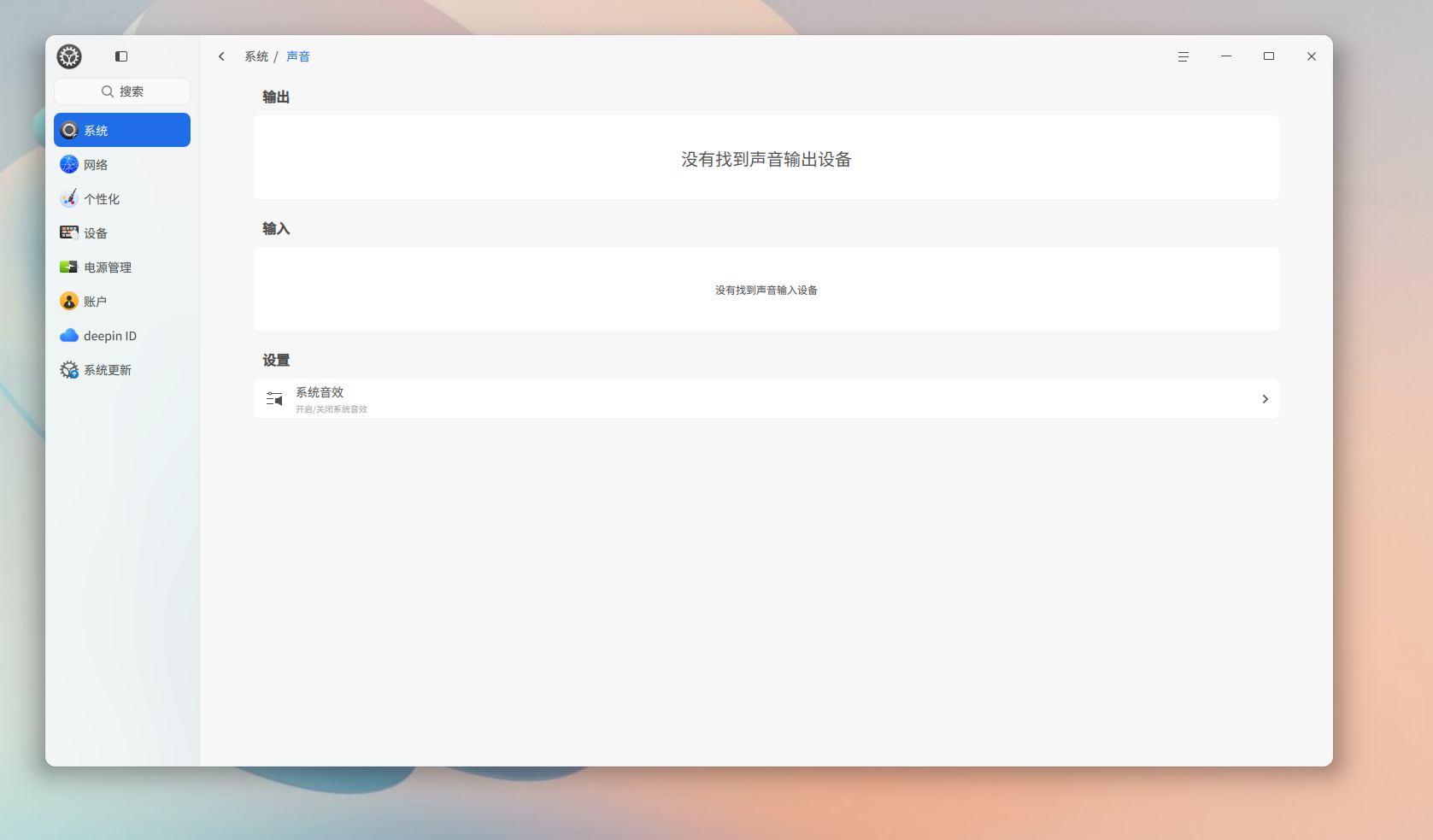
现在发现声音设置项是空的,正在努力排查原因
 deepin
 准备升级,没更新就是没问题
升级完成了,升级了3个系统;
只一个笔记本之前全盘安装,根分区只有15G,安装过程中没空间了,手动删除了一些文件,重新执行的脚本,提示升级成功
deepin 好的 多谢提醒
备份我用timeshift,问题不大
现在发现声音设置项是空的,正在努力排查原因
sudo apt reinstall alsa-utils libasound2 pulseaudio pipewire alsa-base pavucontrol
deepin sudo apt reinstall alsa-utils libasound2 pulseaudio pipewire alsa-base pavucontrol
Popular Ranking
ChangePopular Events
More


 erro no meu teclado
使用说明:
将脚本 deepin23upgrade25.sh.txt下载后重命名 deepin23upgrade25.sh 去除.txt和deepin23前面的数字_。
在脚本所在文件夹右击 选择 在终端打开
授予执行权限:
chmod +x deepin23upgrade25.sh
运行脚本:
sudo ./deepin23upgrade25.sh
重要注意事项:
⚠️ 脚本会自动覆盖以下文件:
/etc/apt/sources.list
/etc/apt/sources.list.d/driver.list
/etc/apt/sources.list.d/appstore.list
系统升级过程可能导致:
软件兼容性问题
系统配置变更
硬件驱动失效
系统无法启动(小概率)
建议在操作前:
创建系统快照(如Timeshift)
准备Live USB启动盘
确保电源稳定(笔记本接电源)
任何系统升级操作均有风险,请谨慎操作。