

 中文
中文 
doleph deepin
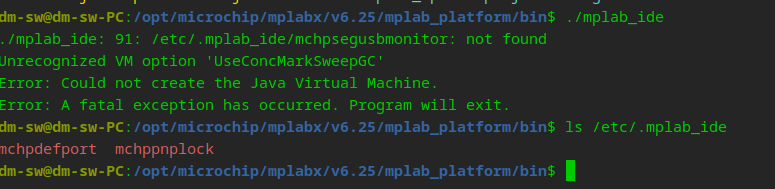
2025-10-23 08:26 deepin 该软件只能以root身份安装,最新版是v6.25,出现同样的问题。弹出错误时,我都是点的Ignore忽略,安装完后进入安装目录中的bin,手动执行报错如下:
Reply Like 0 View the author
 deepin
 该软件只能以root身份安装,最新版是v6.25,出现同样的问题。弹出错误时,我都是点的Ignore忽略,安装完后进入安装目录中的bin,手动执行报错如下:

关闭磐石重启再试试
deepin 关闭磐石重启再试试
请问关闭命令是什么呀?我试过以下命令者报错。
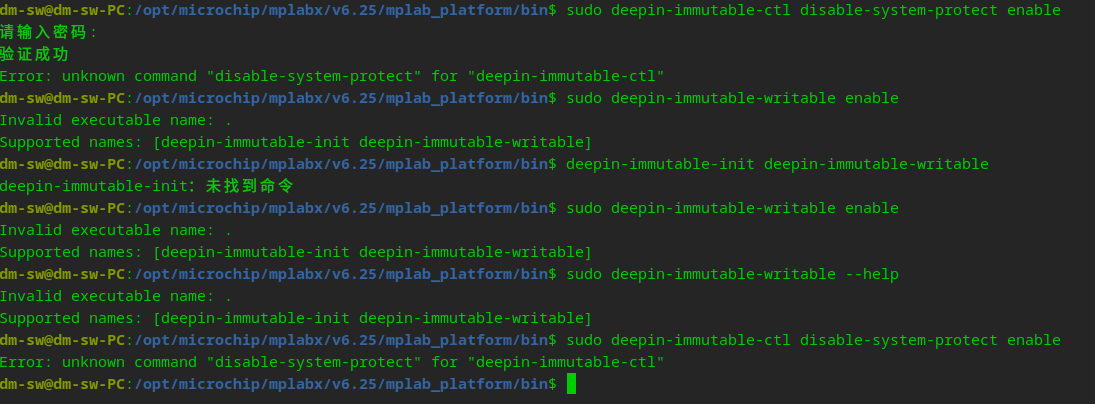
我试过sudo deepin-immutable-ctl disable-system-protect enable
请问关闭命令是什么呀?我试过以下命令者报错。
我试过sudo deepin-immutable-ctl disable-system-protect enable
https://bbs.deepin.org.cn/zh/post/286633
sudo deepin-immutable-writable enable
deepin https://bbs.deepin.org.cn/zh/post/286633
sudo deepin-immutable-writable enable
谢谢了,好像还是不行:

deepin 谢谢了,好像还是不行:
可以了,原来目录已经不存在了,切换到根目录就可以了。谢谢!

谢谢了,好像还是不行:
新打开个终端在根目录执行呢,不要在其他文件夹里
deepin 新打开个终端在根目录执行呢,不要在其他文件夹里
非常感谢,已经成功安装。
Popular Events
More


 WhatsApp doesn't work in the official Deepin browser!
在安装Microchip的MPLABX时,遇到一些问题,请大神看看有没有办法解决: