

 中文
中文 
兆兆嘟嘟嘟
2025-10-13 08:53 Moderator
你用的是deb还是玲珑?如果是玲珑的话,直接命令行肯定不灵。
Reply Like 0 View the author
你用的是deb还是玲珑?如果是玲珑的话,直接命令行肯定不灵。

 deepin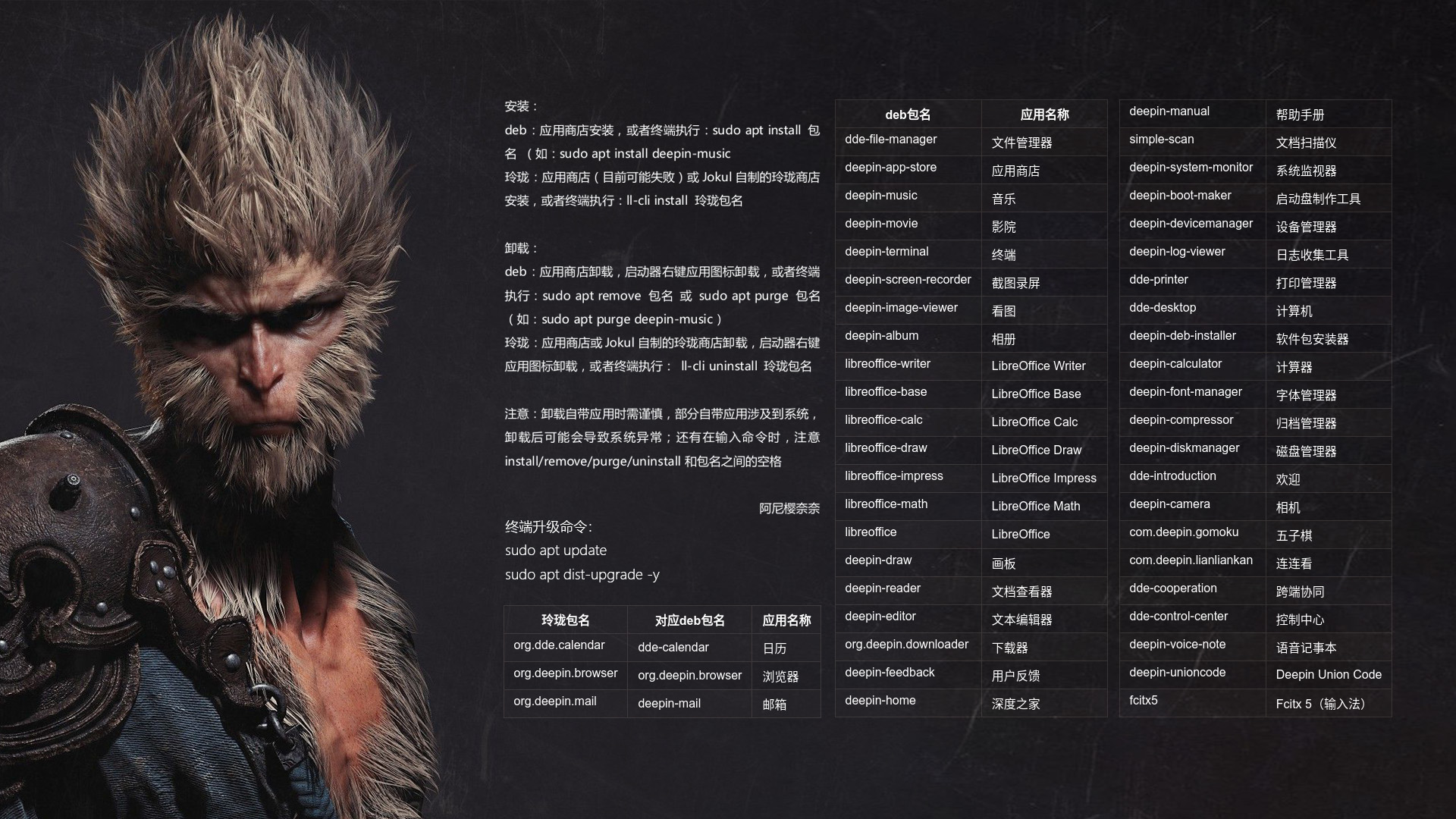
 deepin
 默认安装的文本编辑器,玲珑的,命令行如何启动?我实在不习惯用vim这些?
deepin 你用的是deb还是玲珑?如果是玲珑的话,直接命令行肯定不灵。
麻烦指教一下,自带的玲珑文本编辑器,命令行如何启动?
 deepin
# 玲珑包名,deepin25默认安装
org.deepin.editor
#启动
ll-cli run org.deepin.editor


# DED包名,需要手动安装
deepin-editor
 deepin
 终端下的文本编辑器,nano,使用举例:
编辑apt安装源 sudo nano /etc/apt/sources.list
 deepin
 可以用 dde-am deepin-editor 启动,同时这个命令也有tab不全,还能用 dde-am --list 获取程序列表
 deepin
 装个vs code 吧,启动命令是code [文件名]。
本来想推荐kate的,但是qt写的软件在deepin上可能显示不是很好,所以还是算了吧。

AM启动:dde-am deepin-editor
玲珑命令行启动:ll-cli run org.deepin.editor
我个人习惯:右键文件,使用文本编辑器打开,如果文件带锁无法编辑,那就管理员权限打开文件夹,然后再右键使用文本编辑器打开。
deepin 25 的文本编辑器相当不好用。 打开大文本直接卡死。
deepin 如何卸载默认的文本编辑器啊?
Popular Events
More


 WhatsApp doesn't work in the official Deepin browser!
我就想用命令行启动文本编辑器编辑个文本文件,到底程序名是什么?deepin-editor不灵了?