

 中文
中文 
😀😃😄😁 deepin
2025-05-17 18:45 deepin 只有从文件管理器双击打开会这样。直接在WPS导出PDF后点打开文件或者用命令行打开PDF或HTML就是好的。
Reply Like 0 View the author
deepin 只有从文件管理器双击打开会这样。直接在WPS导出PDF后点打开文件或者用命令行打开PDF或HTML就是好的。

问题描述的有点模糊哦,是说浏览器下载文件后,直接点击无法打开文件,还是无法打开文件所在目录?
我这边刚才验证是可以打开下载文件所在目录和文件的。

 deepin
 描述过于含糊,另外贴浏览器版本是有什么作用么?

描述过于含糊,另外贴浏览器版本是有什么作用么?
文件是通过浏览器打开的,例如pdf文件
问题描述的有点模糊哦,是说浏览器下载文件后,直接点击无法打开文件,还是无法打开文件所在目录?
我这边刚才验证是可以打开下载文件所在目录和文件的。
使用浏览器打开pdf等格式的文件,Chromium是支持查看pdf的
deepin 使用浏览器打开pdf等格式的文件,Chromium是支持查看pdf的
右键以浏览器打开 pdf 文件,无论使用 chrome 还是自带的浏览器我都没能复现这个问题。
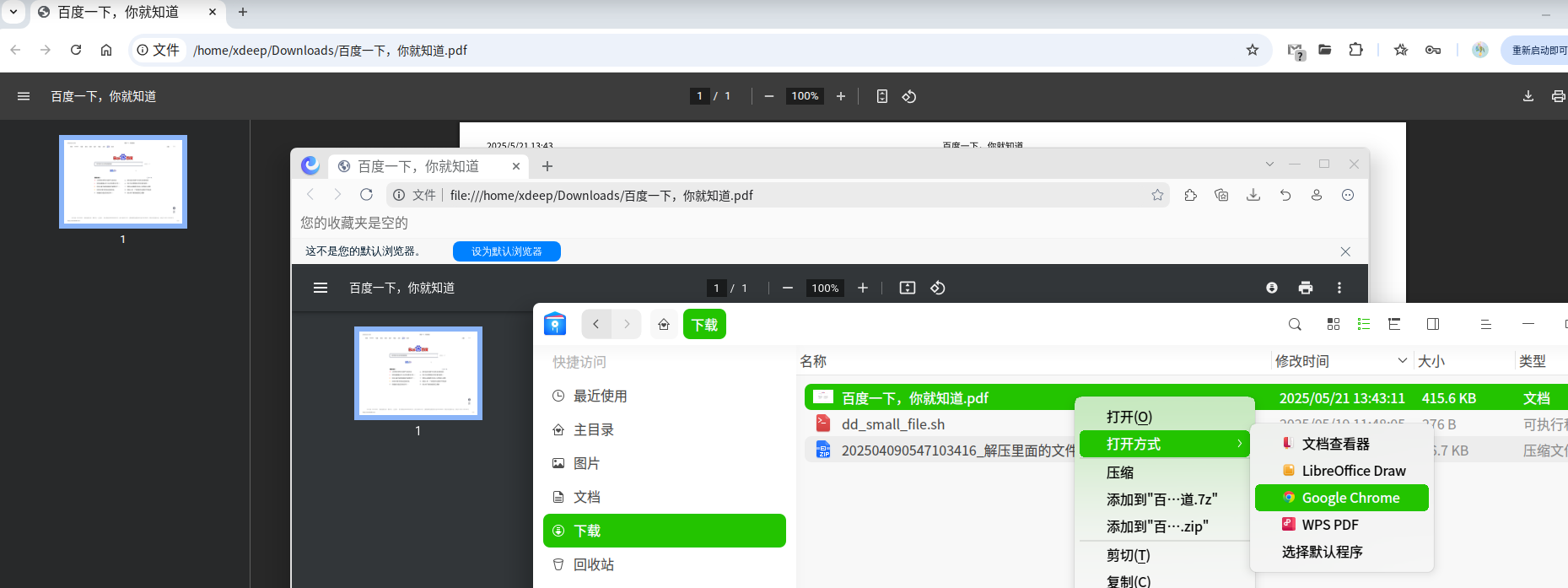
deepin 右键以浏览器打开 pdf 文件,无论使用 chrome 还是自带的浏览器我都没能复现这个问题。
设置为默认打开方式后,双击 pdf 文件在浏览器中打开了,查看地址也是正常的。
deepin 只有从文件管理器双击打开会这样。直接在WPS导出PDF后点打开文件或者用命令行打开PDF或HTML就是好的。
可以发下文件管理器的版本:
dpkg -l | grep dde-file-manager
deepin 描述过于含糊,另外贴浏览器版本是有什么作用么?
因为是在应用商店更新浏览器之后才出的问题
deepin deepin deepin deepin deepin 右键以浏览器打开 pdf 文件,无论使用 chrome 还是自带的浏览器我都没能复现这个问题。
有用户复现了
https://bbs.deepin.org.cn/post/287469
deepin 有用户复现了
https://bbs.deepin.org.cn/post/287469
看楼上感觉是浏览器问题?
Popular Ranking
ChangePopular Events
More


 My 2 apps rewritten, submitted to store
本地文件双击打开后路径错误,应该是file:///home/……变成了file://home/……(file:后少了个/)(需要手动在地址栏调整)
浏览器版本 6.6.5.3(正式版本) (64 位)| 127.0.6533.100