

 中文
中文 
昨夜的星辰 deepin
2024-12-15 09:05 deepin 1、libyaml-cpp.so.0.7()(64bit) 库缺失,通过openSUSE官方libyaml-cpp的版本是0.8
这个可以搞个软链接链接到0.8版本上去试试
Reply Like 0 View the author
 deepin
 1、libyaml-cpp.so.0.7()(64bit) 库缺失,通过openSUSE官方libyaml-cpp的版本是0.8
这个可以搞个软链接链接到0.8版本上去试试
 deepin
 1、libyaml-cpp.so.0.7()(64bit) 库缺失,通过openSUSE官方libyaml-cpp的版本是0.8
这个可以搞个软链接链接到0.8版本上去试试
chanson@192:~> ll /usr/lib64/libyaml-cpp.so.0.7
lrwxrwxrwx 1 root root 29 12月 15 09:49 /usr/lib64/libyaml-cpp.so.0.7 -> /usr/lib64/libyaml-cpp.so.0.8
先卸载玲珑,再尝试软连接后重新安装玲珑,依旧报依赖错误
2 个问题:
问题:1: 没有软件源能提供要安装的 linglong-bin-1.7.0-1.x86_64 所需的 "libyaml-cpp.so.0.7()(64bit)"
问题:2: 没有软件源能提供要安装的 linglong-builder-1.7.0-1.x86_64 所需的 "libyaml-cpp.so.0.7()(64bit)"
忽略依赖关系安装后,出现新的错误提示
chanson@192:~> ll-cli
(3518) /builddir/build/BUILD/linglong-1.7.0/apps/ll-cli/src/main.cpp:532 underlying repository doesn't exist: "/var/lib/linglong"
你放的位置要能不对,这是在deepin上的位置,附件是这个版本的文件,可能还是要做个链接
deepin 你放的位置要能不对,这是在deepin上的位置,附件是这个版本的文件,可能还是要做个链接
opensuse找不到/usr/lib/x86_64-linux-gnu
这个路径,它安装的libyaml-cpp是默认安装到了/usr/lib64
尝试吧0.7版本放到/usr/lib64,再做链接,还是提示找不到libyaml-cpp.so.0.7

您用的是deepin仓库的玲珑还是自己编译出来的
 deepin
 您用的是deepin仓库的玲珑还是自己编译出来的
当然lz可以尝试解压或安装 openeuler的 libyaml-cpp.so.0.7 rpm包进行依赖补全
https://mirrors.ustc.edu.cn/openeuler/openEuler-24.03-LTS/everything/x86_64/Packages/yaml-cpp-0.7.0-2.oe2403.x86_64.rpm

 deepin
 期待玲珑早日支持OpenSUSE
deepin deepin 当然lz可以尝试解压或安装 openeuler的 libyaml-cpp.so.0.7 rpm包进行依赖补全
https://mirrors.ustc.edu.cn/openeuler/openEuler-24.03-LTS/everything/x86_64/Packages/yaml-cpp-0.7.0-2.oe2403.x86_64.rpm
现在安装不报错了,但是仍然无法运行,提示如下
chanson@192:~> ll-cli
(13281) /builddir/build/BUILD/linglong-1.7.0/apps/ll-cli/src/main.cpp:532 underlying repository doesn't exist: "/var/lib/linglong"
现在安装不报错了,但是仍然无法运行,提示如下
chanson@192:~> ll-cli
(13281) /builddir/build/BUILD/linglong-1.7.0/apps/ll-cli/src/main.cpp:532 underlying repository doesn't exist: "/var/lib/linglong"
建议去deepin-community把源码拉下来编译一下,看看报错什么,发出来我及时反馈一下,玲珑的源码包有rpm编译的spec文件
项目地址:https://github.com/deepin-community/linyaps
当前的拉取命令: git clone -b release/1.7 https://github.com/deepin-community/linyaps.git
deepin 建议去deepin-community把源码拉下来编译一下,看看报错什么,发出来我及时反馈一下,玲珑的源码包有rpm编译的spec文件
项目地址:https://github.com/deepin-community/linyaps
当前的拉取命令: git clone -b release/1.7 https://github.com/deepin-community/linyaps.git
这种高端操作还不会
deepin 
 deepin
 用Fedora42的就可以,运行没有任何问题。
我自己去仓库下载的Fedora42的rpm包,在我的TumbleWeed-0820上运行良好。
glqyu@localhost:~> sudo zypper in /home/glqyu/下载/linglong-builder-1.9.91-41.1.x86_64.rpm /home/glqyu/下载/linglong-box-2.0.31.20250721-3.1.x86_64.rpm /home/glqyu/下载/linglong-bin-1.9.91-41.1.x86_64.rpm /home/glqyu/下载/linglong-1.9.91-41.1.x86_64.rpm
正在刷新服务 'NVIDIA'。
正在刷新服务 'openSUSE'。
正在加载软件源数据...
正在读取已安装的软件包...
正在解决软件包依赖关系...

将安装以下 4 个新软件包:
  linglong linglong-bin linglong-box linglong-builder

4 个软件包将新装.

软件包下载大小:     2.9 MiB

软件包安装大小更改:
              |       9.6 MiB  将安装的软件包需要
     9.6 MiB  |  -      0 B    由将去除的软件包释放

后端:  classic_rpmtrans
继续吗? [y/n/v/...? 显示全部选项] (y):
正在检索: linglong-box-2.0.31.20250721-3.1.x86_64 (纯 RPM 文件缓存)                                                           (1/4), 329.9 KiB
linglong-box-2.0.31.20250721-3.1.x86_64.rpm:
    软件包包头未签名!

linglong-box-2.0.31.20250721-3.1.x86_64 (纯 RPM 文件缓存): 签名校验失败 [6-未签署文件]
中止、重试、还是忽略呢? [a/r/i] (a): i
正在检索: linglong-bin-1.9.91-41.1.x86_64 (纯 RPM 文件缓存)                                                                   (2/4),   1.8 MiB
linglong-bin-1.9.91-41.1.x86_64.rpm:
    软件包包头未签名!

linglong-bin-1.9.91-41.1.x86_64 (纯 RPM 文件缓存): 签名校验失败 [6-未签署文件]
中止、重试、还是忽略呢? [a/r/i] (a): i
正在检索: linglong-builder-1.9.91-41.1.x86_64 (纯 RPM 文件缓存)                                                               (3/4), 815.6 KiB
linglong-builder-1.9.91-41.1.x86_64.rpm:
    软件包包头未签名!

linglong-builder-1.9.91-41.1.x86_64 (纯 RPM 文件缓存): 签名校验失败 [6-未签署文件]
中止、重试、还是忽略呢? [a/r/i] (a): i
正在检索: linglong-1.9.91-41.1.x86_64 (纯 RPM 文件缓存)                                                                       (4/4),  13.0 KiB
linglong-1.9.91-41.1.x86_64.rpm:
    软件包包头未签名!

linglong-1.9.91-41.1.x86_64 (纯 RPM 文件缓存): 签名校验失败 [6-未签署文件]
中止、重试、还是忽略呢? [a/r/i] (a): i

正在检查文件冲突: ..........................................................................................................................[完毕]
(1/4) 正在安装:linglong-box-2.0.31.20250721-3.1.x86_64 .....................................................................................[完毕]
(2/4) 正在安装:linglong-bin-1.9.91-41.1.x86_64 .............................................................................................[完毕]
(3/4) 正在安装:linglong-builder-1.9.91-41.1.x86_64 .........................................................................................[完毕]
(4/4) 正在安装:linglong-1.9.91-41.1.x86_64 .................................................................................................[完毕]
运行事务后脚本 ..............................................................................................................................[完毕]
glqyu@localhost:~>
这就算安装好了,下面安了个QQ音乐试验,正常使用:
glqyu@localhost:~> ll-cli install com.qq.music
Install main:com.qq.music/1.1.5.3/x86_64 (from repo: stable)  success:100%
glqyu@localhost:~> ll-cli run com.qq.music

(qqmusic:19): Gtk-WARNING **: 01:46:11.085: Theme parsing error: gtk.css:3377:25: 'font-feature-settings' is not a valid property name
Gtk-Message: 01:46:11.098: Failed to load module "colorreload-gtk-module"
Gtk-Message: 01:46:11.098: Failed to load module "window-decorations-gtk-module"
(electron) The default value of app.allowRendererProcessReuse is deprecated, it is currently "false".  It will change to be "true" in Electron 9.  For more information please check https://github.com/electron/electron/issues/18397
(node:19) UnhandledPromiseRejectionWarning: undefined
(node:19) UnhandledPromiseRejectionWarning: undefined
(node:19) UnhandledPromiseRejectionWarning: Unhandled promise rejection. This error originated either by throwing inside of an async function without a catch block, or by rejecting a promise which was not handled with .catch(). (rejection id: 1)
(node:19) UnhandledPromiseRejectionWarning: Unhandled promise rejection. This error originated either by throwing inside of an async function without a catch block, or by rejecting a promise which was not handled with .catch(). (rejection id: 1)
(node:19) [DEP0018] DeprecationWarning: Unhandled promise rejections are deprecated. In the future, promise rejections that are not handled will terminate the Node.js process with a non-zero exit code.
(node:19) [DEP0018] DeprecationWarning: Unhandled promise rejections are deprecated. In the future, promise rejections that are not handled will terminate the Node.js process with a non-zero exit code.
login refresh fail
(node:19) PromiseRejectionHandledWarning: Promise rejection was handled asynchronously (rejection id: 1)
(node:19) PromiseRejectionHandledWarning: Promise rejection was handled asynchronously (rejection id: 1)
(electron) 'setUserAgent function' is deprecated and will be removed. Please use 'userAgent property' instead.
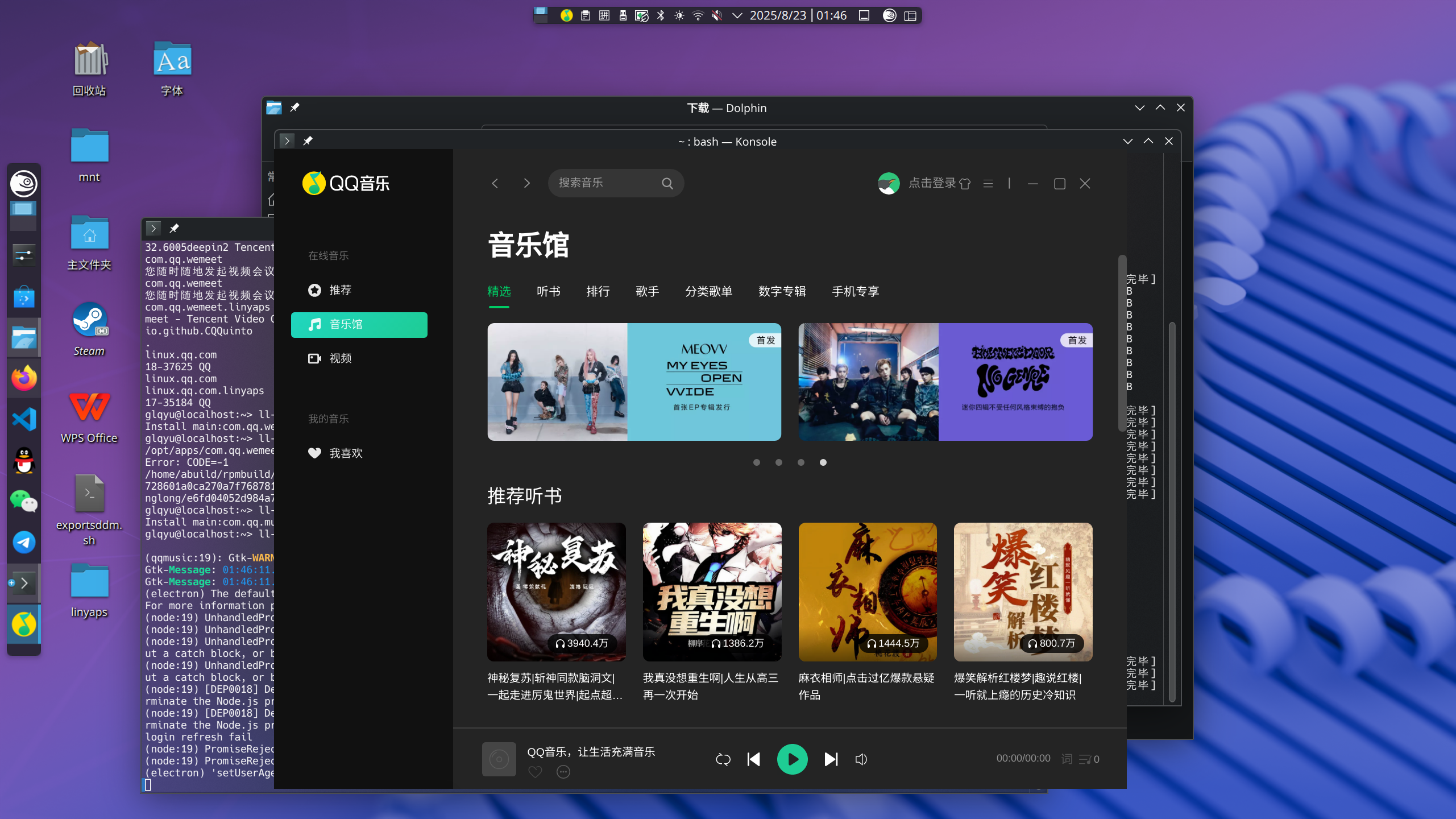
deepin 用Fedora42的就可以,运行没有任何问题。
我自己去仓库下载的Fedora42的rpm包,在我的TumbleWeed-0820上运行良好。
glqyu@localhost:~> sudo zypper in /home/glqyu/下载/linglong-builder-1.9.91-41.1.x86_64.rpm /home/glqyu/下载/linglong-box-2.0.31.20250721-3.1.x86_64.rpm /home/glqyu/下载/linglong-bin-1.9.91-41.1.x86_64.rpm /home/glqyu/下载/linglong-1.9.91-41.1.x86_64.rpm
正在刷新服务 'NVIDIA'。
正在刷新服务 'openSUSE'。
正在加载软件源数据...
正在读取已安装的软件包...
正在解决软件包依赖关系...

将安装以下 4 个新软件包:
  linglong linglong-bin linglong-box linglong-builder

4 个软件包将新装.

软件包下载大小:     2.9 MiB

软件包安装大小更改:
              |       9.6 MiB  将安装的软件包需要
     9.6 MiB  |  -      0 B    由将去除的软件包释放

后端:  classic_rpmtrans
继续吗? [y/n/v/...? 显示全部选项] (y):
正在检索: linglong-box-2.0.31.20250721-3.1.x86_64 (纯 RPM 文件缓存)                                                           (1/4), 329.9 KiB
linglong-box-2.0.31.20250721-3.1.x86_64.rpm:
    软件包包头未签名!

linglong-box-2.0.31.20250721-3.1.x86_64 (纯 RPM 文件缓存): 签名校验失败 [6-未签署文件]
中止、重试、还是忽略呢? [a/r/i] (a): i
正在检索: linglong-bin-1.9.91-41.1.x86_64 (纯 RPM 文件缓存)                                                                   (2/4),   1.8 MiB
linglong-bin-1.9.91-41.1.x86_64.rpm:
    软件包包头未签名!

linglong-bin-1.9.91-41.1.x86_64 (纯 RPM 文件缓存): 签名校验失败 [6-未签署文件]
中止、重试、还是忽略呢? [a/r/i] (a): i
正在检索: linglong-builder-1.9.91-41.1.x86_64 (纯 RPM 文件缓存)                                                               (3/4), 815.6 KiB
linglong-builder-1.9.91-41.1.x86_64.rpm:
    软件包包头未签名!

linglong-builder-1.9.91-41.1.x86_64 (纯 RPM 文件缓存): 签名校验失败 [6-未签署文件]
中止、重试、还是忽略呢? [a/r/i] (a): i
正在检索: linglong-1.9.91-41.1.x86_64 (纯 RPM 文件缓存)                                                                       (4/4),  13.0 KiB
linglong-1.9.91-41.1.x86_64.rpm:
    软件包包头未签名!

linglong-1.9.91-41.1.x86_64 (纯 RPM 文件缓存): 签名校验失败 [6-未签署文件]
中止、重试、还是忽略呢? [a/r/i] (a): i

正在检查文件冲突: ..........................................................................................................................[完毕]
(1/4) 正在安装:linglong-box-2.0.31.20250721-3.1.x86_64 .....................................................................................[完毕]
(2/4) 正在安装:linglong-bin-1.9.91-41.1.x86_64 .............................................................................................[完毕]
(3/4) 正在安装:linglong-builder-1.9.91-41.1.x86_64 .........................................................................................[完毕]
(4/4) 正在安装:linglong-1.9.91-41.1.x86_64 .................................................................................................[完毕]
运行事务后脚本 ..............................................................................................................................[完毕]
glqyu@localhost:~>
这就算安装好了,下面安了个QQ音乐试验,正常使用:
glqyu@localhost:~> ll-cli install com.qq.music
Install main:com.qq.music/1.1.5.3/x86_64 (from repo: stable)  success:100%
glqyu@localhost:~> ll-cli run com.qq.music

(qqmusic:19): Gtk-WARNING **: 01:46:11.085: Theme parsing error: gtk.css:3377:25: 'font-feature-settings' is not a valid property name
Gtk-Message: 01:46:11.098: Failed to load module "colorreload-gtk-module"
Gtk-Message: 01:46:11.098: Failed to load module "window-decorations-gtk-module"
(electron) The default value of app.allowRendererProcessReuse is deprecated, it is currently "false".  It will change to be "true" in Electron 9.  For more information please check https://github.com/electron/electron/issues/18397
(node:19) UnhandledPromiseRejectionWarning: undefined
(node:19) UnhandledPromiseRejectionWarning: undefined
(node:19) UnhandledPromiseRejectionWarning: Unhandled promise rejection. This error originated either by throwing inside of an async function without a catch block, or by rejecting a promise which was not handled with .catch(). (rejection id: 1)
(node:19) UnhandledPromiseRejectionWarning: Unhandled promise rejection. This error originated either by throwing inside of an async function without a catch block, or by rejecting a promise which was not handled with .catch(). (rejection id: 1)
(node:19) [DEP0018] DeprecationWarning: Unhandled promise rejections are deprecated. In the future, promise rejections that are not handled will terminate the Node.js process with a non-zero exit code.
(node:19) [DEP0018] DeprecationWarning: Unhandled promise rejections are deprecated. In the future, promise rejections that are not handled will terminate the Node.js process with a non-zero exit code.
login refresh fail
(node:19) PromiseRejectionHandledWarning: Promise rejection was handled asynchronously (rejection id: 1)
(node:19) PromiseRejectionHandledWarning: Promise rejection was handled asynchronously (rejection id: 1)
(electron) 'setUserAgent function' is deprecated and will be removed. Please use 'userAgent property' instead.
但是现在sig版本好像没法用了,依赖无法满足
Popular Ranking
ChangePopular Events
More


 GXDE 25.5 beta1 has arrived — now with full Wayland support!
安装教程参考了open欧拉
1、将玲珑库写入到/etc/zypp/repos.d/linglong.repo
2、刷新缓存
3、通过zypper安装
存在的问题:
1、libyaml-cpp.so.0.7()(64bit) 库缺失,通过openSUSE官方libyaml-cpp的版本是0.8
忽略一些依赖关系来断开 linglong-bin-1.7.0-1.x86_64,即便后期安装成功后也无法运行,提示如下:
2、摘要校验失败,使用校验码错误的软件包可能造成系统毁损,极端情况下甚至会导致系统被入侵。
通过输入校验码前4个字符能继续安装但是很麻烦!!!
贴出所有安装过程中的提示,请负责玲珑的专家帮忙解决一下,感激不尽!