

 中文

铁山老道孔乙己 deepin
2023-12-06 16:36 deepin 看标题好牛X的样子
Reply Like 0 View the author
 deepin
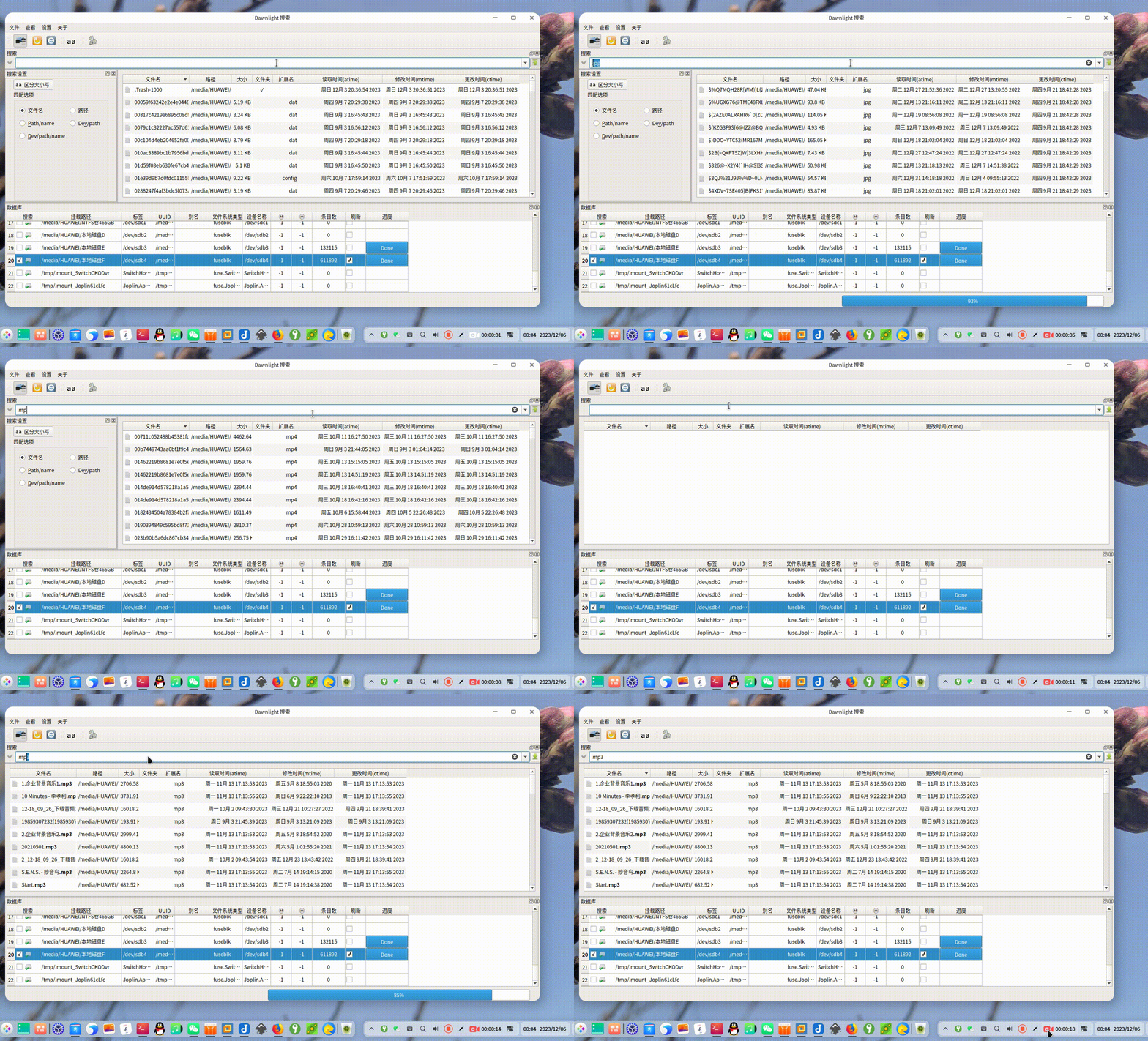
 deepin
看标题好牛X的样子

 deepin
下载试了一下,勾选了home目录,搜索 .deb,但是没有显示任何结果,搜索其他的也是一样,而且无法在搜索框输入中文
deepin 下载试了一下,勾选了home目录,搜索 .deb,但是没有显示任何结果,搜索其他的也是一样,而且无法在搜索框输入中文
勾选刷新 建立索引数据库
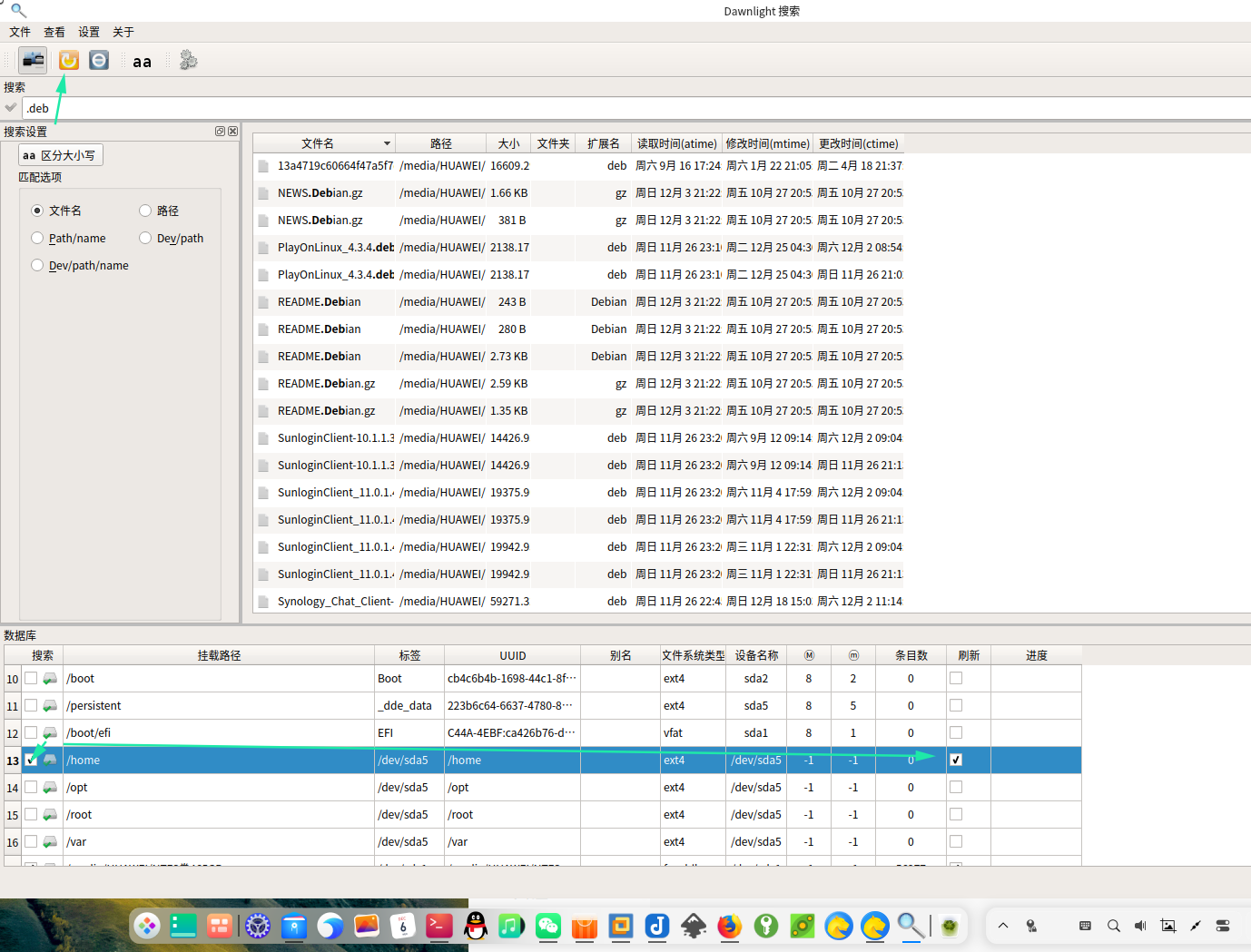
 deepin
有网盘地址吗 给的地址打不开 软件商店搜不到
deepin 有网盘地址吗 给的地址打不开 软件商店搜不到
是不能在23 用吗安装不了
deepin 下载试了一下,勾选了home目录,搜索 .deb,但是没有显示任何结果,搜索其他的也是一样,而且无法在搜索框输入中文
没有可用的软件包 kio-dev,但是它被其它的软件包引用了。怎样解决?
deepin 没有可用的软件包 kio-dev,但是它被其它的软件包引用了。怎样解决?

 deepin
还是挺好用的。我把FSearch删了换这个。找不到可以在底下数据库栏右键更新数据库。
deepin 还是挺好用的。我把FSearch删了换这个。找不到可以在底下数据库栏右键更新数据库。
是的 唯一的缺点,就是不能实时跟踪更新
手动更新也很快
deepin 没有可用的软件包 kio-dev,但是它被其它的软件包引用了。怎样解决?
 也可以按一下教程自己进行编译,即可修复无法中文问题
DawnlightSearch 是一个 Linux 平台的文件即时搜索工具(类似 Windows 的 Everything),使用 C++ + Qt5 + SQLite3 开发,支持 NTFS 索引。
https://github.com/chg-hou/DawnlightSearch0.1.2.6(见 src/VERSION)现象:在 Deepin v25.2.2(x86_64 平台)系统中无法输入中文。
原因分析:
QT_IM_MODULE=fcitx、XMODIFIERS=@im=fcitx、GTK_IM_MODULE=fcitx。/usr/lib/x86_64-linux-gnu/qt5/plugins/platforminputcontexts/ 加载libfcitx5platforminputcontextplugin.so(已实测验证)。/usr/plugins/platforminputcontexts/ 查找输入法插件;而默认打包流程没有把解决方案:打包 AppImage 时,将系统 fcitx5 的 Qt5 平台输入插件
libfcitx5platforminputcontextplugin.so 一起打进 AppDir 的
usr/plugins/platforminputcontexts/ 目录,并保证其依赖库(libFcitx5Qt5DBusAddons.so.1 等)
被收集到 usr/lib/。这样 AppImage 运行时 Qt 就能加载 fcitx5 插件,实现中文输入。
| 项目 | 版本 |
|---|---|
| 操作系统 | Deepin 25 (Debian 12 基础) / 其他 Debian 系发行版 |
| 编译器 | GCC/G++ 8+(实测 12.3.0) |
| Qt | Qt 5.15(qtbase5-dev 提供 qmake、头文件) |
| 构建工具 | make、lrelease(qttools5-dev-tools) |
| 数据库 | SQLite3(libsqlite3-dev、libqt5sql5-sqlite) |
| KDE 框架 | libkf5kio-dev(项目依赖 KIO 的“打开方式”菜单功能) |
| 输入法 | fcitx5 + fcitx5-frontend-qt5(Deepin 25 默认已装) |
# 更新软件源
sudo apt update

# 安装编译工具链与 Qt5 开发包
sudo apt install -y \
    build-essential \
    qt5-qmake \
    qttools5-dev-tools \
    qtbase5-dev \
    libqt5sql5-sqlite \
    libsqlite3-dev \
    libkf5kio-dev
注意:项目 README 里写的
kio-dev在 Deepin 25 源中已不存在,
对应包名为libkf5kio-dev(提供 KIOCore / KIOFileWidgets / KIOWidgets / KNTLM 模块)。
# 1) 获取源码
git clone https://github.com/chg-hou/DawnlightSearch.git
cd DawnlightSearch/src

# 2) 指定 Qt5(系统同时存在 qtchooser 时需要)
export QT_SELECT=qt5

# 3) 编译翻译文件(生成 .qm)
lrelease DawnlightSearch.pro

# 4) 生成 Makefile(release 模式)
qmake -qt=qt5 CONFIG+=release DawnlightSearch.pro

# 5) 编译
make -j$(nproc)

# 6) 产出可执行文件
#    生成于 src/dawnlightsearch
file dawnlightsearch
#    ELF 64-bit LSB executable, x86-64 ...

# 7) 可选:清理中间文件
make clean
编译产物:src/dawnlightsearch(约 1 MB)。
直接运行验证:
cd src
./dawnlightsearch
此时因为使用系统 Qt 插件目录,fcitx5 输入法插件会被自动加载(可用
QT_DEBUG_PLUGINS=1 ./dawnlightsearch 查看加载日志,应出现
QFcitx5PlatformInputContextPlugin)。
linuxdeployqt 已停止维护,在部分平台(如 Deepin 25 / Debian 12)上无法正常运行,因此采用
appimagetool + 手动收集依赖 的方式(完全可控、可复现)。
# 下载 appimagetool(GitHub 直连不稳时使用加速镜像)
wget -q "https://ghfast.top/https://github.com/AppImage/appimagetool/releases/download/continuous/appimagetool-x86_64.AppImage" -O /tmp/appimagetool.AppImage
chmod +x /tmp/appimagetool.AppImage
# 提取(避免 FUSE 限制)
cd /tmp && /tmp/appimagetool.AppImage --appimage-extract   # 产物在 /tmp/squashfs-root
cd DawnlightSearch
mkdir -p AppDir/usr/bin AppDir/usr/lib \
         AppDir/usr/share/applications \
         AppDir/usr/share/icons/hicolor/256x256/apps

# 复制二进制 / 桌面文件 / 图标
cp src/dawnlightsearch AppDir/usr/bin/
cp src/dawnlightsearch_appimage.desktop AppDir/usr/share/applications/dawnlightsearch.desktop
cp src/ui/icon/main.png AppDir/usr/share/icons/hicolor/256x256/apps/dawnlightsearch.png
cp AppDir/usr/share/icons/hicolor/256x256/apps/dawnlightsearch.png AppDir/dawnlightsearch.png
cp AppDir/usr/share/applications/dawnlightsearch.desktop AppDir/

# 收集依赖库(主程序 + Qt 插件),排除 libc 等基础库
ldd AppDir/usr/bin/dawnlightsearch | grep "=> /" | awk '{print $3}' \
  | grep -vE 'libc\.so|libm\.so|libdl\.so|libpthread|ld-linux|librt\.so|libresolv\.so' \
  | sort -u | while read lib; do cp -Lf "$lib" AppDir/usr/lib/ 2>/dev/null || true; done
P=/usr/lib/x86_64-linux-gnu/qt5/plugins
mkdir -p AppDir/usr/plugins/{platforms,platforminputcontexts,sqldrivers,imageformats,iconengines,styles,xcbglintegrations}

cp -f $P/platforms/libqxcb.so                        AppDir/usr/plugins/platforms/
cp -f $P/platforminputcontexts/libfcitx5platforminputcontextplugin.so AppDir/usr/plugins/platforminputcontexts/   # ★ 中文输入关键
cp -f $P/platforminputcontexts/libcomposeplatforminputcontextplugin.so AppDir/usr/plugins/platforminputcontexts/
cp -f $P/sqldrivers/libqsqlite.so                    AppDir/usr/plugins/sqldrivers/
cp -f $P/imageformats/libqpng.so $P/imageformats/libqsvg.so $P/imageformats/libqjpeg.so AppDir/usr/plugins/imageformats/
cp -f $P/iconengines/libqsvgicon.so                  AppDir/usr/plugins/iconengines/
cp -f $P/styles/libqgtk2style.so $P/styles/libqfusionstyle.so AppDir/usr/plugins/styles/

# fcitx5 插件自身的依赖库也要打进 AppDir
ldd $P/platforminputcontexts/libfcitx5platforminputcontextplugin.so \
  | grep "=> /" | awk '{print $3}' \
  | grep -vE 'libc\.so|libm\.so|libQt5|libstdc\+\+|libgcc_s' \
  | while read lib; do cp -Lf "$lib" AppDir/usr/lib/ 2>/dev/null || true; done
cat > AppDir/AppRun <<'EOF'
#!/bin/sh
HERE="$(dirname "$(readlink -f "$0")")"
export LD_LIBRARY_PATH="$HERE/usr/lib:$LD_LIBRARY_PATH"
export QT_PLUGIN_PATH="$HERE/usr/plugins"
export QT_QPA_PLATFORM_PLUGIN_PATH="$HERE/usr/plugins/platforms"
export QT_QPA_PLATFORM="xcb"
exec "$HERE/usr/bin/dawnlightsearch" "$@"
EOF
chmod +x AppDir/AppRun AppDir/usr/bin/dawnlightsearch
export ARCH=x86_64
/tmp/squashfs-root/AppRun -n AppDir DawnlightSearch-0.1.2.6-x86_64.AppImage
打包成功输出 Success,产物约 38 MB:
-rwxr-xr-x 1 user user 39815672 DawnlightSearch-0.1.2.6-x86_64.AppImage
DEB 包不捆绑 Qt/KF5 库,而是通过 Depends 声明依赖,安装时由系统包管理器自动处理。
cd DawnlightSearch
rm -rf deb_pkg && mkdir -p deb_pkg/usr/bin \
         deb_pkg/usr/share/applications \
         deb_pkg/usr/share/icons/hicolor/256x256/apps \
         deb_pkg/DEBIAN

# 复制二进制 / desktop / 图标
cp src/dawnlightsearch deb_pkg/usr/bin/
cp src/dawnlightsearch_appimage.desktop \
   deb_pkg/usr/share/applications/dawnlightsearch.desktop
cp src/ui/icon/main.png \
   deb_pkg/usr/share/icons/hicolor/256x256/apps/dawnlightsearch.png
desktop 文件需修正为 deb 安装路径:
Exec=dawnlightsearch、Icon=dawnlightsearch
(不能保留 AppImage 打包用或 make install 用的/opt/...绝对路径)。
cat > deb_pkg/DEBIAN/control <<'EOF'
Package: dawnlightsearch
Version: 0.1.2.6
Section: utils
Priority: optional
Architecture: amd64
Depends: kio, libc6 (>= 2.34), libgcc-s1 (>= 3.0),
 libkf5kiocore5 (>= 5.69.0), libkf5kiofilewidgets5 (>= 5.69.0),
 libkf5kiowidgets5 (>= 5.69.0), libqt5core5a (>= 5.15.1),
 libqt5gui5 (>= 5.12.2) | libqt5gui5-gles (>= 5.12.2),
 libqt5sql5 (>= 5.0.2), libqt5sql5-sqlite, libqt5widgets5 (>= 5.14.1),
 libsqlite3-0 (>= 3.7.3), libstdc++6 (>= 5.2), fcitx5-frontend-qt5
Maintainer: DawnlightSearch
Description: DawnlightSearch - instant file search engine for Linux
 A Linux version of Everything Search Engine.
 Support NTFS indexing. Show instant results as you type.
EOF
Depends可用dpkg-shlibdeps -O deb_pkg/usr/bin/dawnlightsearch自动生成后补充:
libqt5sql5-sqlite:SQLite 数据库驱动插件fcitx5-frontend-qt5:中文输入关键,提供 Qt5 的 fcitx5 输入法平台插件
cd deb_pkg
find usr -type f -exec md5sum {} \; | sed 's| \./| |' > DEBIAN/md5sums
cd ..
dpkg-deb --build --root-owner-group deb_pkg dawnlightsearch_0.1.2.6_amd64.deb
产物:dawnlightsearch_0.1.2.6_amd64.deb(约 434 KB)。
# 查看包信息
dpkg-deb -I dawnlightsearch_0.1.2.6_amd64.deb

# 安装(自动解析依赖)
sudo apt install ./dawnlightsearch_0.1.2.6_amd64.deb

# 卸载
sudo apt remove dawnlightsearch
中文输入说明:deb 版使用系统 Qt 插件目录(/usr/lib/x86_64-linux-gnu/qt5/plugins/platforminputcontexts/),
只要系统装有 fcitx5-frontend-qt5 且 fcitx5 正在运行即可正常输入中文。
9. 常见问题
| 现象 | 原因与解决 |
|---|---|
编译报 Unknown module(s) in QT: KIOCore... |
缺少 libkf5kio-dev,安装后重新 qmake |
qmake: could not find a Qt installation |
系统有 qtchooser,先 export QT_SELECT=qt5 |
| AppImage 双击无输入法 | 打包时未包含 fcitx5 插件,按 6.3 节补充并重新打包 |
打包报 dawnlightsearch.png defined in desktop file but not found |
按提示把图标复制到 AppDir 根目录 |
| 输入法有候选词但无法上屏 | 确认宿主系统 fcitx5 正在运行(ps aux | grep fcitx5) |
| 产物 | 路径 | 说明 |
|---|---|---|
| 源码 | DawnlightSearch/ |
克隆的完整源码 |
| 编译二进制 | DawnlightSearch/src/dawnlightsearch |
系统版本,可直接运行 |
| AppImage | DawnlightSearch-0.1.2.6-x86_64.AppImage |
免安装版,含 fcitx5 中文输入支持 |
| DEB 包 | dawnlightsearch_0.1.2.6_amd64.deb |
Debian/Deepin 安装包,依赖自动解析 |
| 打包脚本 | DawnlightSearch/build_appimage.sh |
一键构建 AppDir 的脚本 |
| 本文档 | DawnlightSearch/docs/BUILD_中文编译文档.md |
编译与打包文档 |
built_appimage_snap_flatpak.txt


