

 中文
中文 
sshnuke deepin
2023-06-21 19:39 deepin 你用了第三方源 得找第三方源管理者解决 要么就禁掉第三方源再更新
Reply Like 0 View the author
 deepin
 你用了第三方源 得找第三方源管理者解决 要么就禁掉第三方源再更新

 deepin
 去 /etc/apt/sources.list 把那个“ubuntu2004”的报错源删了或注释掉:终端执行 sudo vim /etc/apt/sources.list ,然后回车,输入密码后再回车(密码不显示是正常的),然后按Insert键进入编辑模式,将报错源删除或最前面加#注释掉,然后按一下Esc键,输入 :wq! 保存并退出。
如果 /etc/apt/sources.list 里面没有,进入系统盘的 /etc/apt/ 目录,然后右键 sources.list.d 这个文件夹,选择“以管理员权限打开”,输入密码后会弹出该文件夹的窗口,看看有没有带这个源的文件,有就鼠标右键删除。

 deepin
 你用了第三方源 得找第三方源管理者解决 要么就禁掉第三方源再更新
什么是第三方源?
deepin 去 /etc/apt/sources.list 把那个“ubuntu2004”的报错源删了或注释掉:终端执行 sudo vim /etc/apt/sources.list ,然后回车,输入密码后再回车(密码不显示是正常的),然后按Insert键进入编辑模式,将报错源删除或最前面加#注释掉,然后按一下Esc键,输入 :wq! 保存并退出。
如果 /etc/apt/sources.list 里面没有,进入系统盘的 /etc/apt/ 目录,然后右键 sources.list.d 这个文件夹,选择“以管理员权限打开”,输入密码后会弹出该文件夹的窗口,看看有没有带这个源的文件,有就鼠标右键删除。
一共就两行代码,没有其他源。

deepin 什么是第三方源?
报错的cudnn那堆不就是
你装了cudnn 他给你引入了第三方源
然后更新时候就报错了呗
deepin 什么是第三方源?
不是系统策略带来的源都是第三方源。
不建议在系统中加入第三方源。
deepin 一共就两行代码,没有其他源。
/etc/apt/souces.list.d目录呢
又不是只看那一个文件
deepin 一共就两行代码,没有其他源。
那就去 /etc/apt/sources.list.d 这个文件夹。
在 /etc/apt/目录,右键管理员权限打开 sources.list.d文件夹
然后把里面与该源相关的文件删除。
deepin 去 /etc/apt/sources.list 把那个“ubuntu2004”的报错源删了或注释掉:终端执行 sudo vim /etc/apt/sources.list ,然后回车,输入密码后再回车(密码不显示是正常的),然后按Insert键进入编辑模式,将报错源删除或最前面加#注释掉,然后按一下Esc键,输入 :wq! 保存并退出。
如果 /etc/apt/sources.list 里面没有,进入系统盘的 /etc/apt/ 目录,然后右键 sources.list.d 这个文件夹,选择“以管理员权限打开”,输入密码后会弹出该文件夹的窗口,看看有没有带这个源的文件,有就鼠标右键删除。
我该怎么操作?
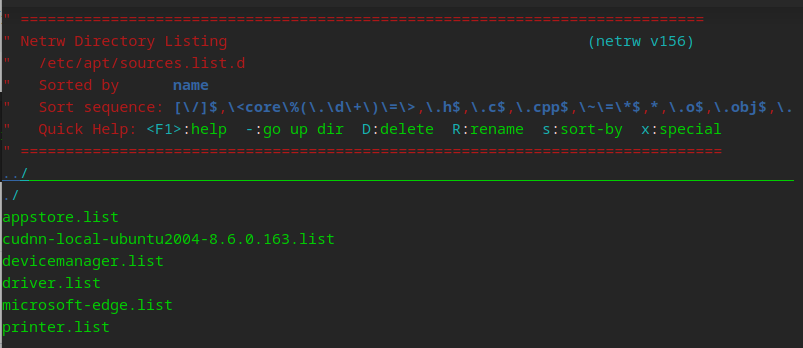
deepin 我该怎么操作?
应该这样执行:
cd /etc/apt/sources.list.d
sudo rm cudnn-local-ubuntu2004-8.6.0.163.list
或者 sudo rm /etc/apt/sources.list.d/cudnn-local-ubuntu2004-8.6.0.163.list
deepin 应该这样执行:
cd /etc/apt/sources.list.d
sudo rm cudnn-local-ubuntu2004-8.6.0.163.list
或者 sudo rm /etc/apt/sources.list.d/cudnn-local-ubuntu2004-8.6.0.163.list
好了,我已经删除了。

deepin 好了,我已经删除了。
再执行一下 sudo apt update 可以了吧。
deepin 再执行一下 sudo apt update 可以了吧。
这样是不是已经好了。
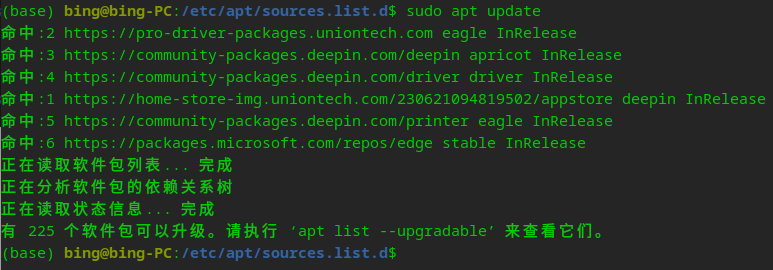
deepin 这样是不是已经好了。
好了,这就正常了👌🏻
deepin 好了,这就正常了👌🏻
更新后,应用商店还是打不开。
deepin 更新后,应用商店还是打不开。
你执行下 /usr/bin/deepin-home-appstore-client 试试
deepin 你执行下 /usr/bin/deepin-home-appstore-client 试试

deepin
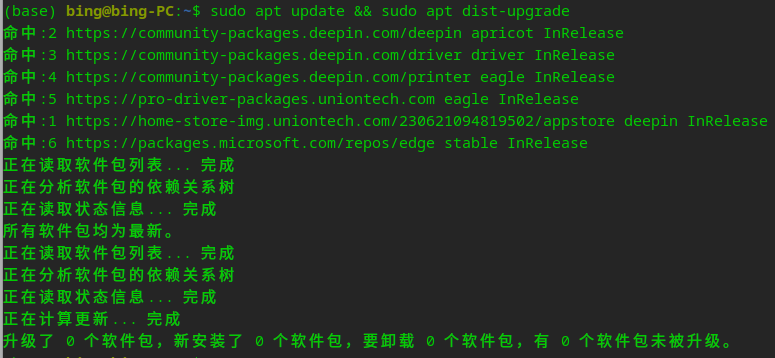
执行下 sudo apt update && sudo apt dist-upgrade
deepin 执行下 sudo apt update && sudo apt dist-upgrade
更新很慢,稍等,好了,我会发截图。
deepin 更新很慢,稍等,好了,我会发截图。
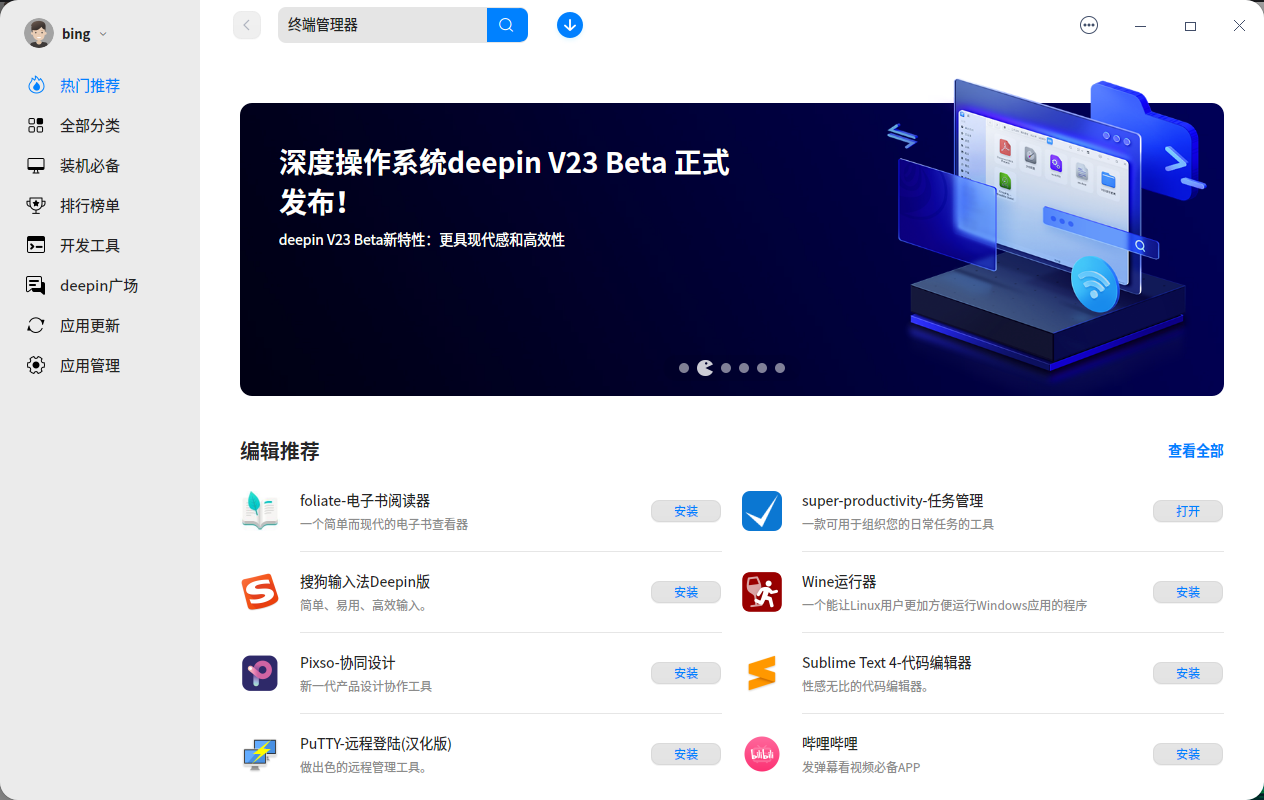
好的,应用商店已经可以打开了。谢谢。
Popular Ranking
ChangePopular Events
More


 NVIDIA graphics driver are not working with enabled secure boot
(base) bing@bing-PC:~$ sudo apt update
获取:1 file:/var/cudnn-local-repo-ubuntu2004-8.6.0.163 InRelease [1,575 B]
获取:1 file:/var/cudnn-local-repo-ubuntu2004-8.6.0.163 InRelease [1,575 B]
错误:1 file:/var/cudnn-local-repo-ubuntu2004-8.6.0.163 InRelease
由于没有公钥,无法验证下列签名: NO_PUBKEY 323547C4B0FE0A41
命中:3 https://community-packages.deepin.com/driver driver InRelease
命中:4 https://community-packages.deepin.com/printer eagle InRelease
命中:5 https://pro-driver-packages.uniontech.com eagle InRelease
命中:2 https://home-store-img.uniontech.com/230621094819502/appstore deepin InRelease
命中:6 https://packages.microsoft.com/repos/edge stable InRelease
正在读取软件包列表... 完成
W: GPG 错误:file:/var/cudnn-local-repo-ubuntu2004-8.6.0.163 InRelease: 由于没有公钥,无法验证下列签名: NO_PUBKEY 323547C4B0FE0A41
E: 仓库 “file:/var/cudnn-local-repo-ubuntu2004-8.6.0.163 InRelease” 没有数字签名。
N: 无法安全地用该源进行更新,所以默认禁用该源。
N: 参见 apt-secure(8) 手册以了解仓库创建和用户配置方面的细节。