

 中文
中文 
阿尼樱奈奈 deepin
2023-06-21 07:24 deepin It has been deleted!
 deepin
  deepin
 https://bbs.archlinux.org/viewtopic.php?id=267365
ArchLinux 论坛上有人提过类似问题,可以参考下解决方式试试看:
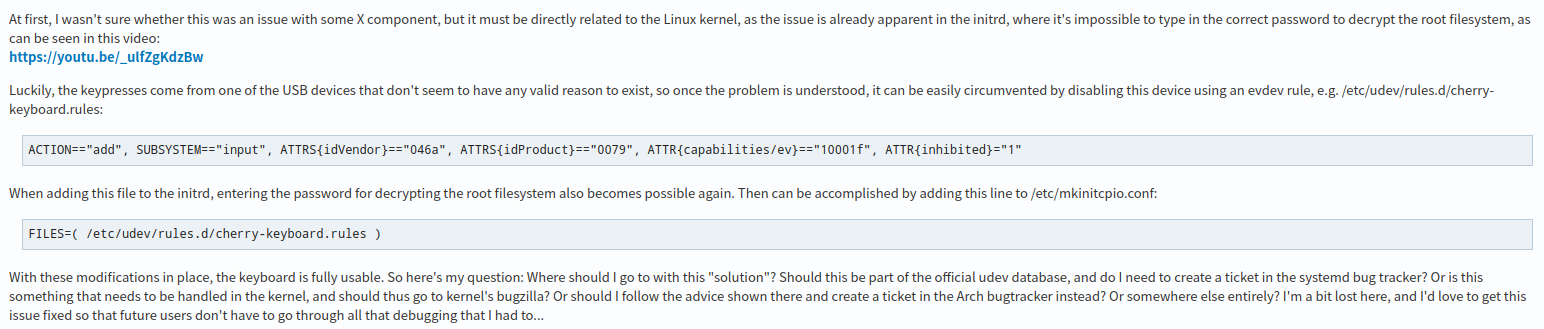
echo 'ACTION=="add", SUBSYSTEM=="input", ATTRS{idVendor}=="046a", ATTRS{idProduct}=="0079", ATTR{capabilities/ev}=="10001f", ATTR{inhibited}="1"'
| sudo tee /etc/udev/rules.d/cherry-keyboard.rules
P.S. 如果不行的话,执行
sudo rm /etc/udev/rules.d/cherry-keyboard.rules删掉这个配置
不过帖子里也说了,最好还是联系 cherry 的售后支持,在 Windows 下更新下键盘固件可以解决问题


sudo apt install linux-image-5.18.17-amd64-desktop-hwe linux-headers-5.18.17-amd64-desktop-hwe
可以使用这个命令升级看看
Popular Ranking
ChangePopular Events
More


 NVIDIA graphics driver are not working with enabled secure boot
1、问题描述:指定cherry键盘的数字键盘在系统内的输入框,以及wps中不能正常输入数字。中文输入下按shift不能将拼音输入为英文字符串。但是键盘能在系统自带浏览器中正常使用。
2、键盘型号如下:
3、deepin系统信息如下: