

 中文
中文 
阿尼樱奈奈 deepin
2023-06-19 15:58 deepin 可以用Grub Customizer调整。
因为是V23,应用商店没有上架,不过可以用命令行安装:sudo apt install grub-customizer
Reply Like 0 View the author
 deepin
 可以用Grub Customizer调整。
因为是V23,应用商店没有上架,不过可以用命令行安装:sudo apt install grub-customizer
 deepin
 可以用Grub Customizer调整。
因为是V23,应用商店没有上架,不过可以用命令行安装:sudo apt install grub-customizer
感谢!这个软件不错,适合我们菜鸟。

 deepin
 可以用Grub Customizer调整。
因为是V23,应用商店没有上架,不过可以用命令行安装:sudo apt install grub-customizer
好分享要支持啰!
deepin 多少有点强迫症了。在你的系统完全正常的前提下,如果不想看到系统恢复,可以把/boot下面带"rescu"的文件删掉(或移走),执行update-grub2就可以了。
deepin 多少有点强迫症了。在你的系统完全正常的前提下,如果不想看到系统恢复,可以把/boot下面带"rescu"的文件删掉(或移走),执行update-grub2就可以了。
不是显示问题,主要是启动时会不注意就进恢复去了,多耽搁事。

这个在进入deepin系统后,在控制中心》通用界面中,调整设置是不生效么?
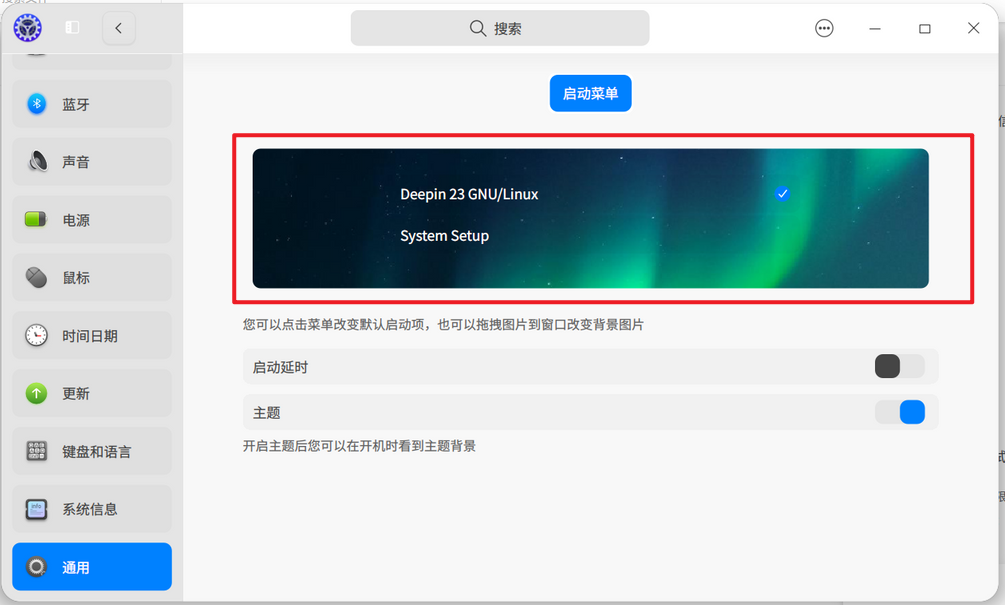
也可以在bios中看看启动项的顺序是否可以调整。

 deepin
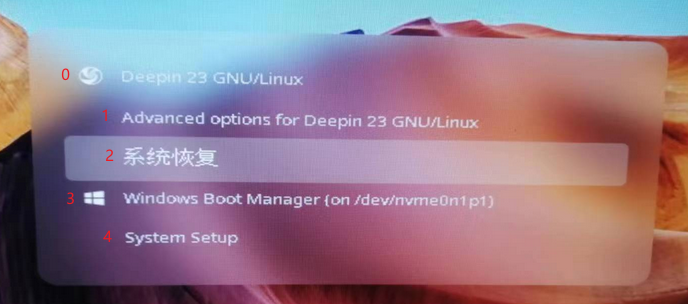
 你可以看一下/etc/default/grub中,GRUB_DEFAULT那一行是不是写着GRUB_DEFAULT=2
如果是的话,你可以把它改成GRUB_DEFAULT=3
保存后执行sudo update-grub,等待执行结束后重启。
这样就将默认启动项变回“Widnwos boot manager”了。
Popular Ranking
ChangePopular Events
More


 NVIDIA graphics driver are not working with enabled secure boot
导致每次都进入系统恢复菜单,修改/boot/grub/grub.cfg,每次更新都会变回来,看了看,系统恢复是在 /etc/grub.d/15_deepin-boot-kit生成的,windows是在30_os-prober生成的,系统恢复15是按照序号是排在windows的30之前的,我可不可以对调它们一下?不会崩溃吧?