

 中文
中文 
阿尼樱奈奈 deepin
2023-06-03 16:30 deepin 执行:sudo apt update && sudo apt dist-upgrade,然后重启。
Reply Like 0 View the author
 deepin
 执行:sudo apt update && sudo apt dist-upgrade,然后重启。

 deepin
 执行:sudo apt update && sudo apt dist-upgrade,然后重启。
这个之前执行过了没用
deepin 这个之前执行过了没用
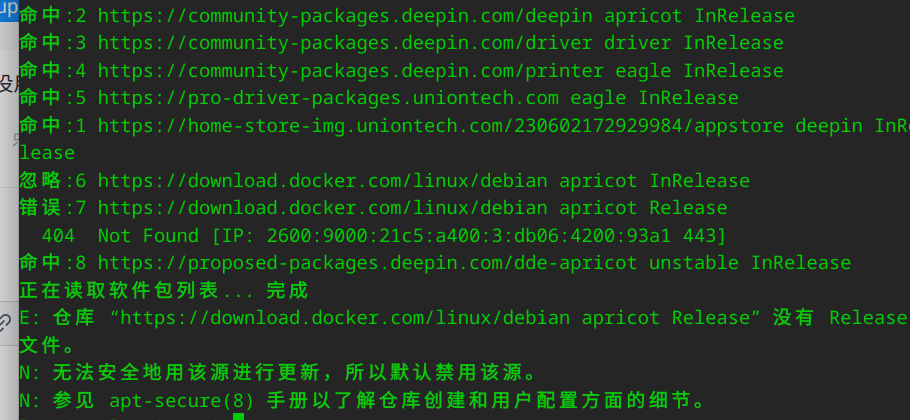
deepin
去 /etc/apt/sources.list 把那个报错的源删了
默认的sources.list是这个:
Generated by deepin-installer
deb https://community-packages.deepin.com/deepin/ apricot main contrib non-free
#deb-src https://community-packages.deepin.com/deepin/ apricot main contrib non-free
如果sources.list里没有该源,就去 /etc/apt/sources.list.d 文件夹找找,然后看看每个文件,把含有该源的文件删除
deepin 去 /etc/apt/sources.list 把那个报错的源删了
默认的sources.list是这个:
Generated by deepin-installer
deb https://community-packages.deepin.com/deepin/ apricot main contrib non-free
#deb-src https://community-packages.deepin.com/deepin/ apricot main contrib non-free
如果sources.list里没有该源,就去 /etc/apt/sources.list.d 文件夹找找,然后看看每个文件,把含有该源的文件删除
好的,感谢,注释docker的那个源就可以了,
Popular Ranking
ChangePopular Events
More


 necesito ayuda
尝试过卸载, 安装应用商店也没用
sudo apt remove deepin-app-store (卸载)
sudo apt install deepin-app-store (安装)