

 中文
中文 
阿尼樱奈奈 deepin
2023-05-29 22:04 deepin 先升级内核试试。
Reply Like 0 View the author
 deepin
 先升级内核试试。
 deepin
 就是按论坛里说的那些命令在终端下操作吗。
deepin 先升级内核试试。
升级完了,还用重启电脑吗。
deepin 另外,我还有一个hdmi接口显示器,咱们系统是不是也不支持。
deepin 先升级内核试试。
升级了,重启电脑了,好像还是不行。
deepin 升级完了,还用重启电脑吗。
需要重启的。
deepin 需要重启的。
重启了,还是不行。
我在终端下输入的是这个命令,对吗?
sudo apt install linux-image-5.18.4-amd64-desktop-hwe linux-headers-5.18.4-amd64-desktop-hwe
deepin 重启了,还是不行。
我在终端下输入的是这个命令,对吗?
sudo apt install linux-image-5.18.4-amd64-desktop-hwe linux-headers-5.18.4-amd64-desktop-hwe
你的电脑配置可以发一下吗?
deepin 你的电脑配置可以发一下吗?
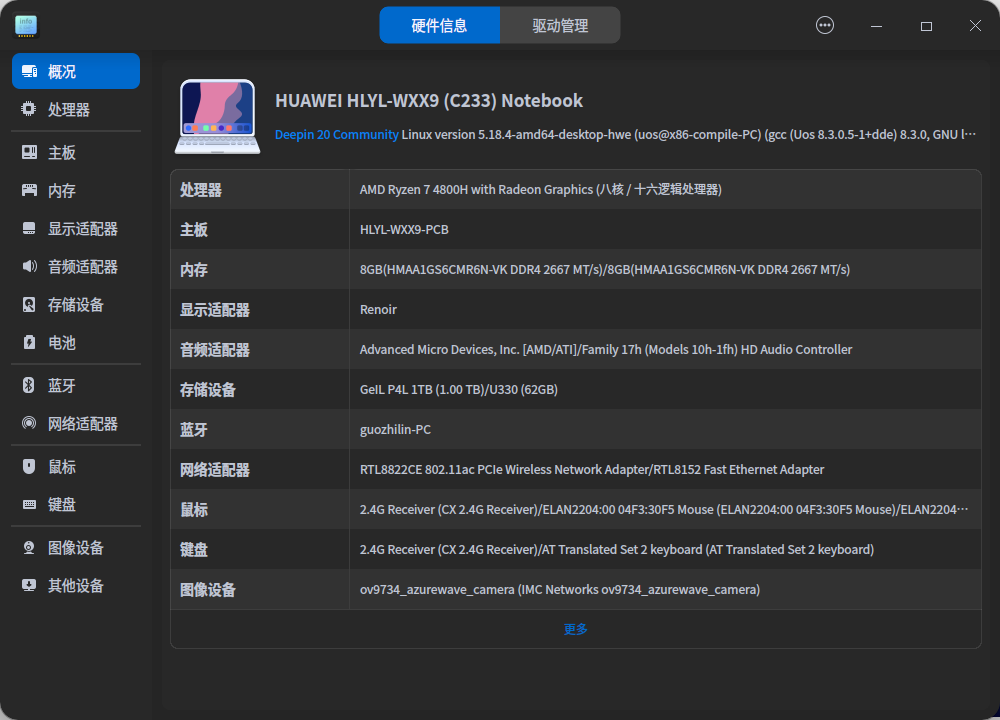

使用键盘上的快捷键可以调节吗?

 deepin
 1.编辑/etc/default/grub, 在LINUX_CMD_LINE里加入acpi_backligh=vendor。
2.update-grub
最后重启试试

 deepin
 Popular Ranking
ChangePopular Events
More


 necesito ayuda
荣耀笔记本,刚好了20.9版本,显示器太亮,无法进行调节。调整之后,亮度调还是在最右侧最亮的地方。