

 中文
中文 
阿尼樱奈奈 deepin
2023-05-19 06:18 deepin 执行:dpkg --get-selections| grep linux 看看你现在装的内核
然后卸载命令:sudo apt purge linux-image-内核版本 linux-headers-内核版本
Reply Like 2 View the author
 deepin
 执行:dpkg --get-selections| grep linux 看看你现在装的内核
然后卸载命令:sudo apt purge linux-image-内核版本 linux-headers-内核版本

 deepin
 我都是直接 sudo apt autoremove --purge '*5.15-xxx*'
 deepin
 执行:dpkg --get-selections| grep linux 看看你现在装的内核
然后卸载命令:sudo apt purge linux-image-内核版本 linux-headers-内核版本
补充一句,查看当前使用的内核,把不用的内核卸载了。
输入命令:uname -a
查看当前使用内核。
 deepin
 谢谢!按照你们的方法已经卸载成功。
 deepin
 https://bbs.deepin.org/post/243646
 deepin
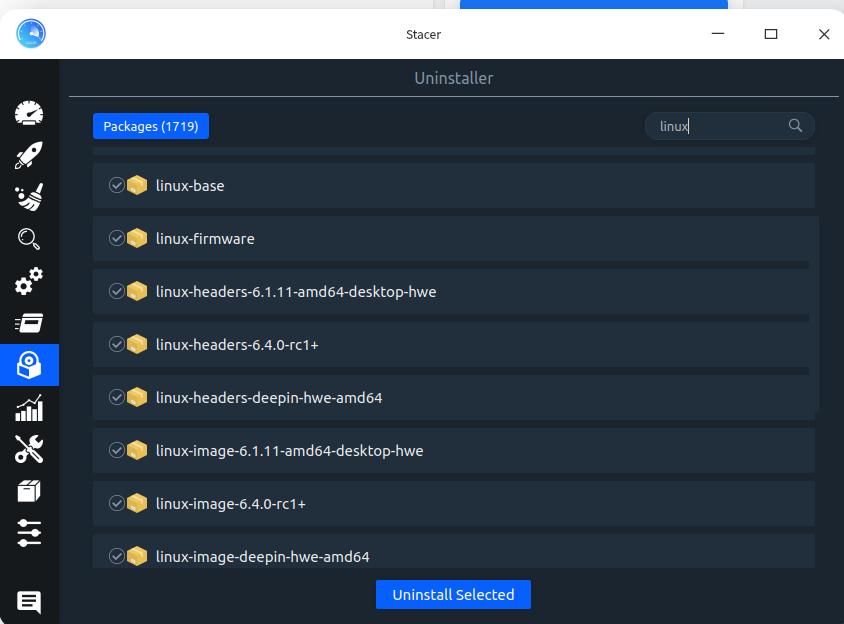
 我是在商店里先安装如下图的软件scater 再搜索linux 找到你不想要的内核 勾选 点删除重启动就行
 deepin
 我是在商店里先安装如下图的软件scater 再搜索linux 找到你不想要的内核 勾选 点删除重启动就行
是个方法,学习了
deepin 我是在商店里先安装如下图的软件scater 再搜索linux 找到你不想要的内核 勾选 点删除重启动就行
stacer 更正一下

stacer 更正一下
好方法,装了好多内核,正想卸载几个呢
deepin 我是在商店里先安装如下图的软件scater 再搜索linux 找到你不想要的内核 勾选 点删除重启动就行
欠缺少个删除编译的内核的,要是一搜删,棒棒的
Popular Ranking
ChangePopular Events
More


 necesito ayuda
如题,网上找了好几种办法,都没有成功,请教各位大神