

 中文
中文 
Ligocut光剪视频剪辑软件 deepin
2023-05-16 10:21 deepin Backbone of ecological co-construction group
3.因为Linux版功能不太完善。
Reply Like 1 View the author
 deepin
 3.因为Linux版功能不太完善。

 deepin
  deepin
 1,是否使用了特殊键盘,可能系统确实相应驱动。
2,deepin对于低配置电脑的确不够友好
3,deepin默认没有安装QQ,用户可以自己选择安装原生版、安卓版,还是wine版
 deepin
 就是普通 USB 键盘。
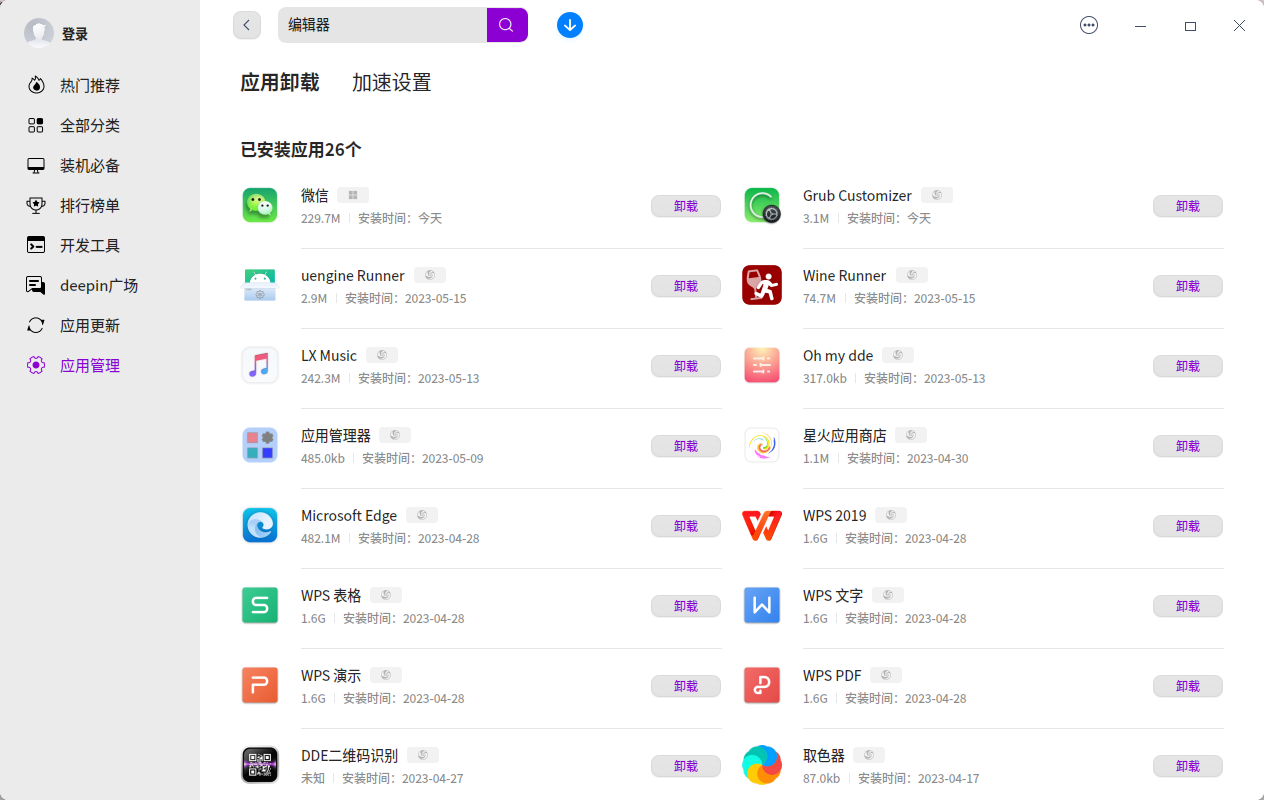
应用商城里大量使用了Wine,低端机根本带不动。安装时能不能对原生的Linux应用加个角标来标注?装了一堆应用,80%是基于wine的 😅
deepin 就是普通 USB 键盘。
应用商城里大量使用了Wine,低端机根本带不动。安装时能不能对原生的Linux应用加个角标来标注?装了一堆应用,80%是基于wine的 😅
我支持,就像应用管理显示这样:
deepin 找到小键盘不能输入数字的源头了,我使用 xset led on 把键盘背景灯打开了的缘故,按 Scroll Lock 键无法打开,只能通过命令打开,但是背景灯打开后小键盘就失效了。xset led off 之后,小键盘就正常了,但是键盘一片漆黑,看不清。
Popular Ranking
ChangePopular Events
More


 necesito ayuda
1、键盘问题
选用了 英语键盘(美国),右侧小键盘不管是否按了 Num Lock 键,按键都没有反应(刚发现上锁后,按0, 5, + 号这个键会弹出邮件菜单)
2、系统流畅度问题
我在拼多多花 300 元购买的 升腾小盒子(J1800CPU + 8G + 256G SSD),安装了 Win8 和 Debian 双引导系统,Win8 开机和运行速度都很快。Deepin 就差一些了,内存利用率太低的缘故吗?开机后才用了 1.5G 内存。
3、软件问题
腾讯已经出了 Linux 版 QQ 了,官方居然默认还在用 Wine 版 QQ。