

 中文
中文 
阿尼樱奈奈 deepin
2023-05-05 07:04 deepin 请把声卡型号、电脑配置和系统版本号报出来一下。
Reply Like 0 View the author
 deepin
 请把声卡型号、电脑配置和系统版本号报出来一下。

 deepin
 请把声卡型号、电脑配置和系统版本号报出来一下。
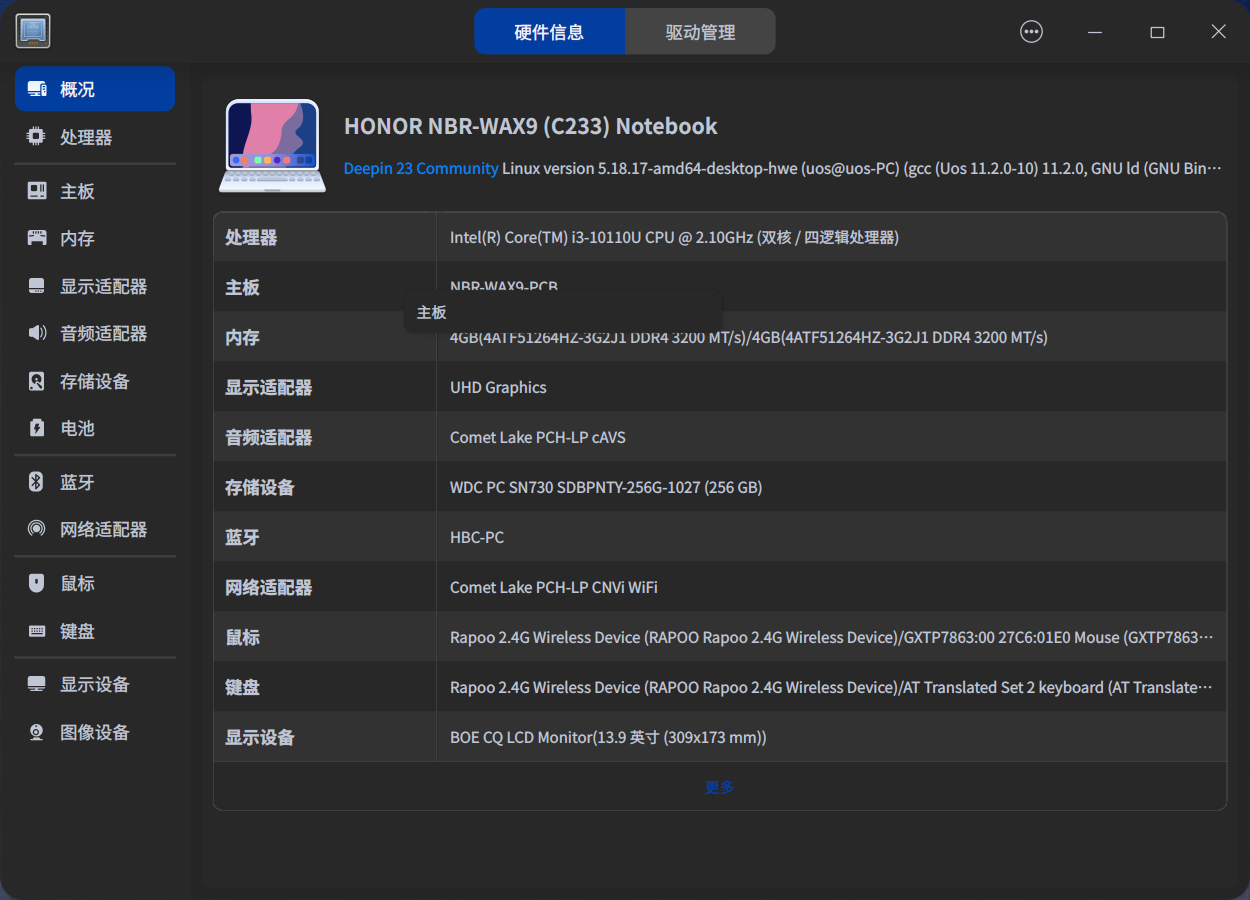

 deepin
看一下音量调节,能不能切换输出设备,尝试切换一下。
deepin 如果不行,就是设备适配问题。

 deepin
 没声音可以试一下装新的内核,指纹那个得联系设备制造商(看截图应该是荣耀
deepin 没声音可以试一下装新的内核,指纹那个得联系设备制造商(看截图应该是荣耀
就是荣耀,荣耀的官网有驱动但是linux不保证。新内核有无教程啊
deepin 某宝一个USB声卡才几块还包邮

deepin 如果不行,就是设备适配问题。
不能切换设备,都是空的
deepin 某宝一个USB声卡才几块还包邮
需要一直插着吗?
deepin 没声音可以试一下装新的内核,指纹那个得联系设备制造商(看截图应该是荣耀
装了6.3.1内核,还 无声音
deepin 装了6.3.1内核,还 无声音
声卡是什么型号的啊?
装一下linux声卡驱动。
deepin 需要一直插着吗?
是哒,使用usb声卡免驱
 deepin
 自己去研究一下声卡驱动
deepin 自己去研究一下声卡驱动
没有那个能量啊!扎心
deepin 是哒,使用usb声卡免驱
好吧!
 deepin
 2023-05-12,荣耀 X 14 2022 i3 10110U,我也用的这个笔记本,声音需要改下配置(deepin20.9和23都是这个方法),指纹我还没找到方法
没有声音方法如下:
sudo vi /etc/default/grub
下面这个选项后面添加snd_hda_intel.dmic_detect=0
GRUB_CMDLINE_LINUX_DEFAULT="${这里你的原有配置不要动} snd_hda_intel.dmic_detect=0"
sudo update-grub
reboot
例如:
修改前:
GRUB_CMDLINE_LINUX_DEFAULT="splash quiet "
修改后:
GRUB_CMDLINE_LINUX_DEFAULT="splash quiet snd_hda_intel.dmic_detect=0"
重启后,声音设备正常
deepin 2023-05-12,荣耀 X 14 2022 i3 10110U,我也用的这个笔记本,声音需要改下配置(deepin20.9和23都是这个方法),指纹我还没找到方法
没有声音方法如下:
sudo vi /etc/default/grub
下面这个选项后面添加snd_hda_intel.dmic_detect=0
GRUB_CMDLINE_LINUX_DEFAULT="${这里你的原有配置不要动} snd_hda_intel.dmic_detect=0"
sudo update-grub
reboot
例如:
修改前:
GRUB_CMDLINE_LINUX_DEFAULT="splash quiet "
修改后:
GRUB_CMDLINE_LINUX_DEFAULT="splash quiet snd_hda_intel.dmic_detect=0"
重启后,声音设备正常
👍 👍 👍
已经转到UOS 了目前使用正常。感谢大佬
Popular Ranking
ChangePopular Events
More


 necesito ayuda
如题,没声音啊!急急急……