[App Sharing] 分享一个局域网文件传输应用LANDrop
Tofloor
poster avatar
广快开饭
deepin
2023-05-02 01:07
Author

LANDrop

仓库链接:https://github.com/LANDrop/LANDrop

APP 网站:https://landrop.app

image-20230501163205121.png

下载链接:https://js.xxooo.ml/https://github.com/LANDrop/LANDrop/releases/download/v0.4.0/LANDrop-0.4.0-linux.AppImage(可以去github仓库下,这个链接是加速过的)
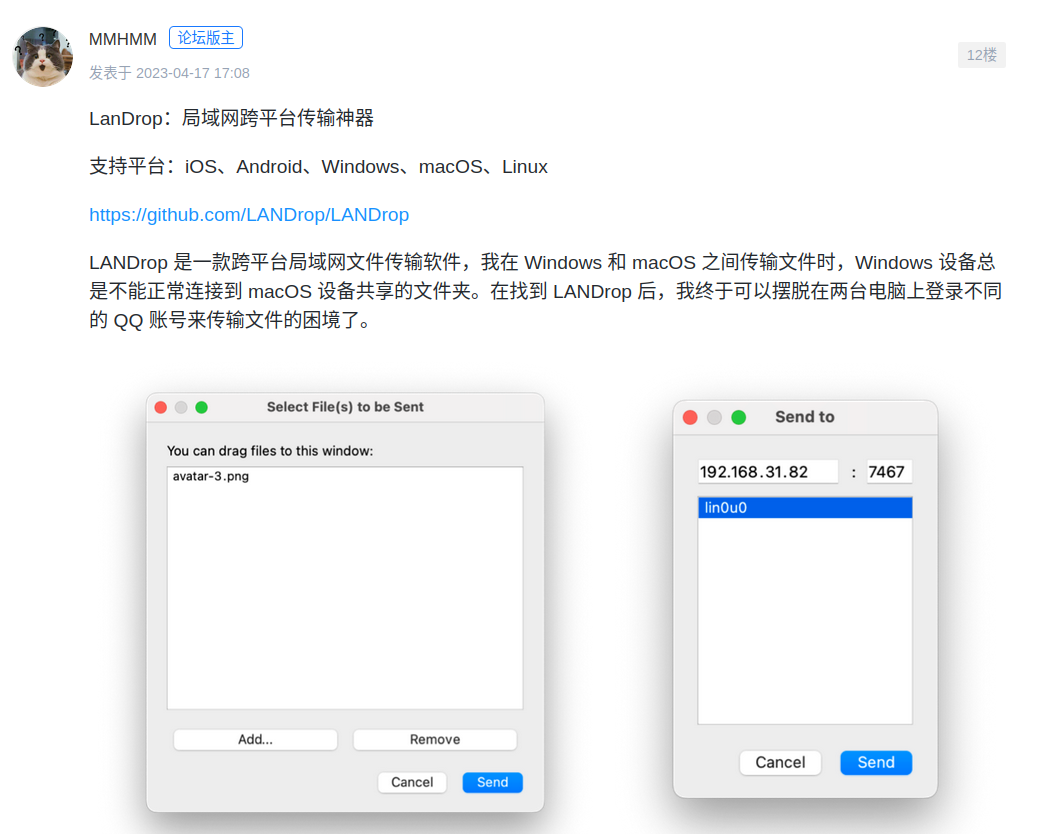
image-20230427110716159.png

一直以来跨平台文件传输是个比较麻烦的问题,最近看到版主推荐的局域网跨平台软件便试了一下,还挺方便的。想着写个使用的帖子,奈何最近学业繁忙搁置了一段时间。。。

这次软件运行是在 ubuntu 上测试的,原因:

  • linux是我的主力平台,对续航长的需求让我不得不选择 ubuntu ,deepin 在我的机器上续航有点差(这算是 deepin 的老问题了)
  • 本来前几天是打算装一下 deepin 23 作为运行环境的,由于 efi 分区给的比较小,装 deepin 23 的时候爆满导致安装失败,结果把我原来的 ubuntu 和 win 引导给干没了。。。所以花了又一些时间迁移引导分区和重装系统,然而装好后发现文件管理器打不开。。。放弃了,等 v23 稳定点再重新测试一下。
  • 其实不同发行版也没关系,软件还是一样能用的

运行:

  • 首先下载 appimage 文件(链接在前面),在文件所在文件夹下右键打开终端
  • 执行
    sudo chmod +x Drop-latest-linux.AppImage
    ./LANDrop-latest-linux.AppImage
    
  • 可以看到软件出现在托盘里

传输文件前先设置一下传输文件夹,之后手机端传过来的文件都在这里

电脑端

image-20230428113828475.png

打开托盘点击「打开下载文件夹」,设置你想要存放文件的文件夹

image-20230428113951933.png

这里的设备名会显示在手机上

手机端

Screenshot_2023-04-28-11-30-48-258_app.landrop.landrop_flutter.jpg

打开应用,可以看到 Devices 项有我们电脑端的设备名(此时手机和电脑必须在同一网络环境下:热点或者同一个路由),点击右上角图标可以选择文件或者图片

Screenshot_2023-04-28-11-37-52-026_com.google.android.documentsui.jpg

我这里选了几个文件,然后点击设备名即可发送。

电脑端

截图 2023-04-28 11-40-22.png

当手机端选择文件后传送会向电脑端发送一个验证码,选择 yes

截图 2023-04-28 11-40-34.png

可以看到在电脑端文件夹🗂得到传输结果


是不是很简单,文件传输速率取决于你的局域网网速,可以说超快

关于在电脑端创建一个桌面图标的问题可以参考以下步骤:

  1. 下载图标(右键保存在软件同个目录)

    app.png

  2. 执行(在软件所在文件夹右键打开终端再执行)

    sudo mkdir /opt/landrop
    sudo mv app.png LANDrop-latest-linux.AppImage /opt/landrop/
    sudo touch /usr/share/applications/LANDrop.desktop
    

    用文本编辑器打开这个文件 /usr/share/applications/LANDrop.desktop

  3. 粘贴保存即可

    [Desktop Entry]
    Name=LANDrop
    Icon=/opt/landrop/app.png
    Exec=/opt/landrop/LANDrop-latest-linux.AppImage
    Terminal=false
    Type=Application
    
Reply Favorite View the author
All Replies
2023开始学习
deepin
2023-05-02 02:57
#1

无法运行,

qt问题:qt.qpa.plugin: Could not load the Qt platform plugin "xcb" in "" even though it was found.

Cannot load library /tmp/.mount_LANDrotQBWua/usr/plugins/platforms/libqxcb.so: (/lib/x86_64-linux-gnu/libc.so.6: version `GLIBC_2.30' not found (required by /tmp/.mount_LANDrotQBWua/usr/plugins/platforms/../../lib/libsystemd.so.0))

我的GLIBC只有:gnu lib version : 2.28

你的是V23吗

Reply View the author
‌量子巡游者
Moderator
2023-05-02 03:21
#2
2023开始学习

无法运行,

qt问题:qt.qpa.plugin: Could not load the Qt platform plugin "xcb" in "" even though it was found.

Cannot load library /tmp/.mount_LANDrotQBWua/usr/plugins/platforms/libqxcb.so: (/lib/x86_64-linux-gnu/libc.so.6: version `GLIBC_2.30' not found (required by /tmp/.mount_LANDrotQBWua/usr/plugins/platforms/../../lib/libsystemd.so.0))

我的GLIBC只有:gnu lib version : 2.28

你的是V23吗

官方商店有这个软件

Reply View the author
2023开始学习
deepin
2023-05-02 03:31
#3
‌量子巡游者

官方商店有这个软件

没有搜索到LANDrop,能发下名字吗

Reply View the author
风吹过的绿洲
deepin
2023-05-02 03:37
#4

我也想推荐这个,但是自己在deepin下试,运行不起来

╭─jay@jay-PC ~/Downloads
╰─‹anaconda3-2020.11› λ ./LANDrop-latest-linux.AppImage
qt.qpa.plugin: Could not load the Qt platform plugin "xcb" in "" even though it was found.
This application failed to start because no Qt platform plugin could be initialized. Reinstalling the application may fix this problem.

Available platform plugins are: xcb.

[1] 1807176 abort ./LANDrop-latest-linux.AppImage

Reply View the author
新手小白
deepin
2023-05-02 03:54
#5
It has been deleted!
新手小白
deepin
2023-05-02 03:59
#6
It has been deleted!
donaldsebleung
deepin
2023-05-02 16:12
#7

感谢分享kissing_heart

Reply View the author
蒙笛
deepin
2025-08-21 14:46
#8

挖个坟,不错的局域网传输软件,最新2.8版本了。

Reply View the author