

 中文
中文 
阿尼樱奈奈 deepin
2023-04-24 19:01 deepin 磁盘启动格式最好全部都是MBR(传统启动)或都是GPT(UEFI)。
Reply Like 0 View the author
 deepin
 磁盘启动格式最好全部都是MBR(传统启动)或都是GPT(UEFI)。

 deepin
 磁盘启动格式最好全部都是MBR(传统启动)或都是GPT(UEFI)。
这个是下的官方工具做的启动盘自动安装的,分区也是自动的。没有进行修改,这种格式不行是吗?

 deepin
 grub没搜索到win7 码?
deepin 通过BIOS切换启动磁盘就行了
deepin 通过BIOS切换启动磁盘就行了
哦,那他的電腦BIOS應該是支援自動選擇Legacy/UEFI啟動方式
deepin 哦,那他的電腦BIOS應該是支援自動選擇Legacy/UEFI啟動方式
具体他的机器怎样不清楚,但很多BIOS都支持
deepin grub没搜索到win7 码?
搜索不到
deepin 通过BIOS切换启动磁盘就行了
这种方式是可以,就是有点麻烦了
deepin UEFI、传统BIOS的引导模式不同,好像难以用一种方法实现双启动
 deepin
 应该是你首先启动那个盘的mbr里没有安装grub
 deepin
 进BIOS 把 deepin 开机启动引导项位置换到第一,在deepin系统设置里找到通用点进去 打开启动延迟
Popular Ranking
ChangePopular Events
More


 necesito ayuda
电脑是WIN7 64位系统,安装在一块固态硬盘上,在另一块机械硬盘上装了DEEPIN20.9,请问如何添加双系统引导选择项
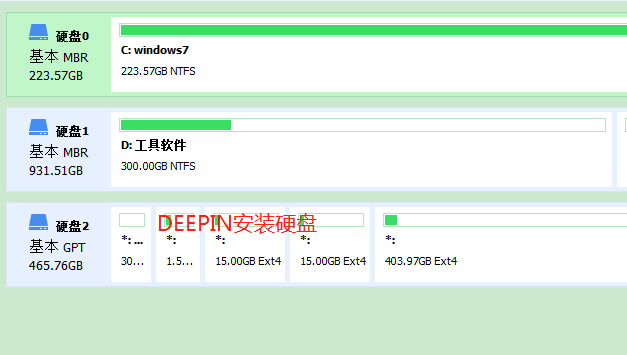
试过用eawy bcd也不行