[Tutorials] 天选二装了beepin系统后怎么恢复成之前的win10,启也
Tofloor
poster avatar
132******11
deepin
2023-04-24 02:06
Author

beepin装在我的e盘,win10装在我的c盘里

Reply Favorite View the author
All Replies
阿尼樱奈奈
deepin
2023-04-24 02:13
#1

重启,然后启动项选择win10

Reply View the author
132******11
deepin
2023-04-24 02:34
#2
阿尼樱奈奈

重启,然后启动项选择win10

启动项没有找到哎

Reply View the author
明天会更好
deepin
2023-04-24 02:42
#3

能进那个系统?deepin里修复grub,或者U盘启动进去修复启动菜单。

Reply View the author
观棋可以语吗
deepin
2023-04-24 02:43
#4

sudo update-grub 一下就行

Reply View the author
西装系统之蝶
deepin
2023-04-24 02:53
#5
The user is banned, and the content is hidden.
132******11
deepin
2023-04-24 02:54
#6
西装系统之蝶
The user is banned, and the content is hidden.

抱歉抱歉,怎么进入哎

Reply View the author
西装系统之蝶
deepin
2023-04-24 03:01
#7
The user is banned, and the content is hidden.
132******11
deepin
2023-04-24 03:09
#8
西装系统之蝶
The user is banned, and the content is hidden.

刚把那个u盘给装成win10系统盘了

Reply View the author
132******11
deepin
2023-04-24 03:10
#9
观棋可以语吗

sudo update-grub 一下就行

然后哎大佬

Reply View the author
西装系统之蝶
deepin
2023-04-24 03:11
#10
The user is banned, and the content is hidden.
青稚
deepin
2023-04-24 03:29
#11
西装系统之蝶
The user is banned, and the content is hidden.

赞同,你抢了我的台词。

Reply View the author
阿尼樱奈奈
deepin
2023-04-24 03:43
#12
132******11

刚把那个u盘给装成win10系统盘了

格式化了,重新写入WinPE,然后修复Windows的引导后重新格式化再写入live。

这个只适用于只有一个U盘的情况,最好多准备几个U盘(最好是大品牌的),分别写入WinPE和live,这样就不用这么麻烦了。没有可以买。

Reply View the author
132******11
deepin
2023-04-24 04:05
#13
阿尼樱奈奈

格式化了,重新写入WinPE,然后修复Windows的引导后重新格式化再写入live。

这个只适用于只有一个U盘的情况,最好多准备几个U盘(最好是大品牌的),分别写入WinPE和live,这样就不用这么麻烦了。没有可以买。

我还是选择重装系统吧
Reply View the author
Comments
buyike
2023-04-24 17:37
和我思路一样,重装比啥都快。哈哈。备用机随便折腾。
WangZhongyun
deepin
2023-04-25 17:25
#14

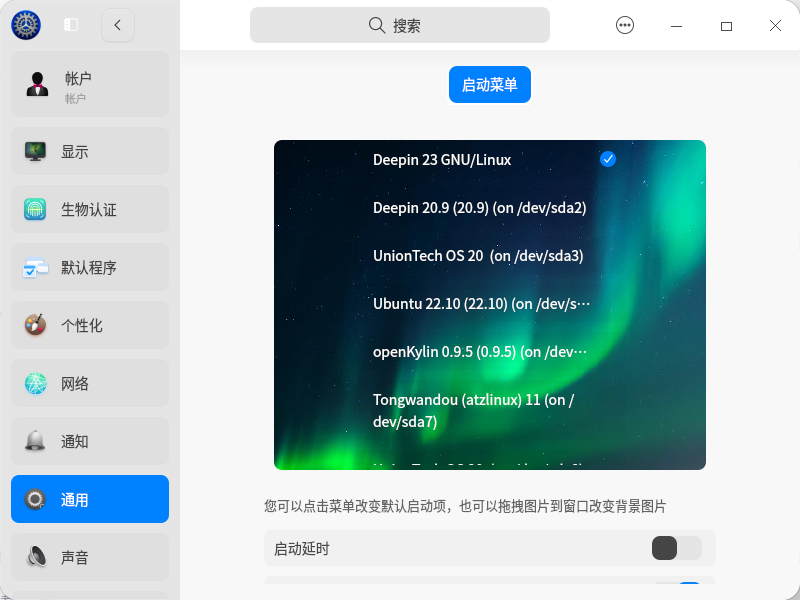
在deepin控制中心如图样勾选默认启动菜单,若想进入其它系统就在显示这启动菜单时快速按向下方向键选择你要的系统到回车好了
截图_dde-control-center_20230425092140.png

Reply View the author