

 中文
中文 
Seiya deepin
2023-04-21 01:40 deepin 我的更新到20.9 后, 索屏后, 明明光标已经在输入密码的框那儿了, 结果小键盘还是输入不了, 非得鼠标点一下才行。 还不如20.8的索屏输入密码方便
Reply Like 0 View the author
 deepin
 我的更新到20.9 后, 索屏后, 明明光标已经在输入密码的框那儿了, 结果小键盘还是输入不了, 非得鼠标点一下才行。 还不如20.8的索屏输入密码方便

 deepin
 我的更新到20.9 后, 索屏后, 明明光标已经在输入密码的框那儿了, 结果小键盘还是输入不了, 非得鼠标点一下才行。 还不如20.8的索屏输入密码方便
这是已知bug,我也有这种情况,需要按两下Numlock才能输入密码。
听说这个问题已经反馈给开发人员了
 deepin
 应该是显卡驱动问题,让分辩率适配出了问题才导致的。
deepin 今天越来越明显:
deepin 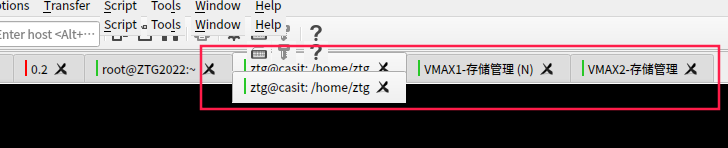
deepin 我感觉是操作的时候,窗口突然网上了一点点,界面就花了
deepin 应该是QT的原因,升级QT的原因
deepin 版主,能将QT降下级不,现在用起来很不爽
deepin 升级前 Qt版本:
deepin 5.15.1.2
升级后:5.15.8-1
deepin 我花屏的程序是SecureCRT For Linux
deepin 解决该问题:
复制之前的Qt5 Lib文件到一个目录:
/home/ztg/scrt-8.7.3/Qt5lib
ztg@casit:~/scrt-8.7.3/Qt5lib$ ls -la
总用量 23384
drwxr-xr-x 2 root root 4096 4月 21 09:50 .
drwxr-xr-x 5 ztg ztg 4096 4月 21 09:55 ..
-rwxr-xr-x 1 root root 6441712 4月 21 09:51 libQt5Core.so.5
-rwxr-xr-x 1 root root 590648 4月 21 09:51 libQt5DBus.so.5
-rwxr-xr-x 1 root root 5981832 4月 21 09:51 libQt5Gui.so.5
-rwxr-xr-x 1 root root 1131312 4月 21 09:51 libQt5Multimedia.so.5
-rwxr-xr-x 1 root root 1380008 4月 21 09:51 libQt5Network.so.5
-rwxr-xr-x 1 root root 465888 4月 21 09:51 libQt5PrintSupport.so.5
-rwxr-xr-x 1 root root 6729128 4月 21 09:51 libQt5Widgets.so.5
-rwxr-xr-x 1 root root 1200520 4月 21 09:51 libQt5XcbQpa.so.5
在运行SecureCRT时候,设置
export LD_LIBRARY_PATH=/home/ztg/scrt-8.7.3:/home/ztg/scrt-8.7.3/libs:/home/ztg/scrt-8.7.3/Qt5lib
再运行SecureCRT的时候,不再花屏。
我写了个shell(start.sh)
#!/bin/bash
export LD_LIBRARY_PATH=/home/ztg/scrt-8.7.3:/home/ztg/scrt-8.7.3/libs:/home/ztg/scrt-8.7.3/Qt5lib
/home/ztg/scrt-8.7.3/SecureCRT
在Desktop文件中,修改
[Desktop Entry]
Actions=Window;
Categories=Network;
Comment=SecureCRT provides remote access using SSH2, SSH1, Telnet, Serial, and other protocols. export LD_LIBRARY_PATH=/opt/apps/com.qq.wemeet/files/lib:/home/ztg/scrt-9.2.2
Exec=/home/ztg/scrt-8.7.3/start.sh
Icon=/home/ztg/scrt-8.7.3/securecrt_64.png
Name=SecureCRT
StartupNotify=true
Terminal=false
Type=Application
X-Deepin-AppID=SecureCRT
X-Deepin-CreatedBy=com.deepin.dde.daemon.Launcher
X-Deepin-Vendor=user-custom
deepin 不行,我用久了,还是如此!呜呜....
deepin 实在是难以忍受花屏,通过再生龙恢复到去年的20.6了,关闭更新...手也不要再欠
Popular Ranking
ChangePopular Events
More


 necesito ayuda
今天中午把机器升级了,咋个现在屏幕有点爱花呢,你们遇到没有?
花屏了就是这样的
我还以为是我运行了啥子东西引起的后遗症,把电脑重启了,又遇到了。我的个天,这才麻烦了。这个笔记本是我的生产工具,已经用了快两年了。