

 中文
中文 
Merlin deepin
2023-04-18 01:36 deepin 新人为啥要升到6.2,官方版本都没有集成。
Reply Like 0 View the author
 deepin
 新人为啥要升到6.2,官方版本都没有集成。

 deepin
 新人为啥要升到6.2,官方版本都没有集成。
那该怎么操作,输入什么指令
 deepin
 那该怎么操作,输入什么指令
降低内核版本到5.18或者6.1试试看,应该能正常。
deepin 降低内核版本到5.18或者6.1试试看,应该能正常。
6.1输什么指令

 deepin
 6.1输什么指令
sudo apt install linux-headers-x.x linux-image-x.x
deepin 降低内核版本到5.18或者6.1试试看,应该能正常。
6.1还是不行
deepin 处理器 : Intel(R) Core(TM) i5-10500 CPU @ 3.10GHz (六核 / 十二逻辑处理器)
主板 : PRIME H510M-K
内存 : 8GB(9905751-007.A00G DDR4 2667 MT/s)
显示适配器 : Intel Corporation
音频适配器 : Intel Corporation
存储设备 : ST1000DM014-2UB10D (1.00 TB)/KINGSTON SA400S37480G (480 GB)
网络适配器 : Ethernet Connection (14) I219-V
鼠标 : USB Receiver (Logitech USB Receiver)/Usb Mouse (SiGma Micro Usb Mouse)
键盘 : USB Receiver (Logitech USB Receiver)/USB Keyboard (A4Tech USB Keyboard)
其他设备 : Elite5 3.X
名称 : Intel Corporation
制造商 : Intel Corporation
型号 : Intel Corporation
版本 : 03
中断 : 255 (no events)
功能 : pciexpress msi pm vga_controller bus_master cap_list
DigitalOutput : Unable
DVI : Unable
VGA : Unable
HDMI : Unable
eDP : Unable
DP : Unable
描述 : VGA compatible controller
当前分辨率 : 1024 x 768
最小分辨率 : 1024 x 768
最大分辨率 : 1024 x 768
总线信息 : pci@0000:00:02.0
I/O端口 : 4000(size=64)
内存地址 : 6000000000-6000ffffff 4000000000-400fffffff c0000-dffff
物理ID : 0x80869bc8
Module Alias : pci:v00008086d00009BC8sv00001043sd00008694b
延迟 : 0
 deepin
 启动界面的 恢复还原 有没你以前的留档
 deepin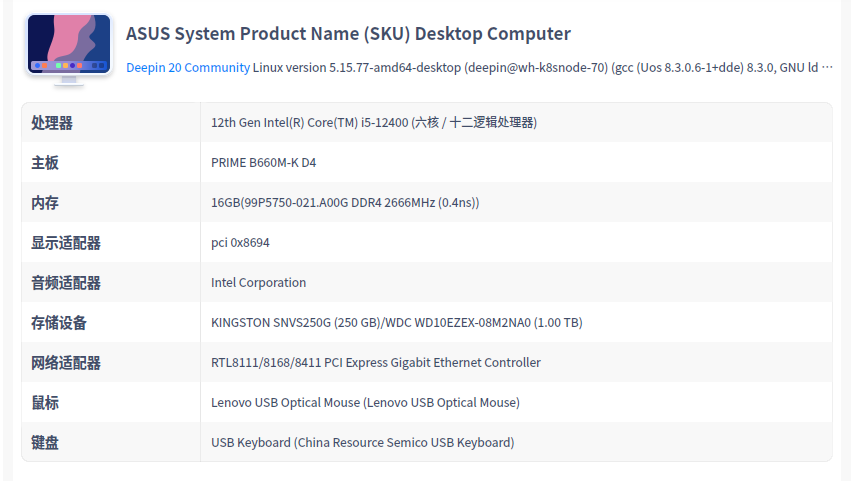
deepin
跟你一样
deepin sudo apt install linux-headers-x.x linux-image-x.x
感觉你的命令。12代 i5-12400 安装 5.18内核正常显示了
Popular Ranking
ChangePopular Events
More


 necesito ayuda
内核更新到了6.2.1,显卡是核显INtel UHD GRaphics 630。无法调整分辨率,识别不了显卡。