

 中文
中文 
青稚 deepin
2023-04-15 18:17 deepin https://bbs.deepin.org/phone/zh/post/251771
参考。
Reply Like 0 View the author
 deepin
 https://bbs.deepin.org/phone/zh/post/251771
参考。

 deepin
 第一:删除旧驱动nvidia
sudo apt remove nvidia*
第二:进入root
sudo -i 然后输入密码
第三:退出桌面模式,进入命令模式
init 3
第四:登录用户名,输入密码,然后进入root
sudo -i 然后输入密码
第五:用cd命令进入下载好的驱动目录
第六:运行驱动安装程序

 deepin
 什么显卡用304驱动?
 deepin
 不行,主要是自带的NVIDIA开源驱动关闭不了,试过网上的办法,没搞定。
deepin 什么显卡用304驱动?
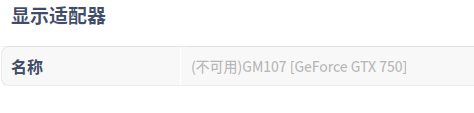
亮机卡 GeForce GTX 750
deepin nvidia-installer log file '/var/log/nvidia-installer.log'
creation time: Sat Apr 15 16:27:05 2023
installer version: 304.137
PATH: /usr/local/sbin:/usr/local/bin:/usr/sbin:/usr/bin:/sbin:/bin
nvidia-installer command line:
./nvidia-installer
Using: nvidia-installer ncurses v6 user interface
-> The file '/tmp/.X0-lock' exists and appears to contain the process ID '1885' of a runnning X server.
ERROR: You appear to be running an X server; please exit X before installing. For further details, please see the section INSTALLING THE NVIDIA DRIVER in the README available on the Linux driver download page at www.nvidia.com.
ERROR: Installation has failed. Please see the file '/var/log/nvidia-installer.log' for details. You may find suggestions on fixing installation problems in the README available on the Linux driver download page at www.nvidia.com.
deepin 试试 sudo kill -1885 去
deepin 一、把默认nouveau驱动加入黑名单
sx-ljm@sx-ljm-PC:~/Desktop$ sudo nano /etc/modprobe.d/blacklist.conf
blacklist.conf加入下面内容保存
blacklist nouveau
blacklist lbm-nouveau
options nouveau modeset=0
alias nouveau off
alias lbm-nouveau off
二、更新initramfs
sx-ljm@sx-ljm-PC:~/Desktop$ sudo update-initramfs -u
三、重启
重启进入图形界面,不用退出图形界面,直接进入终端执行:
sudo sh /home/sx-ljm/Desktop/NVIDIA-Linux-x86_64-525.105.17.run -no-x-check -no-nouveau-check -no-opengl-files
过程中提示:“YES” “ NO” 我是 “y“,”n”,“y“,”n”,成功了
Popular Ranking
ChangePopular Events
More


 necesito ayuda
首先下载里官方for linux 驱动,并解压缩得到:NVIDIA-Linux-x86_64-304.137.run
运行命令:
sx-ljm@sx-ljm-PC:
/Desktop$ cd/Downloads$/Downloads//Downloads$ ./NVIDIA-Linux-x86_64-304.137.runsx-ljm@sx-ljm-PC:
Verifying archive integrity... OK
Uncompressing NVIDIA Accelerated Graphics Driver for Linux-x86_64 304.137................................................................................................................................................................
nvidia-installer: Error opening log file '/var/log/nvidia-installer.log' for writing (Permission denied); disabling logging.
sx-ljm@sx-ljm-PC:
sx-ljm@sx-ljm-PC:
/Downloads$ sudo ./NVIDIA-Linux-x86_64-304.137.run/Downloads$请输入密码:
验证成功
Verifying archive integrity... OK
Uncompressing NVIDIA Accelerated Graphics Driver for Linux-x86_64 304.137................................................................................................................................................................
sx-ljm@sx-ljm-PC:
sx-ljm@sx-ljm-PC:~/Downloads$ init 3
进入tty1
输入:用户名
输入:密码
再次sx-ljm@sx-ljm-PC:~/Downloads$ sudo ./NVIDIA-Linux-x86_64-304.137.run
最终安装失败