

 中文
中文 
云的眼泪 deepin
2023-04-10 23:21 deepin 在官网下载livecd系统,相当于WIN系统中的PE系统,专门用于系统维护的
用它启动系统后,用磁盘管理工具调整。
Reply Like 0 View the author
 deepin
 在官网下载livecd系统,相当于WIN系统中的PE系统,专门用于系统维护的
用它启动系统后,用磁盘管理工具调整。
deepin 试试进live系统用Gparted增加空间。

 deepin
 试试进live系统用Gparted增加空间。
这个是正解,不过,好像直接在系统内跑Gparted也能达成目标。

 deepin
 https://bbs.deepin.org/zh/post/237402
 deepin
 最安全的处理方式:
使用符号链接(终端 ln 命令),根据需求可以把 /opt (应用商店常用软件的安装位置)、/var/flatpak(Flatpak应用软件的安装位置)、/var/docker(Docker应用软件的安装位置)等文件夹链接到有足够空间的磁盘上。
 deepin
 https://bbs.deepin.org/zh/post/237402
还有这么好的参考教程?! 收藏了。
之前编译内核时home空闲空间不足导致编译失败,我是在线合并的rootb分区,凑出了home下的25G空闲,然后才获得了源码编译内核。
方案是把rootb向后并入home,把recovery改成暂存仓库repo。
如此这般,Deepin20备份空间变成随时可用的机动空间。
 deepin
 Gparted不具备合并分区功能阿?
deepin 刚在ubuntu live 状态下用gpared
试过,合并不了,也可能是版本低
deepin 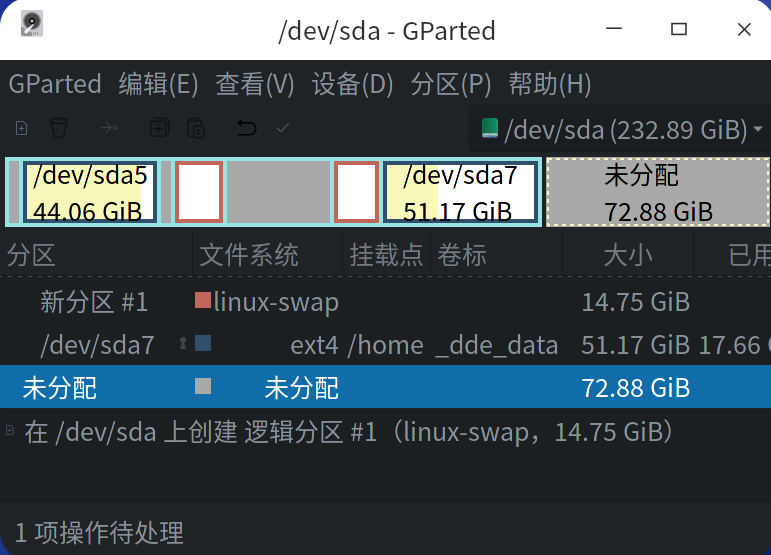
deepin 这个办法不可行
 deepin
 如果有双系统
如果不觉得麻烦
建议win这边先用PE调整缩小空间,留出一个未分配分区。
再到live把未分配分区合并给deepin
deepin linux下的G Parted工具没找到合并功能。
 deepin
 我咋没听说过分区还能合并呢

deepin 我咋没听说过分区还能合并呢
删除分区后是未分配空间,应该能够扩大空间到未使用空间的,gpared做不了,diskgenius可以,可惜是mis的的
deepin 删除分区后是未分配空间,应该能够扩大空间到未使用空间的,gpared做不了,diskgenius可以,可惜是mis的的
你选中已有的分区,然后菜单中有调整大小
 deepin
 删除分区后是未分配空间,应该能够扩大空间到未使用空间的,gpared做不了,diskgenius可以,可惜是mis的的
能的,直接改大小
deepin 版主,我确实改不了,只能调小不能调大,也许是版本,也许是硬盘原因,不管里,已经重装了
deepin 版主,我确实改不了,只能调小不能调大,也许是版本,也许是硬盘原因,不管里,已经重装了
啊逃避问题可不是个好办法哇
deepin 官网的live确实不行,考虑重新安装了
Popular Ranking
ChangePopular Events
More


 necesito ayuda
1、系统盘分配了40g,这才一个月就快满了,怎么调大点,后面还有100G空间。
2、应用商店啥时候放出conky?