

 中文
中文 
神末shenmo deepin
2023-04-04 23:08 deepin Spark-App
Q&A Team
/etc/xdg/autostart
Reply Like 1 View the author
 deepin
 /etc/xdg/autostart

 deepin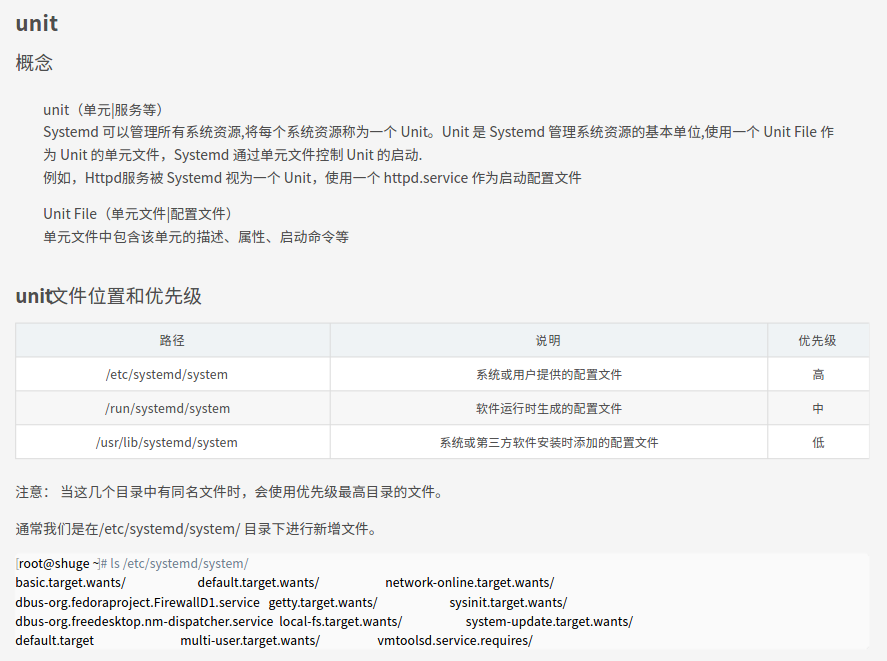
deepin 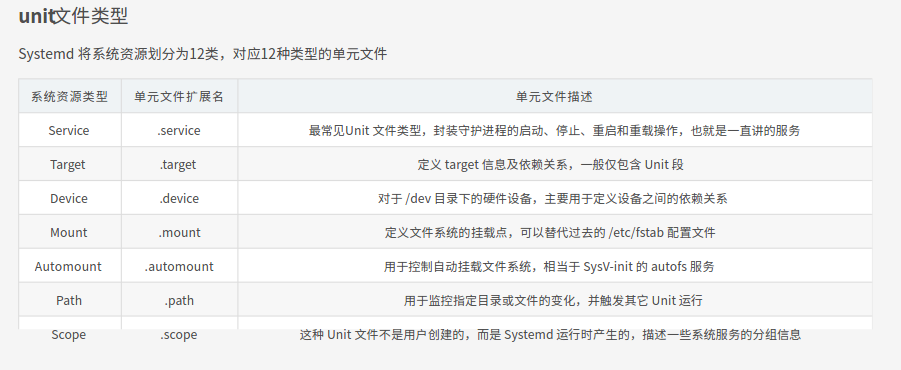
deepin 如今,systemd一统江湖。
按照systemd方式来,不会过时。
deepin systemd管理linux的runtime依赖关系
deepin systemd取代了过去对shell脚本的依赖,采取独立方式实现方式,对依赖关系进行运行时管理。
deepin systemd也是linux系统的1号进程。
deepin 在系统管理中,1号进程是deamon和service的父进程(控制者)。
在用户session管理中,用户终端是用户app的进程的控制台。

 deepin
 /etc/xdg/autostart
正解。
对当前用户来说写到 ~/.config/autostart/ 下更好
 deepin
 感谢各位!
开始编写了一个~/.config/autostart/pgsql.desktop,系统启动后,postgresql并没有启动
[Desktop Entry]
Name=postgresql
Type=Application
Exec=????
Terminal=true
后面修改使用绝对路径后(暂不清楚是绝对路径还是环境变量的问题),成功自启!
 deepin
 可以写个service,具体指定在某service后启动

 deepin
 感谢各位!
开始编写了一个~/.config/autostart/pgsql.desktop,系统启动后,postgresql并没有启动
[Desktop Entry]
Name=postgresql
Type=Application
Exec=????
Terminal=true
后面修改使用绝对路径后(暂不清楚是绝对路径还是环境变量的问题),成功自启!
Exec= 里面只能用绝对路径
Popular Ranking
ChangePopular Events
More


 necesito ayuda
window系统中,可以将服务注册为系统服务,并延迟启动。
我现在系统换到deepin系统了,每次启动系统后,都得使用命令启动一下数据库PostgreSQL(后面可能还有其他服务)。
deepin系统中,普通级别的帐号登录后,如何像window一样自延迟启动其他服务呢?