[Newbies] 分辨率无法修改,显卡(3090)驱动无法安装
Tofloor
poster avatar
188******05
deepin
2023-04-04 09:45
Author

DEEPIN 20.8 显卡为3090,显示分辨率一直为1024×768

安装gcc、g++等工具时提示

Error! Bad return status for module build on kernel: 5.15.77-amd64-desktop (x86_64)
Consult /var/lib/dkms/nvidia-current/510.73.08/build/make.log for more information.
dpkg: 处理软件包 nvidia-kernel-dkms (--configure)时出错:
 已安装 nvidia-kernel-dkms 软件包 post-installation 脚本 子进程返回错误状态 10
dpkg: 依赖关系问题使得 nvidia-driver 的配置工作不能继续:
 nvidia-driver 依赖于 nvidia-kernel-dkms (= 510.73.08-1) | nvidia-kernel-510.73.08;然而:
  软件包 nvidia-kernel-dkms 尚未配置。
  未安装软件包 nvidia-kernel-510.73.08。
  软件包 nvidia-kernel-dkms 提供了 nvidia-kernel-510.73.08,但它尚未被配置。

dpkg: 处理软件包 nvidia-driver (--configure)时出错:
 依赖关系问题 - 仍未被配置
在处理时有错误发生:
 nvidia-kernel-dkms
 nvidia-driver
E: Sub-process /usr/bin/dpkg returned an error code (1)
gsm@gsm-PC:~/Desktop$ 

请问大佬们有啥解决方案吗?

Reply Favorite View the author
All Replies
188******05
deepin
2023-04-04 09:52
#1

使用https://bbs.deepin.org/post/238766帖子解决方法报错如下

update-initramfs: Generating /boot/initrd.img-5.15.77-amd64-desktop
cryptsetup: WARNING: The initramfs image may not contain cryptsetup binaries 
    nor crypto modules. If that's on purpose, you may want to uninstall the 
    'cryptsetup-initramfs' package in order to disable the cryptsetup initramfs 
    integration and avoid this warning.
setupcon is missing. Please install the 'console-setup' package.
I: The initramfs will attempt to resume from /dev/nvme1n1p7
I: (UUID=c24fb885-0a62-4879-86b2-fc47f034b8ac)
I: Set the RESUME variable to override this.
live-boot: core filesystems devices utils udev blockdev dns.
在处理时有错误发生:
 nvidia-kernel-dkms
 nvidia-driver
E: Sub-process /usr/bin/dpkg returned an error code (1)

Reply View the author
jjcui8595
deepin
2023-04-04 14:09
#2

建议加入内测,更新6.1内核

Reply View the author
Amber
deepin
2023-04-04 15:07
#3

内核更新一下,太旧了,这个内核我rx6600都驱动不了

Reply View the author
188******05
deepin
2023-04-04 17:33
#4
jjcui8595

建议加入内测,更新6.1内核

请问内测是哪个版本,不加入内测仅仅只更新内核可行吗,我想有个稳定的开发环境,十分感谢你的解答

Reply View the author
jjcui8595
deepin
2023-04-04 17:44
#5
188******05

请问内测是哪个版本,不加入内测仅仅只更新内核可行吗,我想有个稳定的开发环境,十分感谢你的解答

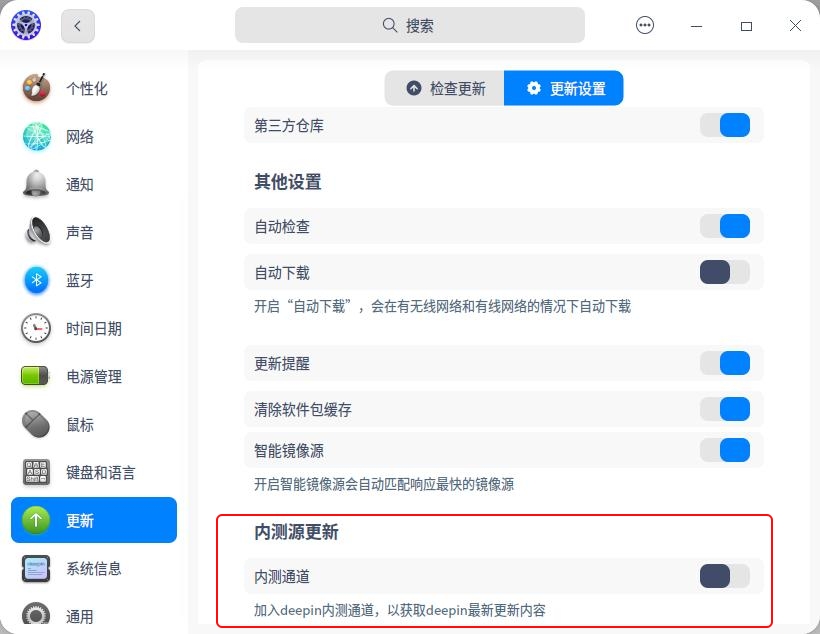
内测也是20.8,从控制中心——更新——更新设置打开,可以更新内核到6.1版本

截图_dde-control-center_20230404094206.jpg

Reply View the author
jjcui8595
deepin
2023-04-04 17:45
#6

如果不加入内测,可以更新到5.18.17

Reply View the author
WangZhongyun
deepin
2023-04-04 17:45
#7
188******05

请问内测是哪个版本,不加入内测仅仅只更新内核可行吗,我想有个稳定的开发环境,十分感谢你的解答

先加入内测源但不更新,安装新内核后关闭内测源试试

Reply View the author
16543389
deepin
2023-04-04 18:47
#8

我的电脑也是分辨率1024X768,怎么安装显卡驱动都不行。(我的电脑比较老,显卡是昂达9600GSO 384M)

Reply View the author
188******05
deepin
2023-04-04 19:44
#9
WangZhongyun

先加入内测源但不更新,安装新内核后关闭内测源试试

感谢解答,我更新到6.1内核后显卡驱动仍然安装失败,安装教程如下

https://bbs.deepin.org/post/238766

pkexec apt install nvidia-driver nvidia-settings nvidia-smi

报错信息

live-boot: core filesystems devices utils udev blockdev dns.
在处理时有错误发生:
 nvidia-kernel-dkms
 nvidia-driver
E: Sub-process /usr/bin/dpkg returned an error code (1)

请问有什么办法解决吗

Reply View the author
忘记、过去
deepin
2023-04-04 21:50
#10
188******05

感谢解答,我更新到6.1内核后显卡驱动仍然安装失败,安装教程如下

https://bbs.deepin.org/post/238766

pkexec apt install nvidia-driver nvidia-settings nvidia-smi

报错信息

live-boot: core filesystems devices utils udev blockdev dns.
在处理时有错误发生:
 nvidia-kernel-dkms
 nvidia-driver
E: Sub-process /usr/bin/dpkg returned an error code (1)

请问有什么办法解决吗

执行 uname -a 看看当前运行的内核版本是不是 6.1

如果确定 6.1 内核正常运行,需要执行 sudo apt autopurge linux-*-5.15.77* 卸载 5.15.77 内核。不然每次安装 nvidia dkms 驱动都会尝试为所有内核编译,有一个编译不过就报错了

Reply View the author
云的眼泪
deepin
2023-04-04 22:47
#11
16543389

我的电脑也是分辨率1024X768,怎么安装显卡驱动都不行。(我的电脑比较老,显卡是昂达9600GSO 384M)

这个显卡要安装340XX驱动,或者降低内核到5.10以下

Reply View the author
188******05
deepin
2023-04-05 04:35
#12
188******05

感谢解答,我更新到6.1内核后显卡驱动仍然安装失败,安装教程如下

https://bbs.deepin.org/post/238766

pkexec apt install nvidia-driver nvidia-settings nvidia-smi

报错信息

live-boot: core filesystems devices utils udev blockdev dns.
在处理时有错误发生:
 nvidia-kernel-dkms
 nvidia-driver
E: Sub-process /usr/bin/dpkg returned an error code (1)

请问有什么办法解决吗

十分感谢,但还是无法安装。

尝试两种方法

第一种是sudo apt install nvidia-driver 仍然报错,同上面

第二种是安装手动安装驱动,提示我没有cc

安装gcc出错

update-alternatives: 错误: 候选项路径 /usr/bin/gcc 不存在
dpkg: 处理软件包 gcc (--configure)时出错:
 已安装 gcc 软件包 post-installation 脚本 子进程返回错误状态 2
正在处理用于 man-db (2.8.5-3) 的触发器 ...
在处理时有错误发生:
 gcc
E: Sub-process /usr/bin/dpkg returned an error code (1)
Reply View the author
Ziggy
deepin
2023-04-05 06:01
#13

装的时候选预装显卡驱动,v20系列最新镜像支持6-30系的卡

Reply View the author
16543389
deepin
2023-04-05 16:26
#14
云的眼泪

这个显卡要安装340XX驱动,或者降低内核到5.10以下

我安装的是340.108,不行,那从哪里下载5.10内核,因我是开始玩Linux.

Reply View the author
云的眼泪
deepin
2023-04-05 17:22
#15

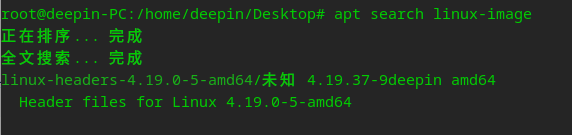
@16543389 软件仓库有,搜一下

linux-
image.png

image.png

image.png

image.png

Reply View the author
188******05
deepin
2023-04-05 22:23
#16

重装系统后更新内核手动安装驱动后解决,感谢大家帮忙

Reply View the author
生活
deepin
2023-04-11 05:43
#17
jjcui8595

如果不加入内测,可以更新到5.18.17

如何更新到这个版本内核

Reply View the author
jjcui8595
deepin
2023-04-11 06:18
#18
生活

如何更新到这个版本内核

sudo apt install linux-image-5.18.* linux-headers-5.18.*

Reply View the author
liuxiaohui1221
deepin
2024-01-27 19:09
#19
188******05

重装系统后更新内核手动安装驱动后解决,感谢大家帮忙

有详细手动安装步骤吗?

Reply View the author
xiao_辉++
deepin
2024-01-29 13:06
#20
Ziggy

装的时候选预装显卡驱动,v20系列最新镜像支持6-30系的卡

请问怎么预装呢,我的组装机,显卡3090,在V20.9系统上安装驱动一直失败,安装了显卡开机都是黑屏的

Reply View the author