中文
中文 
jjcui8595 deepin
2023-03-30 23:35 deepin 硬件较新,建议更新5.18内核,或者内测源更新6.1内核试试
Reply Like 1 View the author
 deepin
 硬件较新,建议更新5.18内核,或者内测源更新6.1内核试试

 deepin
 试试:sudo apt install linux-image-5.18.17-amd64-desktop-hwe linux-headers-5.18.17-amd64-desktop-hwe
不行就开启内测试试:sudo apt update && sudo apt install linux-image-6.1.12 linux-headers-6.1.12
 deepin
 按照楼上说的更新一下内核试试,如果不行,官方人员看到会回复的。
 deepin
 此前我也偶尔会碰到,后来只要一重装系统,第一时间就在电源管理那里,把“电脑进入待机模式”设为“从不”
 deepin
 闭源图形驱动的话,就用4楼的办法吧
Popular Ranking
ChangePopular Events
More


 necesito ayuda
问题:自动息屏后无法唤醒点亮屏幕,按键及电源键均无效,每次需要重启解决。
环境:
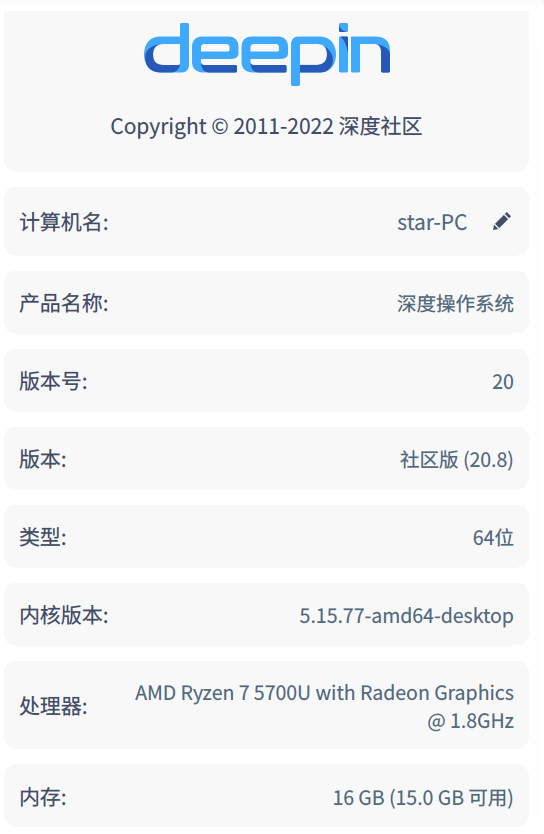
版本: Deepin GNU/Linux 20.8 Linux star-PC 5.15.77-amd64-desktop #1 SMP Wed Nov 9 15:59:34 CST 2022 x86_64 GNU/Linux
系统信息: