中文
中文 
jjcui8595 deepin
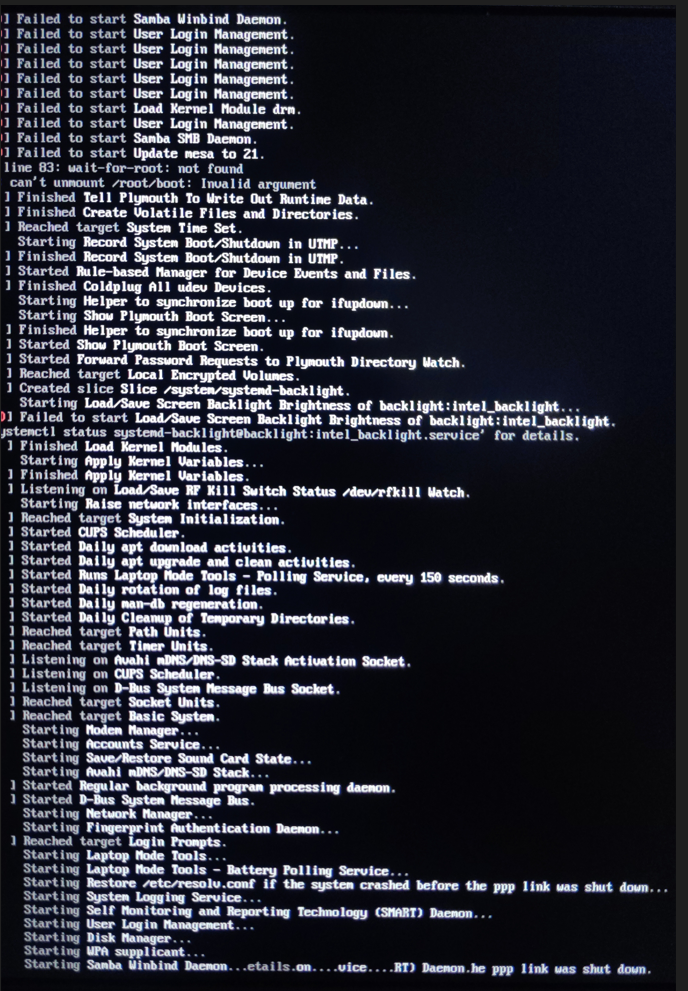
2023-03-24 18:49 deepin 多个错误提示,建议重新安装系统
Reply Like 0 View the author
 deepin
 多个错误提示,建议重新安装系统
 deepin
 多个错误提示,建议重新安装系统
重新安装后还是这个错误提示,有其他的方法吗
 deepin
 U盘安装。安装过程中没有报错。
完成安装后重启系统后就是截图画面了。
还没有进入账号创建的页面。
deepin 多个错误提示,建议重新安装系统
我使用了20.5/20.7.1/20.8三个镜像版本安装,都是相同的报错。
我之前使用的是20beta版本的镜像。
deepin 我使用了20.5/20.7.1/20.8三个镜像版本安装,都是相同的报错。
我之前使用的是20beta版本的镜像。
试试关闭BIOS安全引导,安装时选择手动分区
deepin 试试关闭BIOS安全引导,安装时选择手动分区
尝试过了,还是不行
deepin 确认你的安装介质(比如U盘)正常
deepin 确认你的安装介质(比如U盘)正常
使用的是iso中的系统盘刻录软件制作的系统U盘,制作过程没有异常信息提示
deepin 最终解决方案:
重新安装20Beta版本。该版本安装完后首次进入桌面后,一定要开启开机自动登录功能。
然后进行系统更新,更新至20.8版本。
Popular Ranking
ChangePopular Events
More


 necesito ayuda
【系统环境】
镜像版本:deepin-desktop-community-20.8-amd64.iso
CPU:intel i7
GPU:gtx 1060
【操作步骤】
完成系统安装后,根据提示重启电脑
【问题现象】