

 中文
中文 
云的眼泪 deepin
2023-03-14 16:14 deepin 在虚拟机中安装VM扩展工具,打开相应选项。
Reply Like 0 View the author
 deepin
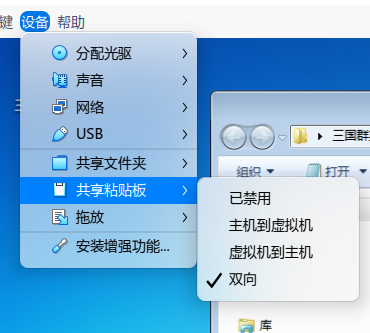
 在虚拟机中安装VM扩展工具,打开相应选项。
 deepin
 在虚拟机中安装VM扩展工具,打开相应选项。
已经安装,且打开,但是无法同步粘帖板,但是文件共享是可以得
文件共享感觉有点不同步,有点像不及时更新得感觉
deepin 我这儿没有问题,不过我的系统是20.8
deepin 我这儿没有问题,不过我的系统是20.8
以下是VM里面装得是DEEPIN 23得结果
yaoying@yaoying-PC:~/Desktop/VMwareTools-10.3.25-20206839/vmware-tools-distrib$ sudo ./vmware-install.pl
请输入密码:
验证成功
Creating a new VMware Tools installer database using the tar4 format.

Installing VMware Tools.

In which directory do you want to install the binary files?
[/usr/bin] /usr/bin

INPUT: [/usr/bin]

What is the directory that contains the init directories (rc0.d/ to rc6.d/)?
[/etc] /etc

INPUT: [/etc]

What is the directory that contains the init scripts?
[/etc/init.d] /etc/init.d

INPUT: [/etc/init.d]

In which directory do you want to install the daemon files?
[/usr/sbin] /usr/sbin

INPUT: [/usr/sbin]

In which directory do you want to install the library files?
[/usr/lib/vmware-tools] /usr/lib/vmware-tools

INPUT: [/usr/lib/vmware-tools]

The path "/usr/lib/vmware-tools" does not exist currently. This program is
going to create it, including needed parent directories. Is this what you want?
[yes] yes

INPUT: [yes]

In which directory do you want to install the documentation files?
[/usr/share/doc/vmware-tools] /usr/share/doc/vmware-tools

INPUT: [/usr/share/doc/vmware-tools]

The path "/usr/share/doc/vmware-tools" does not exist currently. This program
is going to create it, including needed parent directories. Is this what you
want? [yes] yes

INPUT: [yes]

The installation of VMware Tools 10.3.25 build-20206839 for Linux completed
successfully. You can decide to remove this software from your system at any
time by invoking the following command: "/usr/bin/vmware-uninstall-tools.pl".

Before running VMware Tools for the first time, you need to configure it by
invoking the following command: "/usr/bin/vmware-config-tools.pl". Do you want
this program to invoke the command for you now? [yes] yes

INPUT: [yes]

Initializing...

Segmentation fault

Making sure services for VMware Tools are stopped.

Stopping VMware Tools services in the virtual machine:
   Guest operating system daemon:                                      done
   VMware User Agent (vmware-user):                                    done
   Unmounting HGFS shares:                                             done
   Guest filesystem driver:                                            done


The installation status of vmsync could not be determined.
Skippinginstallation.

The installation status of vmci could not be determined. Skippinginstallation.

The installation status of vsock could not be determined. Skippinginstallation.


The installation status of vmxnet3 could not be determined.
Skippinginstallation.

The installation status of pvscsi could not be determined.
Skippinginstallation.

The installation status of vmmemctl could not be determined.
Skippinginstallation.

The VMware Host-Guest Filesystem allows for shared folders between the host OS
and the guest OS in a Fusion or Workstation virtual environment.  Do you wish
to enable this feature? [yes] yes

INPUT: [yes]

The vmxnet driver is no longer supported on kernels 3.3 and greater. Please
upgrade to a newer virtual NIC. (e.g., vmxnet3 or e1000e)

The vmblock enables dragging or copying files between host and guest in a
Fusion or Workstation virtual environment.  Do you wish to enable this feature?
[yes] yes

INPUT: [yes]


Skipping configuring automatic kernel modules as no drivers were installed by
this installer.


Disabling timer-based audio scheduling in pulseaudio.

Do you want to enable Guest Authentication (vgauth)? [yes] yes

INPUT: [yes]


Detected X server version 1.21.1


Distribution provided drivers for Xorg X server are used.

Skipping X configuration because X drivers are not included.


Skipping rebuilding initrd boot image for kernel as no drivers to be included
in boot image were installed by this installer.

The configuration of VMware Tools 10.3.25 build-20206839 for Linux for this
running kernel completed successfully.

You must restart your X session before any mouse or graphics changes take
effect.

To enable advanced X features (e.g., guest resolution fit, drag and drop, and
file and text copy/paste), you will need to do one (or more) of the following:
1. Manually start /usr/bin/vmware-user
2. Log out and log back into your desktop session
3. Restart your X session.

Found VMware Tools CDROM mounted at /media/yaoying/VMware Tools. Ejecting
device /dev/sr0 ...
Enjoy,

--the VMware team

 deepin
 一直用virtualbox从没有出过问题,没有用过vmware.上面的演示是vbox的.
deepin 一直用virtualbox从没有出过问题,没有用过vmware.上面的演示是vbox的.
在virtualbox
里装一个DEEPIN V23 试试
deepin 在virtualbox
里装一个DEEPIN V23 试试
如果你真想用deepin v23,建议不要安装在虚拟机上,可能会影响体验.
刚好今天家里一台电脑从20.9平滑升级到了v23,感觉还不错.如果使用没有什么问题,准备有空了把家里其它两台电脑也升级成v23,虚拟机我只安装一个win7,偶尔用一下.大多数时间还是主力机直接上deepin.这样反而轻松,
折腾过很多版本linux,现在不想折腾了,用deepin反而省心了不少.
deepin 如果你真想用deepin v23,建议不要安装在虚拟机上,可能会影响体验.
刚好今天家里一台电脑从20.9平滑升级到了v23,感觉还不错.如果使用没有什么问题,准备有空了把家里其它两台电脑也升级成v23,虚拟机我只安装一个win7,偶尔用一下.大多数时间还是主力机直接上deepin.这样反而轻松,
折腾过很多版本linux,现在不想折腾了,用deepin反而省心了不少.
我一直用DEEPIN好多年里,我主物理机器也是DEEPIN ,VM也是
deepin sudo apt install open-vm-tools-desktop
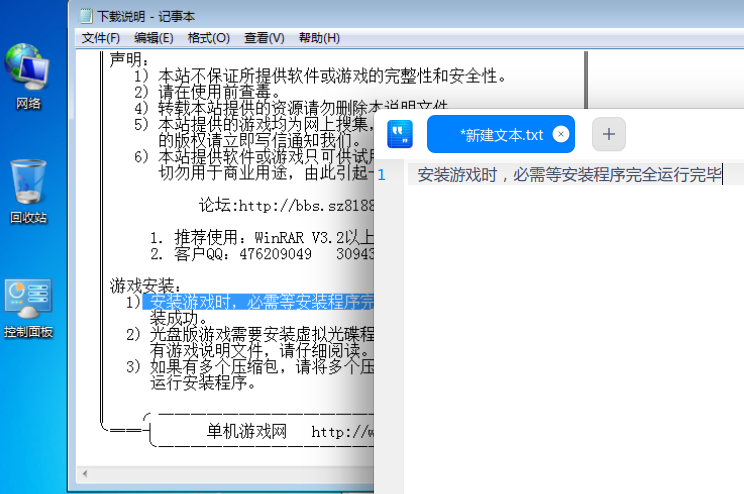
感谢@sshnuke史努克亲王 群友提供以上安装VM TOOL测试,功能正常,粘帖文本主机-虚拟机同步共享正常
 deepin
,暂时用不到
赞
Popular Ranking
ChangePopular Events
More


 unable to type in Deepin ID login menu
deepinV23Alpha 2(Unstable) VM虚拟机宿主机与主系统无法共享剪贴板
感谢@sshnuke史努克亲王 群友提供以上安装VM TOOL测试,功能正常,粘帖文本主机-虚拟机同步共享正常