

 中文
中文 
青稚 deepin
2023-03-10 02:37 deepin 这个问题,我不太懂,你看看其他方法呢?
如果不行,就是深度魔改的原因。
Reply Like 0 View the author
 deepin
 这个问题,我不太懂,你看看其他方法呢?
如果不行,就是深度魔改的原因。

 deepin
 source * #即时生效
 deepin
 goland的GOPATH要在它自己的设置里指定
 deepin
 export GOPATH="$HOME/.go"
export PATH="HOME/.go/bin:HOME/.go/current/bin:$PATH"
你的这个 .go 是隐藏文件?
我的只配了 export PATH=HOME/ruanj/go/bin:PATH
 deepin
 你在bashrc里配置的环境变量只有bash会加载
zshrc里面的环境变量只有zsh会加载
你可以尝试在~/.config/environment.d/envvars.conf添加环境变量(文件名可以自己起)

 deepin
 需要重启一下,source 之后只能在本窗口生效
deepin 看 3 楼回复,需要在 Goland 内设置的。
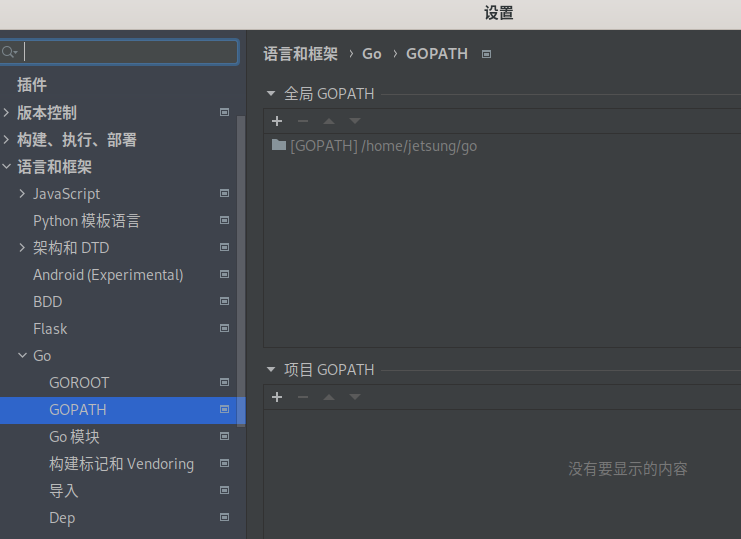
我现在的开发环境是,新建一个 ~/.env 文件,开发环境都在里面设置了。然后在 .zshrc 里面引入。
if [ -f ~/.env ]; then
    . ~/.env
fi
这样的好处是,如果切换回 bash 了,同样在 .bashrc 里面引入上面的内容即可。方便又省事。。。
我前几个星期撸了个 bash 脚本,管理 go 版本的:
https://jihulab.com/jetsung/golang-install
欢迎尝试
Popular Ranking
ChangePopular Events
More


 unable to type in Deepin ID login menu
我使用JetBrains Toolbox 启动goland 没法获取GOPATH环境变量,但是在终端命令行运行确实可以的
百度了一下 发现有交互式和非交互式的区别
但是我这几个文件都写了
~/.bashrc
~/.profile
~/.zprofile
~/.zshrc
内容:
export GOPATH="$HOME/.go"
export PATH="$HOME/.go/bin:$HOME/.go/current/bin:$PATH"