

 中文
中文 
fax928 deepin
2023-02-14 21:40 deepin Q&A Team
蓝牙试试打命令:sudo apt install bluetooth (安装蓝牙)
再按ctrl + alt + esc呼出系统监视器左上角系统服务里找bluetooth,右击启动还有设置启动方式为自动
Reply Like 0 View the author
deepin 蓝牙试试打命令:sudo apt install bluetooth (安装蓝牙)
再按ctrl + alt + esc呼出系统监视器左上角系统服务里找bluetooth,右击启动还有设置启动方式为自动

 deepin
 支持,这也是用户最容易体验到的几个问题点。包括启动器的所有应用和左侧列表的快速跳转。

 deepin
 蓝牙试试打命令:sudo apt install bluetooth (安装蓝牙)
再按ctrl + alt + esc呼出系统监视器左上角系统服务里找bluetooth,右击启动还有设置启动方式为自动
谢谢,试一下,昨天sudo apt install bluetooth还是没用
deepin 支持,这也是用户最容易体验到的几个问题点。包括启动器的所有应用和左侧列表的快速跳转。
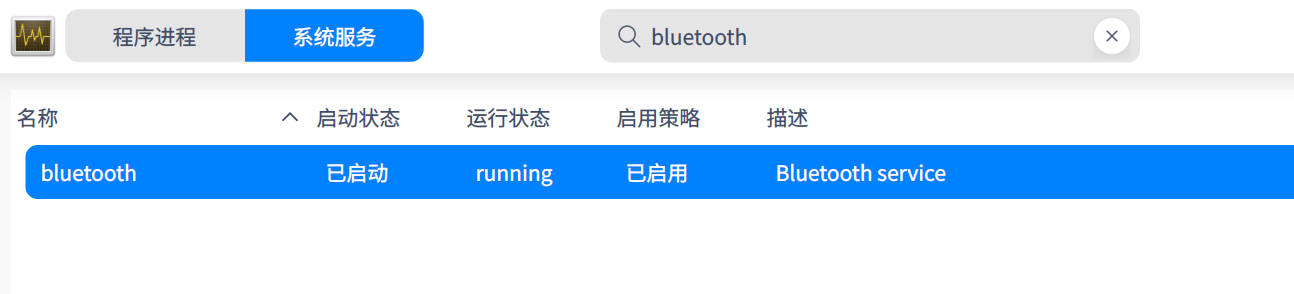
系统已经自动启用了,但有时开机有,有时没有。大概率是没有的
deepin 支持,这也是用户最容易体验到的几个问题点。包括启动器的所有应用和左侧列表的快速跳转。
是的,像依赖那些反正一时也解决不了,还不如现解决这些用户时候用到的
deepin 传送门
https://bbs.deepin.org/zh/post/251278
再试试。
deepin 传送门
https://bbs.deepin.org/zh/post/251278
再试试。
好的
deepin 传送门
https://bbs.deepin.org/zh/post/251278
再试试。
xiaohu@deepin:$ sudo apt install inxi -y && inxi -F && cat /etc/apt/sources.list /etc/apt/sources.list.d/*.list |grep -v ^#60Hz
正在读取软件包列表... 完成
正在分析软件包的依赖关系树... 完成
正在读取状态信息... 完成
inxi 已经是最新版 (3.3.15-1-1)。
下列软件包是自动安装的并且现在不需要了:
genisoimage syslinux syslinux-common
使用'sudo apt autoremove'来卸载它(它们)。
升级了 0 个软件包,新安装了 0 个软件包,要卸载 0 个软件包,有 0 个软件包未被升级。
System:
Host: deepin Kernel: 5.18.17-amd64-desktop-hwe arch: x86_64 bits: 64
Desktop: Deepin v: 23 Distro: Deepin 23
Machine:
Type: Desktop System: ASUS product: N/A v: N/A serial:
Mobo: ASUSTeK model: TUF GAMING B550M-PLUS WIFI II v: Rev X.0x
serial: UEFI: American Megatrends v: 2806
date: 10/27/2022
CPU:
Info: 8-core model: AMD Ryzen 7 5800X bits: 64 type: MT MCP cache:
L2: 4 MiB
Speed (MHz): avg: 2197 min/max: 2200/4850 cores: 1: 2199 2: 2198 3: 2199
4: 2198 5: 2196 6: 2199 7: 2199 8: 2196 9: 2194 10: 2199 11: 2199 12: 2198
13: 2200 14: 2199 15: 2196 16: 2195
Graphics:
Device-1: AMD Navi 23 [Radeon RX 6600/6600 XT/6600M] driver: amdgpu
v: kernel
Device-2: Realtek USB Camera type: USB driver: snd-usb-audio,uvcvideo
Display: x11 server: X.Org v: 1.21.1.3 with: Xwayland v: 22.1.1 driver:
X: loaded: amdgpu unloaded: fbdev,modesetting,radeon,vesa gpu: amdgpu
resolution: 3840x2160
OpenGL: renderer: AMD Radeon RX 6600 XT (DIMGREY_CAVEFISH DRM 3.46.0
5.18.17-amd64-desktop-hwe LLVM 13.0.1)
v: 4.6 Mesa 21.3.8
Audio:
Device-1: AMD Navi 21 HDMI Audio [Radeon RX 6800/6800 XT / 6900 XT]
driver: snd_hda_intel
Device-2: AMD Starship/Matisse HD Audio driver: snd_hda_intel
Device-3: JMTek LLC. USB PnP Audio Device(EEPROM) type: USB
driver: hid-generic,snd-usb-audio,usbhid
Device-4: Realtek USB Camera type: USB driver: snd-usb-audio,uvcvideo
Sound Server-1: ALSA v: k5.18.17-amd64-desktop-hwe running: yes
Sound Server-2: PulseAudio v: 15.0 running: yes
Network:
Device-1: MEDIATEK driver: mt7921e
IF: wlp5s0 state: up mac: 34:6f:24:2a:2a:e5
Device-2: Realtek RTL8125 2.5GbE driver: r8169
IF: enp6s0 state: up speed: 100 Mbps duplex: full mac: 50:eb:f6:b3:9e:65
Bluetooth:
Device-1: IMC Networks Wireless_Device type: USB driver: btusb
Report: hciconfig ID: hci0 rfk-id: 0 state: down
bt-service: enabled,running rfk-block: hardware: no software: no
address: 00:00:00:00:00:00
Drives:
Local Storage: total: 4.9 TiB used: 55.22 GiB (1.1%)
ID-1: /dev/nvme0n1 vendor: Seagate model: XPG GAMMIX S50 Lite
size: 476.94 GiB
ID-2: /dev/sda vendor: Colorful model: SL500 512GB size: 476.94 GiB
ID-3: /dev/sdb vendor: Colorful model: SL500 360GB size: 335.35 GiB
ID-4: /dev/sdc vendor: Seagate model: ST4000DM004-2CV104 size: 3.64 TiB
Partition:
ID-1: / size: 156.43 GiB used: 29.02 GiB (18.5%) fs: ext4 dev: /dev/sda2
ID-2: /home size: 300.54 GiB used: 26.2 GiB (8.7%) fs: btrfs
dev: /dev/sda4
Swap:
ID-1: swap-1 type: partition size: 16 GiB used: 0 KiB (0.0%) dev: /dev/sda3
Sensors:
System Temperatures: cpu: N/A mobo: N/A gpu: amdgpu temp: 29.0 C
Fan Speeds (RPM): N/A gpu: amdgpu fan: 0
Info:
Processes: 401 Uptime: 47m Memory: 31.26 GiB used: 5.48 GiB (17.5%)
Shell: Bash inxi: 3.3.15
deb https://community-packages.deepin.com/beige/ beige main commercial community
deb https://com-store-packages.uniontech.com/appstorev23 beige appstore
deb https://pro-driver-packages.uniontech.com eagle non-free
deb https://community-packages.deepin.com/driver/ driver non-free
deepin xiaohu@deepin:$ sudo apt install inxi -y && inxi -F && cat /etc/apt/sources.list /etc/apt/sources.list.d/*.list |grep -v ^#60Hz
正在读取软件包列表... 完成
正在分析软件包的依赖关系树... 完成
正在读取状态信息... 完成
inxi 已经是最新版 (3.3.15-1-1)。
下列软件包是自动安装的并且现在不需要了:
genisoimage syslinux syslinux-common
使用'sudo apt autoremove'来卸载它(它们)。
升级了 0 个软件包,新安装了 0 个软件包,要卸载 0 个软件包,有 0 个软件包未被升级。
System:
Host: deepin Kernel: 5.18.17-amd64-desktop-hwe arch: x86_64 bits: 64
Desktop: Deepin v: 23 Distro: Deepin 23
Machine:
Type: Desktop System: ASUS product: N/A v: N/A serial:
Mobo: ASUSTeK model: TUF GAMING B550M-PLUS WIFI II v: Rev X.0x
serial: UEFI: American Megatrends v: 2806
date: 10/27/2022
CPU:
Info: 8-core model: AMD Ryzen 7 5800X bits: 64 type: MT MCP cache:
L2: 4 MiB
Speed (MHz): avg: 2197 min/max: 2200/4850 cores: 1: 2199 2: 2198 3: 2199
4: 2198 5: 2196 6: 2199 7: 2199 8: 2196 9: 2194 10: 2199 11: 2199 12: 2198
13: 2200 14: 2199 15: 2196 16: 2195
Graphics:
Device-1: AMD Navi 23 [Radeon RX 6600/6600 XT/6600M] driver: amdgpu
v: kernel
Device-2: Realtek USB Camera type: USB driver: snd-usb-audio,uvcvideo
Display: x11 server: X.Org v: 1.21.1.3 with: Xwayland v: 22.1.1 driver:
X: loaded: amdgpu unloaded: fbdev,modesetting,radeon,vesa gpu: amdgpu
resolution: 3840x2160
OpenGL: renderer: AMD Radeon RX 6600 XT (DIMGREY_CAVEFISH DRM 3.46.0
5.18.17-amd64-desktop-hwe LLVM 13.0.1)
v: 4.6 Mesa 21.3.8
Audio:
Device-1: AMD Navi 21 HDMI Audio [Radeon RX 6800/6800 XT / 6900 XT]
driver: snd_hda_intel
Device-2: AMD Starship/Matisse HD Audio driver: snd_hda_intel
Device-3: JMTek LLC. USB PnP Audio Device(EEPROM) type: USB
driver: hid-generic,snd-usb-audio,usbhid
Device-4: Realtek USB Camera type: USB driver: snd-usb-audio,uvcvideo
Sound Server-1: ALSA v: k5.18.17-amd64-desktop-hwe running: yes
Sound Server-2: PulseAudio v: 15.0 running: yes
Network:
Device-1: MEDIATEK driver: mt7921e
IF: wlp5s0 state: up mac: 34:6f:24:2a:2a:e5
Device-2: Realtek RTL8125 2.5GbE driver: r8169
IF: enp6s0 state: up speed: 100 Mbps duplex: full mac: 50:eb:f6:b3:9e:65
Bluetooth:
Device-1: IMC Networks Wireless_Device type: USB driver: btusb
Report: hciconfig ID: hci0 rfk-id: 0 state: down
bt-service: enabled,running rfk-block: hardware: no software: no
address: 00:00:00:00:00:00
Drives:
Local Storage: total: 4.9 TiB used: 55.22 GiB (1.1%)
ID-1: /dev/nvme0n1 vendor: Seagate model: XPG GAMMIX S50 Lite
size: 476.94 GiB
ID-2: /dev/sda vendor: Colorful model: SL500 512GB size: 476.94 GiB
ID-3: /dev/sdb vendor: Colorful model: SL500 360GB size: 335.35 GiB
ID-4: /dev/sdc vendor: Seagate model: ST4000DM004-2CV104 size: 3.64 TiB
Partition:
ID-1: / size: 156.43 GiB used: 29.02 GiB (18.5%) fs: ext4 dev: /dev/sda2
ID-2: /home size: 300.54 GiB used: 26.2 GiB (8.7%) fs: btrfs
dev: /dev/sda4
Swap:
ID-1: swap-1 type: partition size: 16 GiB used: 0 KiB (0.0%) dev: /dev/sda3
Sensors:
System Temperatures: cpu: N/A mobo: N/A gpu: amdgpu temp: 29.0 C
Fan Speeds (RPM): N/A gpu: amdgpu fan: 0
Info:
Processes: 401 Uptime: 47m Memory: 31.26 GiB used: 5.48 GiB (17.5%)
Shell: Bash inxi: 3.3.15
deb https://community-packages.deepin.com/beige/ beige main commercial community
deb https://com-store-packages.uniontech.com/appstorev23 beige appstore
deb https://pro-driver-packages.uniontech.com eagle non-free
deb https://community-packages.deepin.com/driver/ driver non-free
打完命令控制中心蓝牙出来了吗?
deepin 传送门
https://bbs.deepin.org/zh/post/251278
再试试。
我的出现是下面的内容,但蓝牙还是没有解决
xiaohu@deepin:$ sudo apt install inxi -y && inxi -F && cat /etc/apt/sources.list /etc/apt/sources.list.d/*.list |grep -v ^#60Hz
正在读取软件包列表... 完成
正在分析软件包的依赖关系树... 完成
正在读取状态信息... 完成
inxi 已经是最新版 (3.3.15-1-1)。
下列软件包是自动安装的并且现在不需要了:
genisoimage syslinux syslinux-common
使用'sudo apt autoremove'来卸载它(它们)。
升级了 0 个软件包,新安装了 0 个软件包,要卸载 0 个软件包,有 0 个软件包未被升级。
System:
Host: deepin Kernel: 5.18.17-amd64-desktop-hwe arch: x86_64 bits: 64
Desktop: Deepin v: 23 Distro: Deepin 23
Machine:
Type: Desktop System: ASUS product: N/A v: N/A serial:
Mobo: ASUSTeK model: TUF GAMING B550M-PLUS WIFI II v: Rev X.0x
serial: UEFI: American Megatrends v: 2806
date: 10/27/2022
CPU:
Info: 8-core model: AMD Ryzen 7 5800X bits: 64 type: MT MCP cache:
L2: 4 MiB
Speed (MHz): avg: 2385 min/max: 2200/4850 cores: 1: 2879 2: 2876 3: 2199
4: 2195 5: 2198 6: 2196 7: 2199 8: 2198 9: 2196 10: 2199 11: 2879 12: 2877
13: 2498 14: 2196 15: 2195 16: 2194
Graphics:
Device-1: AMD Navi 23 [Radeon RX 6600/6600 XT/6600M] driver: amdgpu
v: kernel
Device-2: Realtek USB Camera type: USB driver: snd-usb-audio,uvcvideo
Display: x11 server: X.Org v: 1.21.1.3 with: Xwayland v: 22.1.1 driver:
X: loaded: amdgpu unloaded: fbdev,modesetting,radeon,vesa gpu: amdgpu
resolution: 3840x2160
OpenGL: renderer: AMD Radeon RX 6600 XT (DIMGREY_CAVEFISH DRM 3.46.0
5.18.17-amd64-desktop-hwe LLVM 13.0.1)
v: 4.6 Mesa 21.3.8
Audio:
Device-1: AMD Navi 21 HDMI Audio [Radeon RX 6800/6800 XT / 6900 XT]
driver: snd_hda_intel
Device-2: AMD Starship/Matisse HD Audio driver: snd_hda_intel
Device-3: JMTek LLC. USB PnP Audio Device(EEPROM) type: USB
driver: hid-generic,snd-usb-audio,usbhid
Device-4: Realtek USB Camera type: USB driver: snd-usb-audio,uvcvideo
Sound Server-1: ALSA v: k5.18.17-amd64-desktop-hwe running: yes
Sound Server-2: PulseAudio v: 15.0 running: yes
Network:
Device-1: MEDIATEK driver: mt7921e
IF: wlp5s0 state: up mac: 34:6f:24:2a:2a:e5
Device-2: Realtek RTL8125 2.5GbE driver: r8169
IF: enp6s0 state: up speed: 100 Mbps duplex: full mac: 50:eb:f6:b3:9e:65
Bluetooth:
Device-1: IMC Networks Wireless_Device type: USB driver: btusb
Report: hciconfig ID: hci0 rfk-id: 0 state: down
bt-service: enabled,running rfk-block: hardware: no software: no
address: 00:00:00:00:00:00
Drives:
Local Storage: total: 4.9 TiB used: 55.26 GiB (1.1%)
ID-1: /dev/nvme0n1 vendor: Seagate model: XPG GAMMIX S50 Lite
size: 476.94 GiB
ID-2: /dev/sda vendor: Colorful model: SL500 512GB size: 476.94 GiB
ID-3: /dev/sdb vendor: Colorful model: SL500 360GB size: 335.35 GiB
ID-4: /dev/sdc vendor: Seagate model: ST4000DM004-2CV104 size: 3.64 TiB
Partition:
ID-1: / size: 156.43 GiB used: 29.07 GiB (18.6%) fs: ext4 dev: /dev/sda2
ID-2: /home size: 300.54 GiB used: 26.19 GiB (8.7%) fs: btrfs
dev: /dev/sda4
Swap:
ID-1: swap-1 type: partition size: 16 GiB used: 0 KiB (0.0%) dev: /dev/sda3
Sensors:
System Temperatures: cpu: N/A mobo: N/A gpu: amdgpu temp: 30.0 C
Fan Speeds (RPM): N/A gpu: amdgpu fan: 0
Info:
Processes: 400 Uptime: 51m Memory: 31.26 GiB used: 5.41 GiB (17.3%)
Shell: Bash inxi: 3.3.15
deb https://community-packages.deepin.com/beige/ beige main commercial community
deb https://com-store-packages.uniontech.com/appstorev23 beige appstore
deb https://pro-driver-packages.uniontech.com eagle non-free
deb https://community-packages.deepin.com/driver/ driver non-free
xiaohu@deepin:~$
deepin 打完命令控制中心蓝牙出来了吗?
出来了而且也是启用状态
deepin 再装个blueman试试,sudo apt install blueman,blueman里显示什么?
deepin 右键任务栏 任务栏设置里把蓝牙勾上
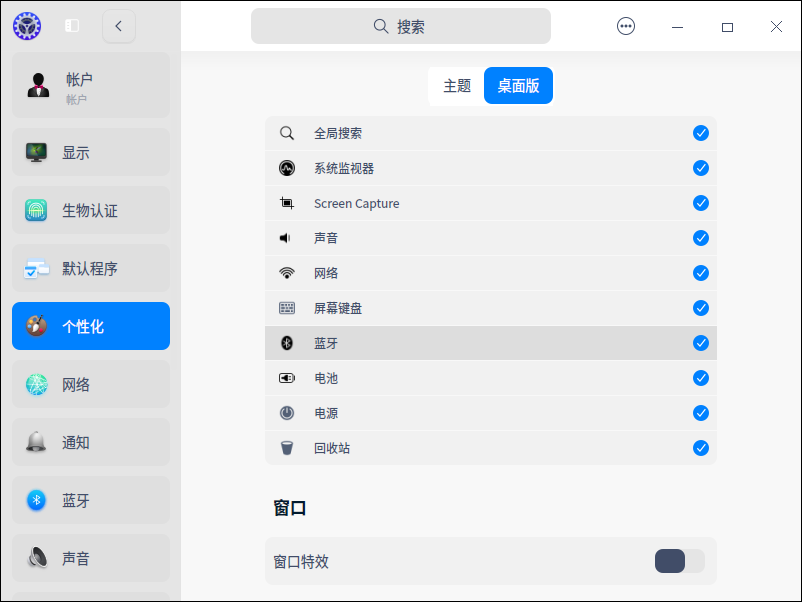
deepin 右键任务栏 任务栏设置里把蓝牙勾上
没有蓝牙选项
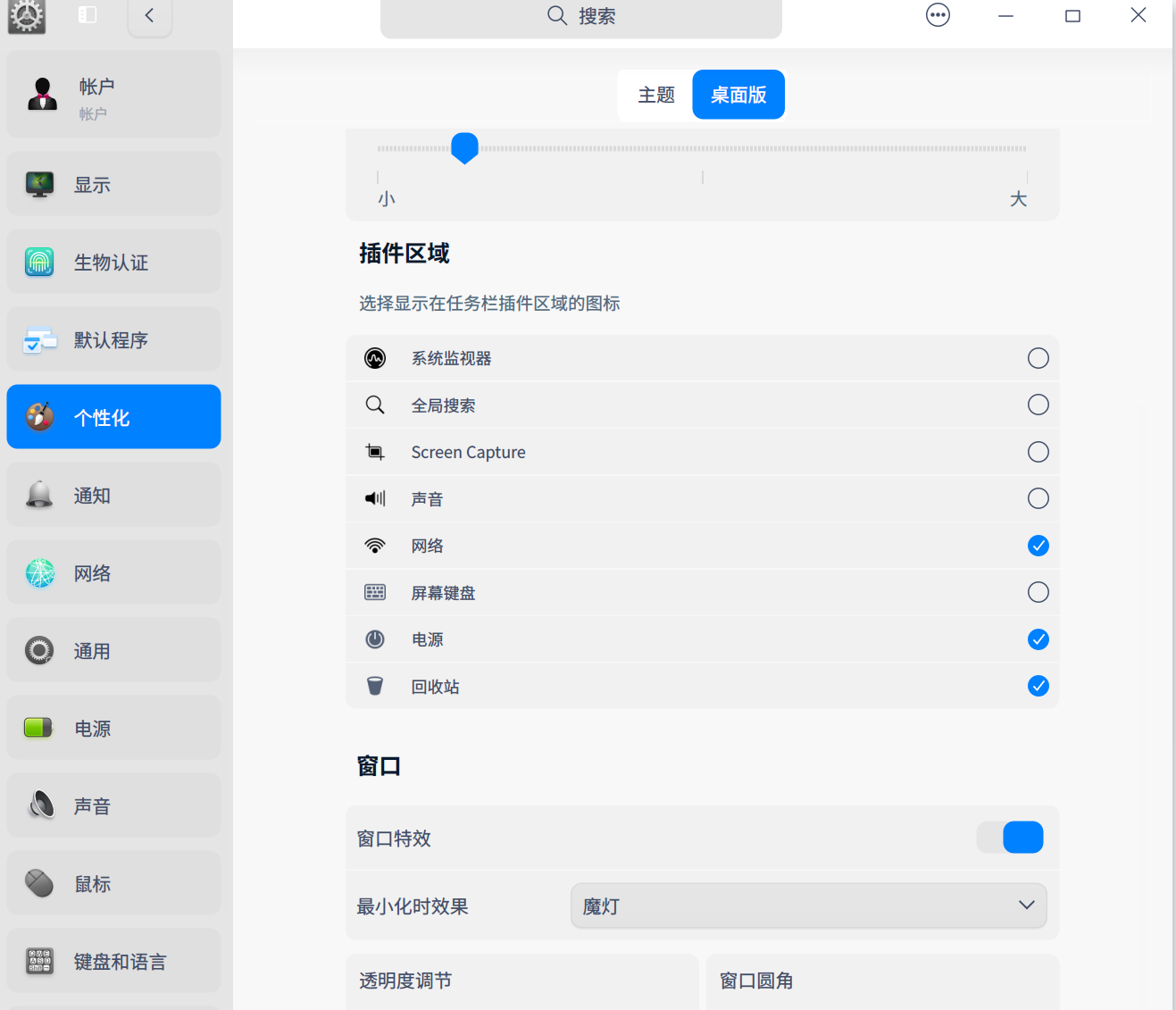
deepin 不行重启看看,这框子里没蓝牙就不清楚怎么办了。
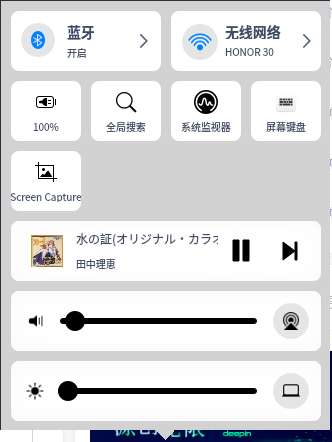
deepin 不行重启看看,这框子里没蓝牙就不清楚怎么办了。
好的,谢谢 试一下
deepin 不行重启看看,这框子里没蓝牙就不清楚怎么办了。
重启还是没有,暂时也就只能先这样了
deepin 重启还是没有,暂时也就只能先这样了
你这机子比较新吗?
deepin 你这机子比较新吗?
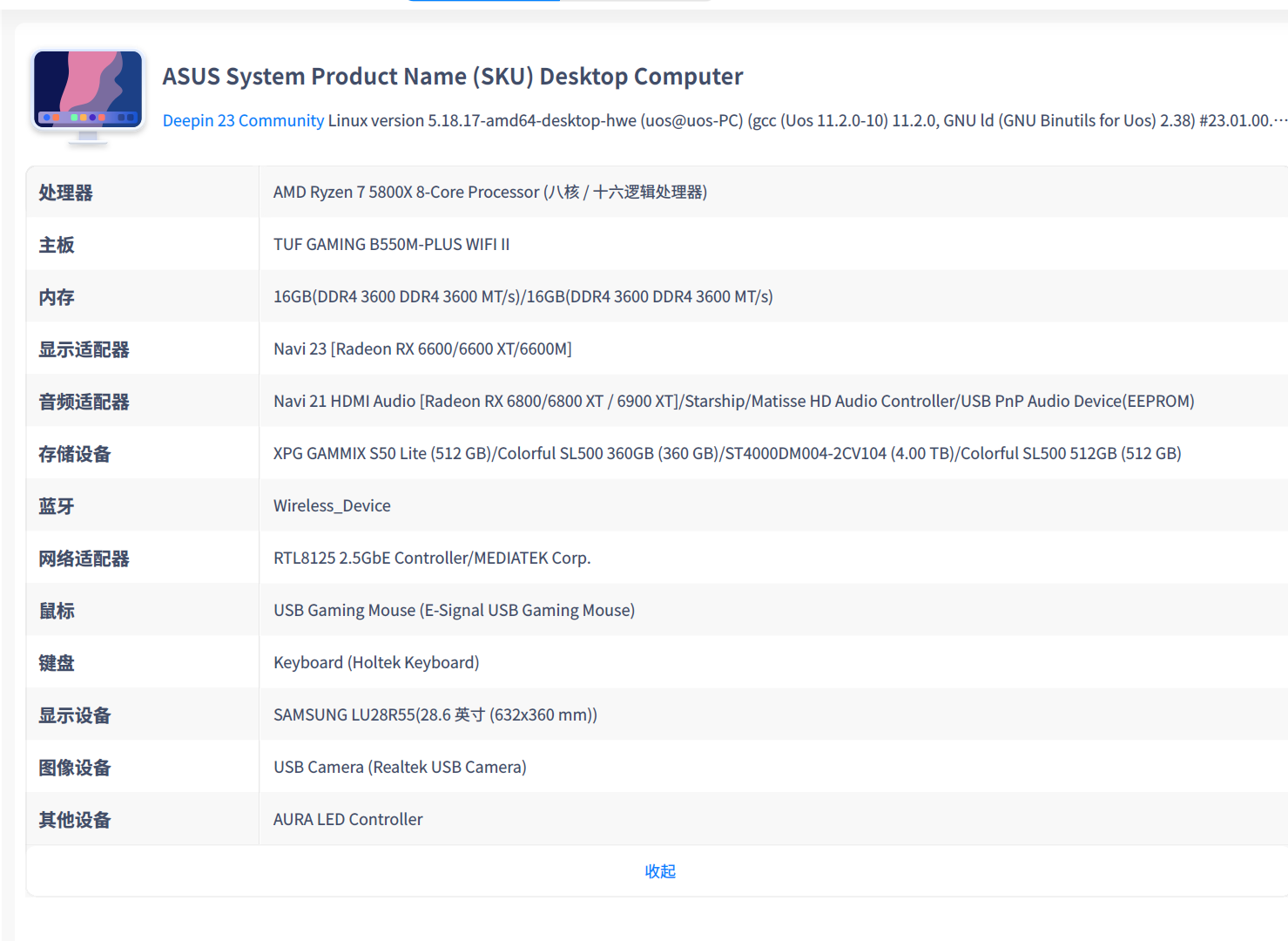
也不是很新吧,这是硬件

亲-感谢您的反馈哦,以上问题为已知问题,我们会尽快在后续的版本中推送修复哦
Popular Ranking
ChangePopular Events
More


 is Deepin 25 using OSTree?
现在deepin v23最麻烦的是依赖,但这个问题我想一下也完全解决不了。那还不如先解决这几个问题
1:时尚模式下,右边任务栏的问题
点击那里,很久都没有反应,要完全退出软件有时还真麻烦。建议还不如,把收缩起来同一软件的图标就会在左侧任务栏,同一软件的图标就合并
2:启动器里面没法固定
下次重启后,就会全屏展示。
3:蓝牙问题,时有时无
5:要能跟deepin20系列一样,开机就能自动挂载好ntfs分区就好了。
暂时也没有什么需求了,因为依赖一下也不可能完全解决。