

 中文
中文 
蔡EEPIN deepin
2023-02-02 06:11 deepin for i in $(seq 1 10);do echo $i;done 可以用这种
Reply Like 1 View the author
 deepin
 for i in $(seq 1 10);do echo $i;done 可以用这种

 deepin
 这是因为底层 shell 不同。在 Debian/Ubuntu 系统中,sh 指向 dash ,而不是 bash 。下面的命令可以查询你的系统底层 shell :
ls -l /bin/sh
dash 和 bash 在语法上有些差别,比如 bash 支持大括号扩展,而 dash 不支持。
dash -c 'echo {0..9}'        # 照原样输出
bash -c 'echo {0..9}'        # 将数字展开
有关 dash 和 bash 的更多差别,参见 https://wiki.ubuntu.com/DashAsBinSh
deepin 这是因为底层 shell 不同。在 Debian/Ubuntu 系统中,sh 指向 dash ,而不是 bash 。下面的命令可以查询你的系统底层 shell :
ls -l /bin/sh
dash 和 bash 在语法上有些差别,比如 bash 支持大括号扩展,而 dash 不支持。
dash -c 'echo {0..9}'        # 照原样输出
bash -c 'echo {0..9}'        # 将数字展开
有关 dash 和 bash 的更多差别,参见 https://wiki.ubuntu.com/DashAsBinSh
很高兴收到您的回复,经过提醒,发现/bin/sh确实软连接指向dash
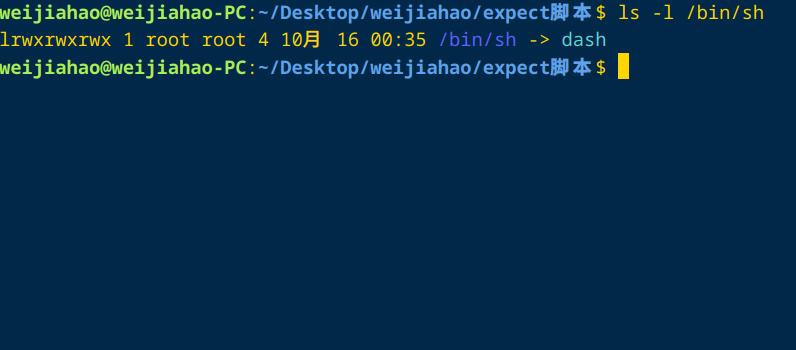
已成功解决此问题,再次感谢您的解答
deepin for i in $(seq 1 10);do echo $i;done 可以用这种
感谢您的解答,已经找到问题的原因,您的方法也是一个非常不错的解决办法,再次 表示感谢
deepin 更传统的用法是:
for i in `seq 1 10`; do echo $i; done
在被Debian/Ubuntu的sh坑了一把之后, 在所有脚本程序里都把/bin/sh改成了/bin/bash. 这样无论是Redhat系, 还是Debian系, 同样的脚本都可以正常运行。

 deepin
 写个shebang
#!/bin/bash
deepin 更传统的用法是:
for i in `seq 1 10`; do echo $i; done
在被Debian/Ubuntu的sh坑了一把之后, 在所有脚本程序里都把/bin/sh改成了/bin/bash. 这样无论是Redhat系, 还是Debian系, 同样的脚本都可以正常运行。
感谢,这是一个不错的建议
deepin 写个shebang
#!/bin/bash
感谢坛友的回复,/bin/bash确实是更规范的写法
Popular Ranking
ChangePopular Events
More


 is Deepin 25 using OSTree?
使用deepin写shell脚本,执行后得到非期望的结果,内容及执行结果如下:
但是在centos中,{}会正常展开,得到期望的结果:
请问下如何让deepin中的脚本得出和cenots脚本正确的结果