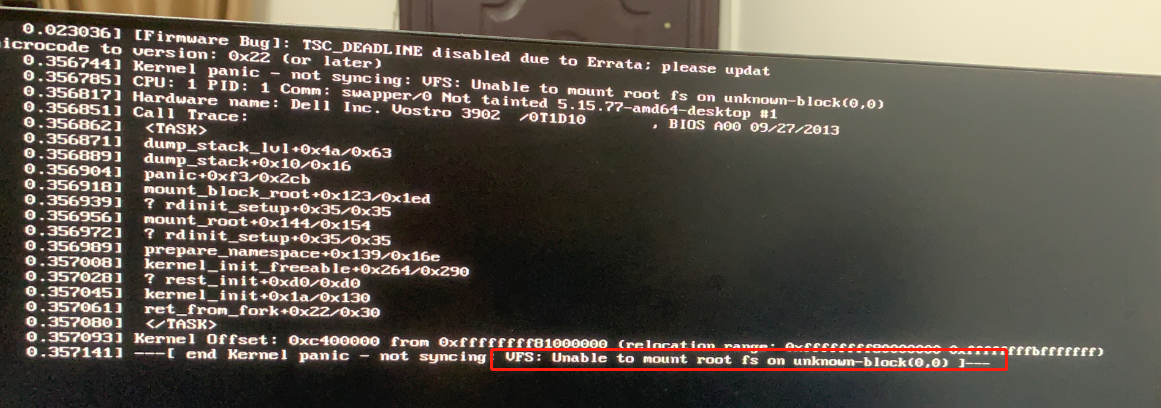
[Freezing/Lagging] 开机无法正常进系统
Tofloor
poster avatar
增遇青水
deepin
2023-01-11 17:06
Author

【系统环境】
处理器 : Intel(R) Pentium(R) CPU G3220 @ 3.00GHz (双核 / 双逻辑处理器)
主板 : 0T1D10
内存 : 4GB(8JTF51264AZ-1G6E1 DDR3 1600MHz (0.6ns))/2GB(99P5474-034.A00LF DDR3 1600MHz (0.6ns))
显示适配器 : GF119 [GeForce GT 620 OEM]
音频适配器 : 8 Series/C220 Series Chipset High Definition Audio Controller/GF119 HDMI Audio Controller
存储设备 : faspeed K5-256G (256 GB)/ST500DM002-1BD142 (500 GB)
网络适配器 : RTL8111/8168/8411 PCI Express Gigabit Ethernet Controller
鼠标 : USB Optical Mouse (Lenovo USB Optical Mouse)
键盘 : USB Keyboard (SiGma Micro USB Keyboard)
显示设备 : C2462HY(23.8 英寸(53cm X 29cm))
光驱 : DVD-ROM DH50N

【操作步骤】
开机后无法正常进系统,必须强制重启后,选择第二项里面的任何一项都能正常进入系统。

【问题现象】

微信图片_20230111090523.jpg

Reply Favorite View the author
All Replies
吉吉如律令
deepin
2023-01-11 17:52
#1

可能是硬件比较老的原因,缺少指令集(please update microcode to version: 0x22 (or later)),我搜了一下,可能需要更新Bios,或者安装一个内核比较老的linux版本

这个界面可以输入命令吗?可以试试这个 sudo apt-get install intel-microcode然后重启看看,我看有的帖子也说安装指令集后可以修复这个问题

Reply View the author
增遇青水
deepin
2023-01-11 18:16
#2

titan@titan-PC:~$ sudo apt-get install intel-microcode
请输入密码:
验证成功
正在读取软件包列表... 完成
正在分析软件包的依赖关系树
正在读取状态信息... 完成
intel-microcode 已经是最新版 (3.20220510.1.1-deepin1)。
下列软件包是自动安装的并且现在不需要了:
gstreamer1.0-fluendo-mp3 gstreamer1.0-plugins-ugly libcrystalhd3:i386 libdavs2-16 libdavs2-16:i386
libdeepin-authenticate libdframeworkdbus-dev libdtkcore5.5 libdtkgui5.5 libdtkwidget5.5 libicu63:i386
libllvm11 libllvm11:i386 libnppc11 libnppicc11 libnppidei11 libnppig11 libopencore-amrnb0
libopencore-amrwb0 libsidplay1v5 libsuperlu5 libwavpack1:i386 libx264-155:i386 libx265-165:i386
libxavs2-13 libxavs2-13:i386
使用'sudo apt autoremove'来卸载它(它们)。
升级了 0 个软件包,新安装了 0 个软件包,要卸载 0 个软件包,有 5 个软件包未被升级。
有 5 个软件包没有被完全安装或卸载。
解压缩后会消耗 0 B 的额外空间。
您希望继续执行吗? [Y/n] y
正在设置 initramfs-tools (0.137.35-1+dde) ...
update-initramfs: deferring update (trigger activated)
正在设置 linux-image-5.15.77-amd64-desktop (5.15.77-amd64-desktop-1) ...

Good news! Module version for wl.ko
exactly matches what is already found in kernel 5.15.77-amd64-desktop.
DKMS will not replace this module.
You may override by specifying --force.

Good news! Module version for vfs_monitor.ko
exactly matches what is already found in kernel 5.15.77-amd64-desktop.
DKMS will not replace this module.
You may override by specifying --force.

Good news! Module version for huawei-wmi.ko
exactly matches what is already found in kernel 5.15.77-amd64-desktop.
DKMS will not replace this module.
You may override by specifying --force.

Good news! Module version for rtw89pci.ko
exactly matches what is already found in kernel 5.15.77-amd64-desktop.
DKMS will not replace this module.
You may override by specifying --force.

Good news! Module version for rtw89core.ko
exactly matches what is already found in kernel 5.15.77-amd64-desktop.
DKMS will not replace this module.
You may override by specifying --force.

Good news! Module version for rtw_8852a.ko
exactly matches what is already found in kernel 5.15.77-amd64-desktop.
DKMS will not replace this module.
You may override by specifying --force.

Good news! Module version for rtw_8852ae.ko
exactly matches what is already found in kernel 5.15.77-amd64-desktop.
DKMS will not replace this module.
You may override by specifying --force.
update-initramfs: Generating /boot/initrd.img-5.15.77-amd64-desktop
cryptsetup: WARNING: The initramfs image may not contain cryptsetup binaries
nor crypto modules. If that's on purpose, you may want to uninstall the
'cryptsetup-initramfs' package in order to disable the cryptsetup initramfs
integration and avoid this warning.
setupcon is missing. Please install the 'console-setup' package.
I: The initramfs will attempt to resume from /dev/sdb7
I: (UUID=e9529611-3f12-4175-8df2-c40295ad480e)
I: Set the RESUME variable to override this.
live-boot: core filesystems devices utils udev blockdev dns.
pigz: abort: write error on (No space left on device)
E: mkinitramfs failure cpio 141 pigz 28
update-initramfs: failed for /boot/initrd.img-5.15.77-amd64-desktop with 1.
run-parts: /etc/kernel/postinst.d/initramfs-tools exited with return code 1
fix systemd/logind config
正在生成 grub 配置文件 ...
找到主题:/boot/grub/themes/deepin-fallback/theme.txt
Found background image: /boot/grub/themes/deepin-fallback/background.jpg
找到 Linux 镜像:/boot/vmlinuz-5.15.77-amd64-desktop
找到 Linux 镜像:/boot/vmlinuz-5.15.45-amd64-desktop
找到 initrd 镜像:/boot/initrd.img-5.15.45-amd64-desktop
找到 Linux 镜像:/boot/vmlinuz-5.15.34-amd64-desktop
找到 initrd 镜像:/boot/initrd.img-5.15.34-amd64-desktop
找到 Linux 镜像:/boot/vmlinuz-5.10.101-amd64-desktop
找到 initrd 镜像:/boot/initrd.img-5.10.101-amd64-desktop
找到 initrd 镜像:/boot/deepin-ab-recovery/initrd.img-5.15.34-amd64-desktop
Found image: /boot/vmlinuz-5.15.77-amd64-desktop
Skipped Deepin 20.7 (20.7) on /dev/sdb3 by user request.
Adding boot menu entry for EFI firmware configuration
完成
dpkg: 处理软件包 linux-image-5.15.77-amd64-desktop (--configure)时出错:
已安装 linux-image-5.15.77-amd64-desktop 软件包 post-installation 脚本 子进程返回错误状态 1
正在设置 linux-firmware (1.202.7) ...
update-initramfs: Generating /boot/initrd.img-5.15.45-amd64-desktop
cryptsetup: WARNING: The initramfs image may not contain cryptsetup binaries
nor crypto modules. If that's on purpose, you may want to uninstall the
'cryptsetup-initramfs' package in order to disable the cryptsetup initramfs
integration and avoid this warning.
setupcon is missing. Please install the 'console-setup' package.
I: The initramfs will attempt to resume from /dev/sdb7
I: (UUID=e9529611-3f12-4175-8df2-c40295ad480e)
I: Set the RESUME variable to override this.
live-boot: core filesystems devices utils udev blockdev dns.
pigz: abort: write error on (No space left on device)
E: mkinitramfs failure cpio 141 pigz 28
update-initramfs: failed for /boot/initrd.img-5.15.45-amd64-desktop with 1.
dpkg: 处理软件包 linux-firmware (--configure)时出错:
已安装 linux-firmware 软件包 post-installation 脚本 子进程返回错误状态 1
正在设置 plymouth-theme-deepin-logo (15.10.20) ...
update-initramfs: Generating /boot/initrd.img-5.10.101-amd64-desktop
cryptsetup: WARNING: The initramfs image may not contain cryptsetup binaries
nor crypto modules. If that's on purpose, you may want to uninstall the
'cryptsetup-initramfs' package in order to disable the cryptsetup initramfs
integration and avoid this warning.
setupcon is missing. Please install the 'console-setup' package.
I: The initramfs will attempt to resume from /dev/sdb7
I: (UUID=e9529611-3f12-4175-8df2-c40295ad480e)
I: Set the RESUME variable to override this.
live-boot: core filesystems devices utils udev blockdev dns.
pigz: abort: write error on (No space left on device)
E: mkinitramfs failure cpio 141 pigz 28
update-initramfs: failed for /boot/initrd.img-5.10.101-amd64-desktop with 1.
dpkg: 处理软件包 plymouth-theme-deepin-logo (--configure)时出错:
已安装 plymouth-theme-deepin-logo 软件包 post-installation 脚本 子进程返回错误状态 1
dpkg: 依赖关系问题使得 linux-image-deepin-amd64 的配置工作不能继续:
linux-image-deepin-amd64 依赖于 linux-image-5.15.77-amd64-desktop;然而:
软件包 linux-image-5.15.77-amd64-desktop 尚未配置。

dpkg: 处理软件包 linux-image-deepin-amd64 (--configure)时出错:
依赖关系问题 - 仍未被配置
正在处理用于 initramfs-tools (0.137.35-1+dde) 的触发器 ...
update-initramfs: Generating /boot/initrd.img-5.15.45-amd64-desktop
cryptsetup: WARNING: The initramfs image may not contain cryptsetup binaries
nor crypto modules. If that's on purpose, you may want to uninstall the
'cryptsetup-initramfs' package in order to disable the cryptsetup initramfs
integration and avoid this warning.
setupcon is missing. Please install the 'console-setup' package.
I: The initramfs will attempt to resume from /dev/sdb7
I: (UUID=e9529611-3f12-4175-8df2-c40295ad480e)
I: Set the RESUME variable to override this.
live-boot: core filesystems devices utils udev blockdev dns.
pigz: abort: write error on (No space left on device)
E: mkinitramfs failure cpio 141 pigz 28
update-initramfs: failed for /boot/initrd.img-5.15.45-amd64-desktop with 1.
dpkg: 处理软件包 initramfs-tools (--configure)时出错:
已安装 initramfs-tools 软件包 post-installation 脚本 子进程返回错误状态 1
在处理时有错误发生:
linux-image-5.15.77-amd64-desktop
linux-firmware
plymouth-theme-deepin-logo
linux-image-deepin-amd64
initramfs-tools
E: Sub-process /usr/bin/dpkg returned an error code (1)

Reply View the author
增遇青水
deepin
2023-01-11 18:17
#3
吉吉如律令

可能是硬件比较老的原因,缺少指令集(please update microcode to version: 0x22 (or later)),我搜了一下,可能需要更新Bios,或者安装一个内核比较老的linux版本

这个界面可以输入命令吗?可以试试这个 sudo apt-get install intel-microcode然后重启看看,我看有的帖子也说安装指令集后可以修复这个问题

好像是不行confused

Reply View the author
来自Ubuntu的某位用户
deepin
2023-01-16 16:40
#4

image.png

看了下截图,这是硬盘挂载出了问题

Reply View the author