

 中文
中文 
忘记、过去 deepin
2022-12-22 04:15 deepin systemctl enable lightdm 或者 systemctl set-default graphical.target 试试?
Reply Like 0 View the author
 deepin
 systemctl enable lightdm 或者 systemctl set-default graphical.target 试试?

 deepin
 systemctl enable lightdm 或者 systemctl set-default graphical.target 试试?
没有效果

 deepin
 在tty里面:
systemctl status lightdm
deepin 在tty里面:
systemctl status lightdm
重启还是进tty

 deepin
 执行一下系统启动日志查看命令
dmesg
把输出的内容重定向到一个日志文件里面, 把日志文件作为附件上传到论坛, 我们一起看看哪里出了问题
deepin 执行一下系统启动日志查看命令
dmesg
把输出的内容重定向到一个日志文件里面, 把日志文件作为附件上传到论坛, 我们一起看看哪里出了问题
deepin 带有明显Error Failed字样的日志有:
[    1.567366] RAS: Correctable Errors collector initialized.
[    4.248971] Error: Driver 'pcspkr' is already registered, aborting...
[    4.314620] iwlwifi 0000:05:00.0: Direct firmware load for iwlwifi-cc-a0-72.ucode failed with error -2
[    4.358480] nvidia: module verification failed: signature and/or required key missing - tainting kernel
[    4.487202] Bluetooth: hci0: FW download error recovery failed (-19)
[    4.554118] usb 5-3: device not accepting address 4, error -71
其中和显卡驱动相关的有那么一条:
nvidia: module verification failed: signature and/or required key missing - tainting kernel
经过在网络查找相关内容, 确实搜到一条可能导致此问题的原因(文章末尾)
https://blog.csdn.net/root_clive/article/details/100175108
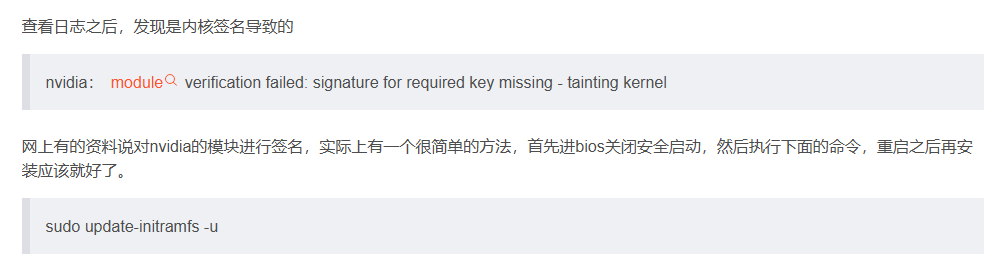
update-initramfs是更新内核驱动的命令, 随便试.
看看关闭bios安全启动并执行此命令重启后能否正常,
如果还是不行, 那只能让更加专业的人士来分析了.
deepin 带有明显Error Failed字样的日志有:
[    1.567366] RAS: Correctable Errors collector initialized.
[    4.248971] Error: Driver 'pcspkr' is already registered, aborting...
[    4.314620] iwlwifi 0000:05:00.0: Direct firmware load for iwlwifi-cc-a0-72.ucode failed with error -2
[    4.358480] nvidia: module verification failed: signature and/or required key missing - tainting kernel
[    4.487202] Bluetooth: hci0: FW download error recovery failed (-19)
[    4.554118] usb 5-3: device not accepting address 4, error -71
其中和显卡驱动相关的有那么一条:
nvidia: module verification failed: signature and/or required key missing - tainting kernel
经过在网络查找相关内容, 确实搜到一条可能导致此问题的原因(文章末尾)
https://blog.csdn.net/root_clive/article/details/100175108
update-initramfs是更新内核驱动的命令, 随便试.
看看关闭bios安全启动并执行此命令重启后能否正常,
如果还是不行, 那只能让更加专业的人士来分析了.
操作了,还是不行。
没有执行重装驱动,先这样把,就是启动麻烦一点。。
感谢付出~~
 deepin
 我现在电脑也出现这个问题,启动10次有个2到3次不能自动进入图形化界面。如果手动执行systemctl start lightdm可以进入图形化界面,那么可以设置一个开机执行的命令,临时解决一下。
切换root用户,然后运行crontab -e,第一次运行会提示选择哪种命令行编辑器编辑,选择你习惯的即可。然后在弹出编辑界面的末尾添加一个新行,编写:
@reboot sleep 10 && ! (ps -ef | grep lightdm | grep -v grep) && systemctl start lightdm
这一行的意思就是启动系统后执行@reboot后面的命令,先等待10秒,然后检测进程中是否有含有lightdm的进程,如果没有,就执行systemctl start lightdm
 deepin
 我这边用虚拟机打命令: sudo apt purge lightdm(完全卸载lightdm)(思路是重装一下lightdm),命令执行完后黑屏,然后虚拟机重启这个系统,是能正常进入桌面的,保险点的话你先备份一下重要资料再操作,祝你修复此问题。
deepin 我现在电脑也出现这个问题,启动10次有个2到3次不能自动进入图形化界面。如果手动执行systemctl start lightdm可以进入图形化界面,那么可以设置一个开机执行的命令,临时解决一下。
切换root用户,然后运行crontab -e,第一次运行会提示选择哪种命令行编辑器编辑,选择你习惯的即可。然后在弹出编辑界面的末尾添加一个新行,编写:
@reboot sleep 10 && ! (ps -ef | grep lightdm | grep -v grep) && systemctl start lightdm
这一行的意思就是启动系统后执行@reboot后面的命令,先等待10秒,然后检测进程中是否有含有lightdm的进程,如果没有,就执行systemctl start lightdm
发现这个脚本还是有启动图形化失败的可能。改成下面这个就是百分百能自动启动图形化了:
@reboot while ! (ps -ef | grep lightdm | grep -v grep); do sleep 3; /bin/systemctl start lightdm; done
发现这个脚本还是有启动图形化失败的可能。改成下面这个就是百分百能自动启动图形化了:
@reboot while ! (ps -ef | grep lightdm | grep -v grep); do sleep 3; /bin/systemctl start lightdm; done
反正重启次数也不多,我现在写了个脚本,每次启动,手动执行一下
Popular Ranking
ChangePopular Events
More


 is Deepin 25 using OSTree?
由于企业微信闪退问题,折腾升级N卡驱动后,deepin启动自动进入tty。
需要再执行systemctl restart lightdm才会进入桌面
在tty执行sudo chkconfig | grep lightdm显示的是on。
现在如何让他直接进入桌面呢?